How to Update Beneficial Ownership Information in Kenya: Step-by-Step Guide
Learn how to update beneficial ownership information in Kenya through the BRS online portal, add or remove beneficial owners, update company records, and meet beneficial ownership compliance requirements.
Updating beneficial ownership information is an important compliance requirement for companies registered in Kenya. The Business Registration Service (BRS) provides an online process that enables companies to report changes in their beneficial ownership structure, including the appointment of new beneficial owners, updates to existing owners’ details, and the cessation of beneficial ownership.
The beneficial ownership update process is available through the BRS platform on eCitizen. Companies can access the relevant service, enter the required information, download and sign the Beneficial Ownership Form (BOF), and submit it electronically.
This guide explains how to update beneficial ownership information, navigate the BRS online portal, report beneficial owner changes, and maintain accurate company ownership records. For more company registration and compliance resources, explore our business registration guides and articles.
What Is Beneficial Ownership Information?
Beneficial ownership information identifies the natural persons who ultimately own or control a company, directly or indirectly. These individuals are known as beneficial owners, and they may exercise control through shareholding, voting rights, or other arrangements.
An ultimate beneficial owner is the individual who ultimately benefits from or exercises effective control over a legal entity, even when ownership is held through another company or intermediary.
Beneficial ownership details help establish transparency in corporate structures and support efforts to prevent money laundering, corruption, terrorist financing, tax evasion, and other financial crimes.
Why Is Beneficial Ownership Disclosure Important?
Accurate beneficial ownership records help regulators and other competent authorities understand who owns or controls a company. They also support due diligence by financial institutions, business partners, and other relevant parties.
Kenya’s beneficial ownership disclosure framework follows recommendations developed by the Financial Action Task Force (FATF), which promotes transparency and measures to prevent the misuse of legal persons and legal arrangements.
Companies should therefore ensure that their beneficial ownership information remains accurate and up to date whenever relevant ownership or control arrangements change.
Beneficial Ownership Requirements in Kenya
The beneficial ownership requirements in Kenya are established under Section 93A of the Companies Act, Cap 486, and the Companies (Beneficial Ownership Information) Regulations, 2020, as referenced in the Business Registration Service’s official guidance.
The Business Registration Service Kenya operationalised its Beneficial Ownership Information e-Register on 13 October 2020. Under the framework described by BRS, companies registered under the Companies Act are required to prepare and submit their beneficial ownership information register to the Registrar of Companies.
Companies should maintain complete records of their beneficial owners and report relevant changes through the prescribed process. Businesses can also consult the official list of entities registered by BRS to learn more about the types of legal entities handled by the registry.
When Should a Company Update Its Beneficial Ownership Register?
A company may need to update its beneficial ownership register when there are changes to the individuals who ultimately own or control it, or when previously submitted information needs correction.
Common circumstances include:
- Appointment of a new beneficial owner.
- Cessation of an existing beneficial owner’s status.
- Changes to the particulars of an existing beneficial owner.
- Changes in ownership or control arrangements that affect beneficial ownership.
- Corrections to previously submitted beneficial ownership information.
Companies should assess the applicable legal requirements and filing timelines whenever such changes occur.
How to Update Beneficial Ownership Information Through BRS
The BRS online portal allows companies to submit changes through the Companies Registry Services section. The following steps are based on the official BRS step-by-step guide for updating beneficial ownership information on BRS Version 2. For additional instructions, see our step-by-step guide to updating beneficial ownership information on BRS in Kenya.
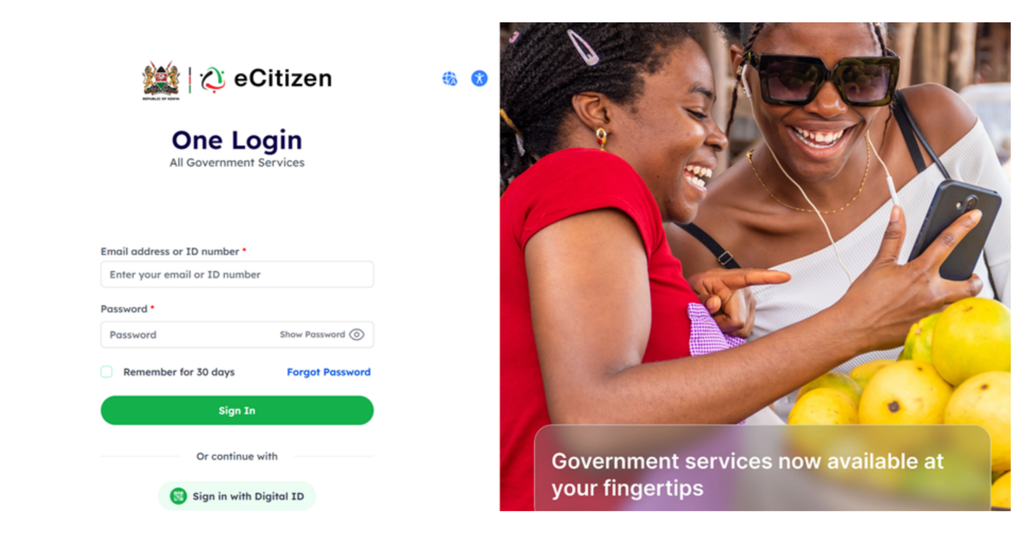
Step 1: Log In to the BRS eCitizen Portal
Visit BRS Version 2 on eCitizen and log in to your account.
When prompted, select whether you want the login one-time password (OTP) sent to your registered email address or phone number. Complete the authentication process to access your account.
Step 2: Select Your Personal Account
After logging in, you will be directed to the account switcher page.
Select your personal account to continue to the dashboard. Ensure that you are using the appropriate account to access the company whose beneficial ownership information you intend to update.
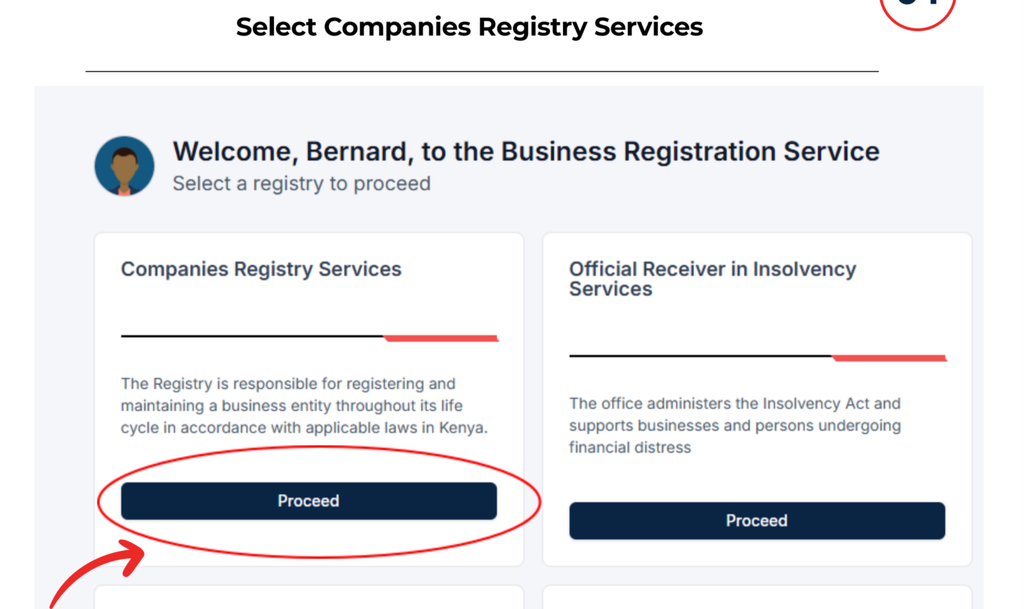
Step 3: Open Companies Registry Services
On the dashboard, select Companies Registry Services.
This section provides access to company registration and maintenance services, including the beneficial ownership information update service.
Step 4: Select the Relevant Business
Click the Businesses tab to view the businesses associated with your account.
Locate the company for which you need to update the beneficial ownership details and click View.
Check the company information carefully before proceeding to ensure that you are making changes to the correct legal entity.
Step 5: Choose Update Beneficial Ownership Information
Once the company record is open, select the Maintain Company tab.
The available company maintenance services will appear. Choose Update Beneficial Ownership Information and click Apply.
A subsequent screen will appear, allowing you to continue with the beneficial ownership update process.
Step 6: Save the Application
After clicking Apply, the platform will display the next application screen.
Click Save to continue. Follow the instructions displayed by the system and enter the information requested for the proposed change.
Ensure that the information you provide corresponds to the company’s actual ownership and control arrangements.
Step 7: Select the Type of Beneficial Owner Change
The system will ask you to select the type of change you intend to make.
Depending on the circumstances, the process may involve appointing a new beneficial owner, recording the cessation of an existing beneficial owner, or updating the details of a current beneficial owner.
Select the appropriate change type and save your selection to proceed.
Choosing the correct category helps ensure that the company’s beneficial ownership records accurately reflect the intended change.
Step 8: Add or Update Beneficial Owner Details
The existing beneficial owners associated with the company will be displayed.
The next action depends on the type of change selected.
How to Add a Beneficial Owner
If you need to add beneficial owner information, enter the required details for the newly appointed beneficial owner in the fields provided.
Ensure that the information is accurate and consistent with the company’s supporting records. After saving, the newly appointed beneficial owner should appear alongside the existing beneficial owners in the application.
If the company has additional beneficial owners to report, use the relevant option to add them as required.
How to Update Existing Beneficial Ownership Details
If the change concerns an existing beneficial owner rather than a new appointment, update the relevant particulars as instructed by the platform.
Review the information carefully before saving to reduce the risk of errors or inconsistencies in the beneficial ownership register. If the change also involves other company particulars, our guide to changing company particulars on BRS in Kenya provides related information.
How to Record the Cessation of a Beneficial Owner
If an individual no longer qualifies as a beneficial owner, select the applicable cessation option and follow the instructions provided by the system.
The information submitted should accurately reflect the change in ownership or control. Do not record cessation simply because an individual’s contact details have changed; the selected action should correspond to the actual circumstances.
Step 9: Download and Sign the Beneficial Ownership Form
After entering the relevant information, use the option provided to download the Beneficial Ownership Form (BOF).
Review the form to confirm that the information reflects the intended changes. Sign the form as required, scan the signed document, and prepare it for upload.
Make sure the scanned document is legible and complete before submitting it through the portal. The official BRS forms page provides access to forms published by the registry.
Step 10: Upload the Signed Form
Return to the application and select the file-upload option.
Choose the scanned and signed Beneficial Ownership Form from your device and upload it to the system.
Click Save to continue. Before moving to the final submission stage, confirm that the correct document has been attached and that the information entered in the application matches the signed form.
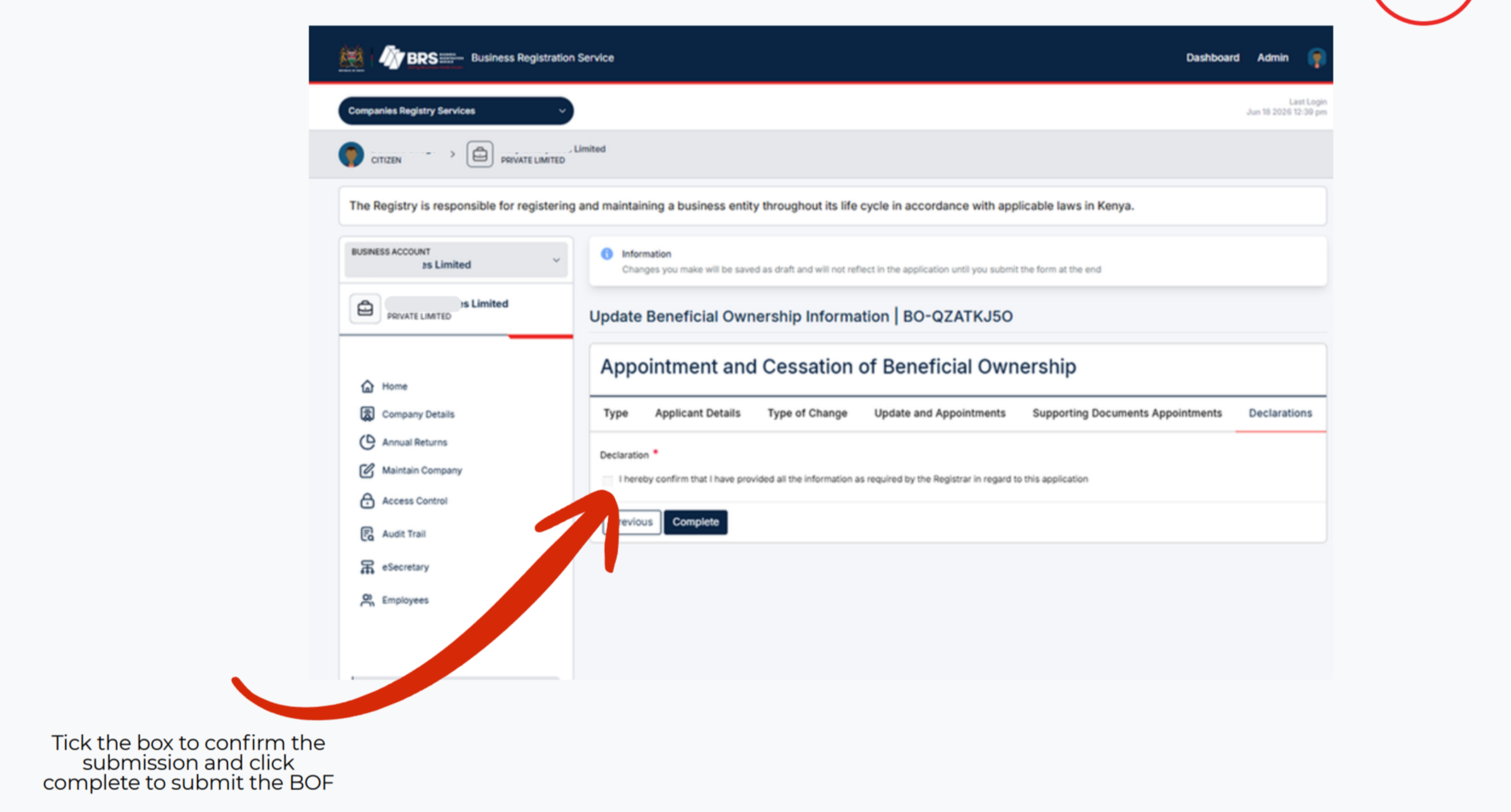
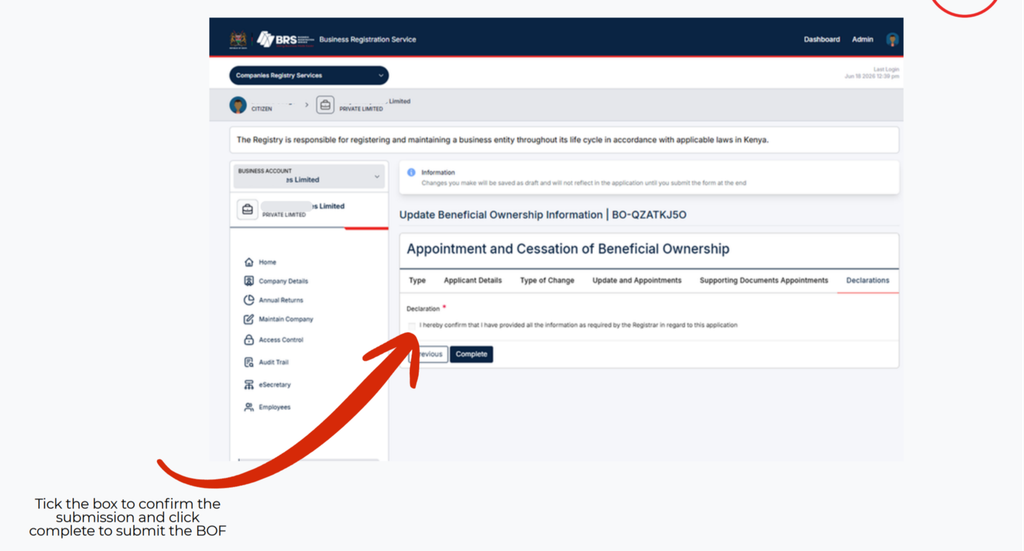
Step 11: Confirm and Submit the Application
The final stage requires you to confirm the submission.
Tick the confirmation box displayed on the platform and click Complete to submit the beneficial ownership form.
Follow any additional instructions provided by the system. Keep a copy of the signed form and any available submission confirmation for the company’s records.
Submitting the form completes the steps described in the official BRS guide. If the portal requests further information or displays an error, address the issue through the available instructions or contact BRS for assistance.
How to Maintain Accurate Beneficial Ownership Records
Updating the online register is only one part of beneficial ownership compliance. Companies should also maintain appropriate internal records and procedures to ensure that ownership information remains accurate over time.
Keep Supporting Documentation
Maintain relevant documents supporting the information reported about beneficial owners. Depending on the circumstances, these may include ownership records, shareholding information, control arrangements, and documents relating to changes in ownership.
Supporting records make it easier to verify the information submitted to the Registrar of Companies and respond to legitimate requests for clarification.
Companies that need official evidence of their registered information can consult our guide on how to download certificates and other records from BRS in Kenya.
Review Ownership and Control Changes
Companies should review their ownership and control arrangements whenever significant changes occur. A change in shareholding, voting rights, or an indirect ownership structure may affect who qualifies as a beneficial owner.
Where necessary, reassess the beneficial ownership information and complete the relevant filing.
Ensure Consistency Across Company Records
The beneficial ownership register should be consistent with the company’s underlying records and other relevant filings.
Check names, identifying particulars, ownership information, and the nature of control before submitting updates. Where discrepancies exist, determine which records require correction and follow the applicable procedures.
For companies that require official evidence of filed information, our guide on how to submit, download, and access certified copies of records in Kenya explains a related registry process.
Protect Confidential Information
Beneficial ownership records contain personal and company information. Limit access to authorised individuals, store supporting documents securely, and use appropriate safeguards when preparing or submitting files.
Companies should also ensure that anyone responsible for maintaining these records understands their role in protecting confidential information.
How the BRS Online Portal Supports Beneficial Ownership Compliance
The beneficial ownership information system provides an electronic channel for companies to submit information to the Registrar of Companies.
Using the BRS online portal, eligible users can access the relevant company, initiate an update, enter details of beneficial owner changes, upload the required signed form, and complete the submission.
The electronic process helps centralise the filing process and provides a structured way to report changes to company ownership information.
However, completing an online application does not remove the company’s responsibility to ensure that the information is accurate, complete, and supported by appropriate records.
Companies may also need to use other registry services as their circumstances change. For example, our guide to obtaining consent on BRS in Kenya explains a separate process that may be relevant to certain company transactions.
Common Mistakes to Avoid When Updating Beneficial Ownership Information
Companies can reduce delays and filing errors by reviewing their applications before submission.
Common mistakes include:
- Selecting the wrong change type: Confirm whether the application concerns an appointment, cessation, or update to existing details.
- Entering inaccurate information: Verify all particulars against reliable company records and supporting documents.
- Uploading an incomplete form: Ensure the Beneficial Ownership Form has been completed and signed as required.
- Attaching the wrong document: Check the selected file before uploading it.
- Failing to complete the submission: Follow the final confirmation process and click Complete.
- Ignoring subsequent changes: Review beneficial ownership information when ownership or control arrangements change.
- Failing to retain records: Keep copies of the signed form and available submission evidence for internal reference.
Careful preparation helps companies maintain reliable beneficial ownership records and supports ongoing compliance with the applicable Kenyan framework.
Where to Get Help With Beneficial Ownership Filing in Kenya
The Business Registration Service provides guidance on the beneficial ownership filing process through its official website at brs.go.ke.
Companies experiencing difficulties with the BRS online portal should consult the official instructions or contact the Business Registration Service through its published support channels.
The official step-by-step guide also explains how to access the relevant service, select the type of change, enter beneficial owner information, upload the signed BOF, and complete the submission.
The service is described as free in the supplied BRS guide. Companies should verify any additional requirements directly with BRS rather than relying on unofficial claims about filing fees or processing times. For other company registry services that may involve charges, consult the official Companies Registry fee schedule.
Businesses structured as limited liability partnerships may have separate filing obligations. Our step-by-step guide to registering a limited liability partnership in Kenya explains the registration process for that legal structure.
Companies facing financial or structural difficulties may also need to understand other legal procedures, including debtors’ bankruptcy proceedings in Kenya, company liquidation in Kenya, or the company administration process in Kenya. These are separate processes from updating beneficial ownership information.
Where a business name needs to be discontinued or converted, the applicable procedure also differs from a beneficial ownership update. Refer to our guide to business name cessation and conversion in Kenya for related information.
For businesses using the Movable Property Security Rights Registry, our MPSR user guide for Kenya covers a separate registry system.
Frequently Asked Questions
1. How do I update beneficial ownership information in Kenya?
Log in to the BRS Version 2 eCitizen portal, select your personal account, open Companies Registry Services, and view the relevant business. Under Maintain Company, select Update Beneficial Ownership Information, click Apply, enter the required changes, download and sign the BOF, upload the completed form, and submit the application.
2. Can I add or remove a beneficial owner through the BRS online portal?
The BRS process supports reporting the appointment and cessation of beneficial owners, as well as updating existing beneficial owner details. Select the appropriate change type and follow the instructions displayed in the application.
3. Is there a fee to update beneficial ownership information?
The official BRS step-by-step guide describes the service as free. For confirmation of current requirements or any circumstances that may affect your filing, consult the Business Registration Service directly.