BRS Consent Process in Kenya: A Step-by-Step Guide to Giving Consent Using OTP
Learn how to complete the BRS consent process in Kenya using OTP verification, approve director appointments, confirm share transfers, resolve eCitizen consent issues, and manage company changes through the Business Registration Service portal.
The Business Registration Service (BRS) in Kenya uses an online consent process to verify and approve certain company-related transactions, including director appointments, director resignations, and share transfers. This process helps confirm that the individuals involved are aware of and agree to the proposed changes before an application proceeds.
The BRS consent process is completed through the eCitizen platform and requires a valid account, access to the phone number or email address registered with the Registrar of Companies, and a One-Time Passcode (OTP). Applicants must review the transaction details and submit their decision accurately to ensure the application is processed correctly.
In this guide, we explain how to complete eCitizen consent approval, how to respond to an OTP request, and what to do if you approve or decline a transaction. For more practical information on business registration and company compliance, explore our business registration and company services blog.
What Is the BRS Consent Process?
The BRS consent process is an online verification procedure administered by the Business Registration Service Kenya. It allows individuals to confirm whether they agree to specific company transactions submitted through the Companies Registry.
When an application involves appointing or resigning a director or transferring shares, the relevant person may receive a consent request. The request includes details of the proposed transaction and instructions for submitting a decision.
The process uses a One-Time Passcode to help verify the authenticity of the transaction. Consent must be submitted through the designated online process, and the application may remain pending until all required parties have responded.
Transactions That Require Consent
The BRS consent process may apply to several company-related transactions, including:
- Director appointment approval: Confirming agreement to a proposed appointment as a company director.
- Director resignation: Verifying a resignation application involving a director.
- Share transfer consent: Confirming agreement to a proposed transfer of company shares.
- Company officials changes: Verifying relevant changes to the individuals holding official positions within a company.
- Shareholder changes: Confirming consent where a proposed transaction affects shareholding arrangements.
The precise consent requirements depend on the transaction and the parties involved. Applicants should review the information displayed on the consent page before making a decision.
Requirements for eCitizen Consent Approval
Before starting the consent procedure, ensure that you have the necessary account access and contact details.
1. An Active eCitizen Account
You must have an eCitizen account to access the online Companies Registry services. If you do not have an account, complete the applicable account registration process before attempting to submit consent.
2. Access to Your Registered Phone Number or Email Address
The OTP and consent notification are sent using the contact details registered with the Registrar of Companies, including details provided during registration or updated subsequently.
Ensure that you can access the registered email account or phone number. If your contact details have changed, you may need to update them through the appropriate official procedure. For further information about updating company records, consult this step-by-step guide to changing particulars on BRS.
3. Ability to Receive OTP Messages
Your phone must be able to receive the required SMS messages. The official BRS guide also advises users to ensure that their phone numbers are enabled to receive promotional messages to facilitate OTP delivery.
For email notifications, check your inbox and spam or junk folders if the message does not appear immediately.
4. Company Information
You should know the company name or registration number associated with the proposed transaction. This information helps you identify the relevant company within the online BRS portal.
You can also consult the official list of entities registered by BRS to understand the types of entities handled through the registration service.
How to Give Consent Using OTP: Step-by-Step Guide
Follow these steps to complete the consent approval procedure through the BRS online system.
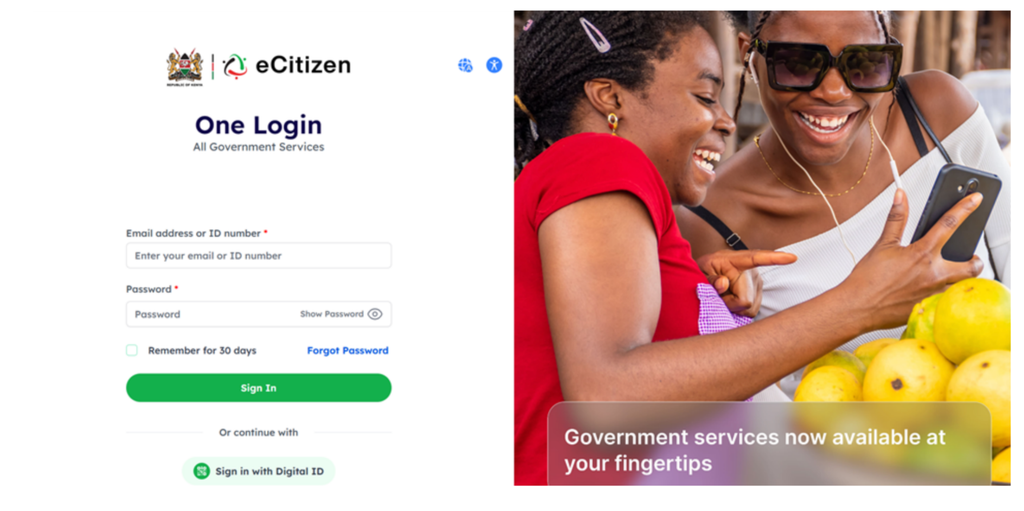
Step 1: Log In to the eCitizen Platform
Visit the official BRS eCitizen portal at brsv2.ecitizen.go.ke.
Log in using your eCitizen account credentials. Select whether you want the login OTP to be sent to your registered email address or phone number, then complete the login verification process.
Keep your login credentials and verification codes confidential.
Step 2: Select Your Personal Account
After logging in, proceed to the account switcher page and select your personal account.
This allows you to access the relevant services and respond to consent requests associated with your identity.
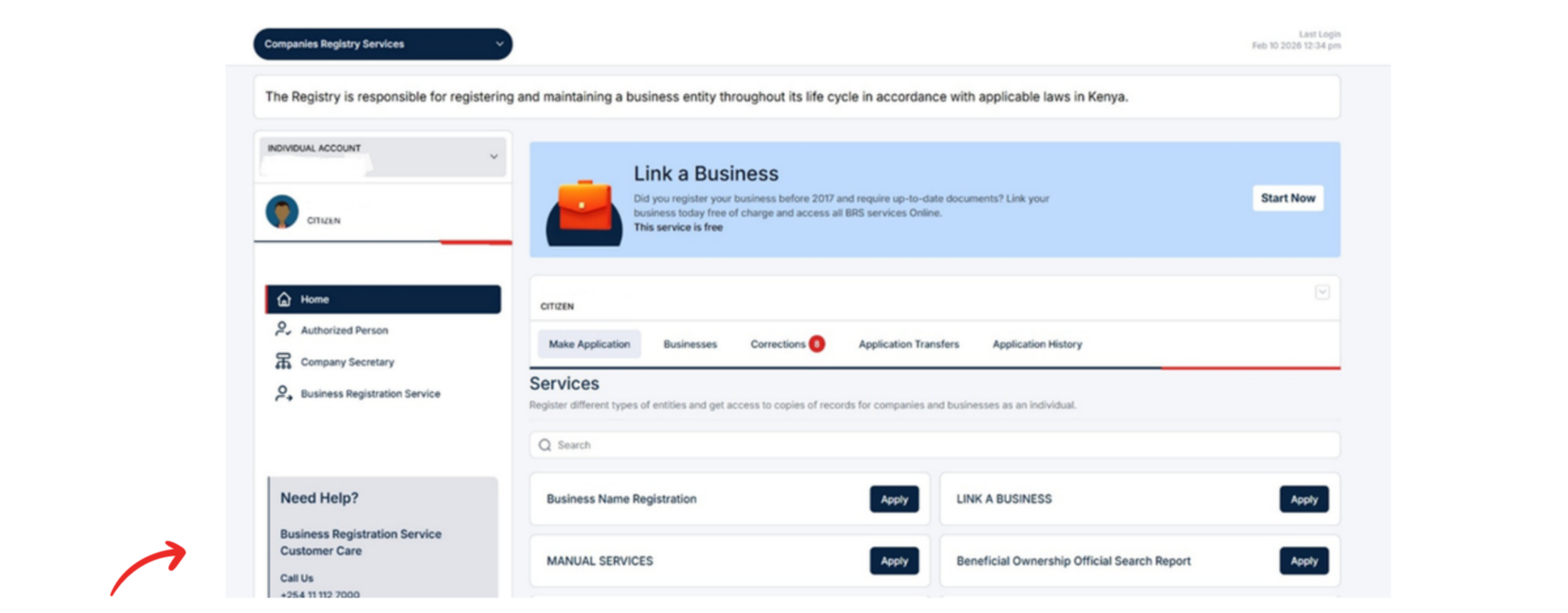
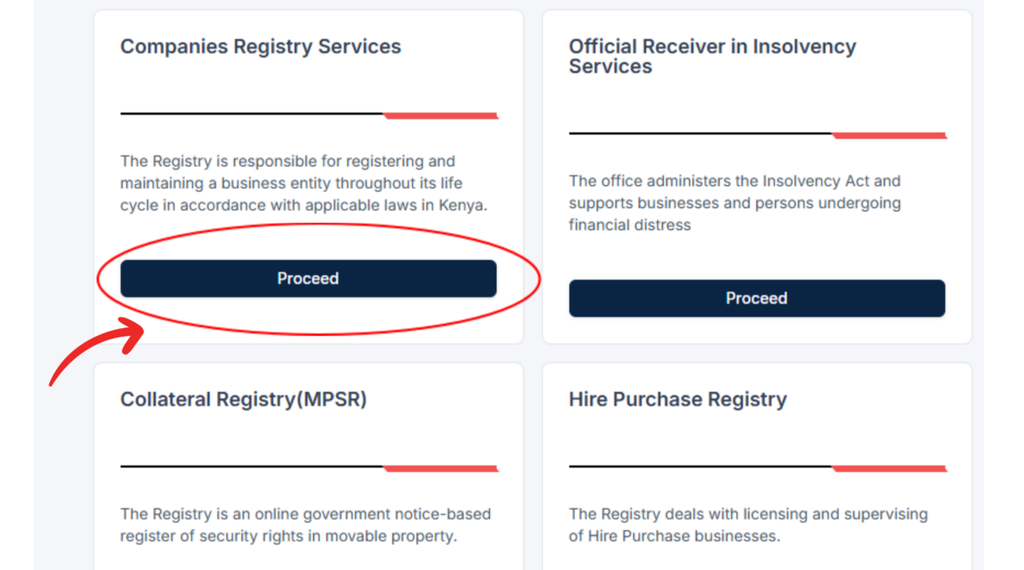
Step 3: Open Companies Registry Services
From your dashboard, select Companies Registry Services.
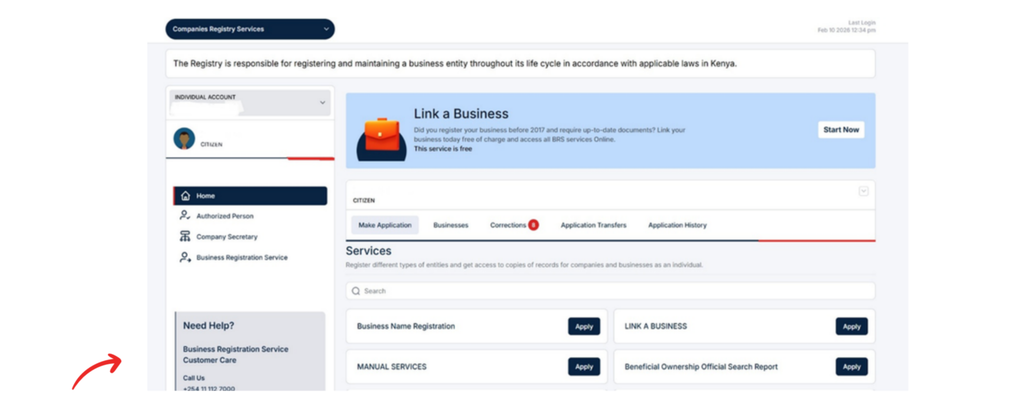
The system will direct you to the Companies Registry landing page, where you can access the relevant company services.
Step 4: Search for the Relevant Company
Choose your search criteria. Depending on the available options, you can search using the company name or registration number.
Enter the required information carefully and identify the correct company before proceeding. Verifying the company details helps reduce the risk of responding to a request involving the wrong entity.
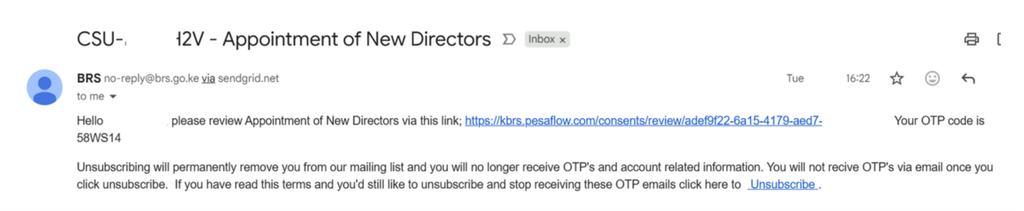
Step 5: Retrieve the Consent Notification
Retrieve the message sent to your registered phone number or email address. Open the notification and click the link provided to access the consent page.
If you cannot find the email, check your spam or junk folder. If the notification was sent by SMS, review your messages and confirm that you are checking the correct registered number.
Use the official portal and verify that the request relates to the expected company transaction before continuing.
Step 6: Review the Transaction Details
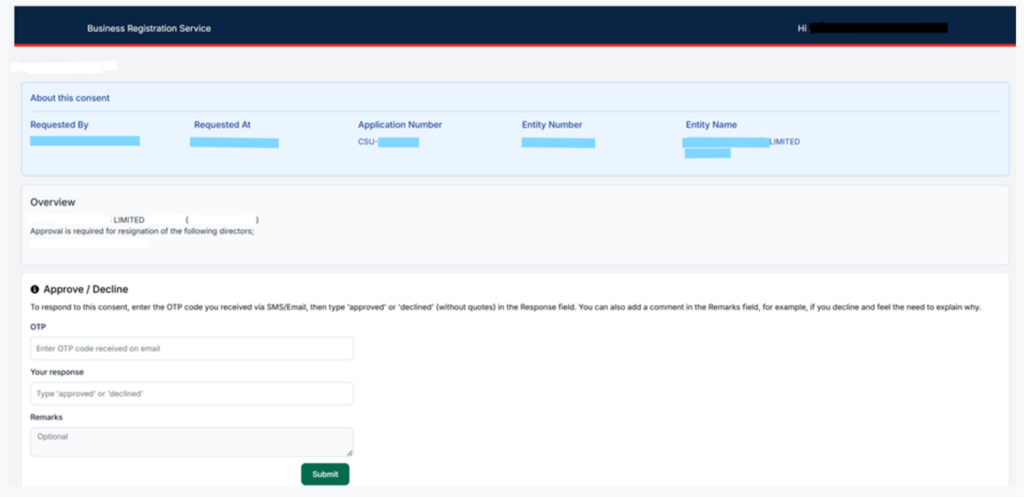
The consent page displays the company details and a summary of the proposed transaction.
Read the information carefully before deciding whether to approve or decline the request.
Check the following details where applicable:
- The company name and registration information.
- The nature of the proposed transaction.
- Whether the request relates to a director appointment, director resignation, or share transfer.
- Whether you recognise and agree with the proposed change.
If you did not initiate the transaction or do not recognise the request, do not approve it without further verification.
Step 7: Enter Your Consent Decision
The BRS consent page requires you to enter one of two responses:
- Approved: Select this response if you agree to the transaction.
- Declined: Select this response if you do not agree to the transaction.
The response must be entered exactly as specified. According to the official guide, the system will not accept variations of these terms.
If you decline the request, you may provide additional information explaining your decision. For example, you can explain that you were unaware of the transaction or do not agree with the proposed change.
Step 8: Complete One-Time Password Verification
Enter the OTP sent to your registered phone number or email address in the appropriate field on the consent page.
Check the code carefully before submitting your response. An incorrect or expired code may prevent successful verification, in which case you should follow the instructions provided by the portal.
An OTP is intended for verification and should not be shared with another person.
Step 9: Submit Your Response
Review your decision and the transaction details once more before submitting the consent.
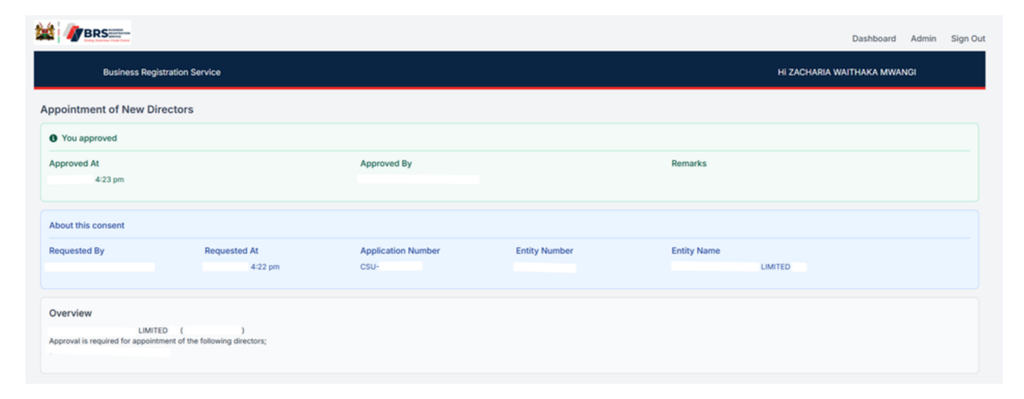
If you select Approved, the application will be automatically approved once your consent has been recorded, provided there are no outstanding consents required from other parties.
If you select Declined, the application will not proceed and will be marked as declined.
Follow any on-screen instructions to confirm that your response has been submitted.
For a more detailed walkthrough of this specific procedure, read our step-by-step guide to giving consent on BRS in Kenya.
What Happens After You Submit Consent?
The next step depends on the decision you submit and whether other parties must also provide consent.
If You Approve the Transaction
When you approve the request and complete OTP verification, the system records your consent. If all required parties have also provided their consent, no further action is required from you or with BRS in relation to the pending consent requests described in the guide.
However, approval of your consent should not be confused with confirmation that every aspect of a company transaction has been completed. Where applicable, check the application status through the official portal.
If You Decline the Transaction
A declined application will not proceed. You may also provide an explanation indicating why you do not consent.
If the request is unfamiliar or appears unauthorised, retain any relevant notifications and seek clarification through official BRS support channels before taking further action.
If Other Parties Have Not Responded
Some applications require consent from more than one person. In such cases, approving your own request may not be sufficient to complete the transaction.
The application can remain pending until all outstanding consent requirements have been addressed.
Common BRS Consent Problems and How to Resolve Them
Although the online process is designed to be straightforward, users may experience difficulties with account access, OTP delivery, or transaction verification.
OTP Not Received
If you do not receive your OTP:
- Confirm that you selected the correct registered phone number or email address.
- Check your email inbox and spam or junk folders.
- Ensure your phone can receive SMS messages and is enabled to receive promotional messages, as advised in the BRS guide.
- Verify that your registered contact details are current.
- Follow the official portal’s instructions if you need another code.
If the problem continues, contact BRS support for assistance.
Unable to Access the Consent Link
If the consent link does not open the expected page, confirm that the notification relates to a legitimate BRS transaction and try accessing the official portal again.
Avoid entering your personal information or OTP on unfamiliar websites. If the link remains inaccessible, seek assistance through the official BRS website.
Incorrect Consent Response
The consent system requires the exact responses Approved or Declined. Alternative wording may not be accepted.
Enter the required response precisely as displayed in the instructions, and review your selection before submitting it.
Company Details Do Not Match
If the company name, registration number, or transaction details do not match your expectations, do not approve the request until you have verified the information.
You can use the available company search information to check the relevant entity and contact BRS support if you cannot establish whether the request is correct.
Application Remains Pending
An application may remain pending if other required parties have not yet submitted their consent.
Check the application status and determine whether additional consent is outstanding. If all required parties have responded but the status does not change, seek clarification from BRS.
How the BRS Consent Process Relates to Company Registration in Kenya
The BRS consent procedure is one part of Kenya’s wider business registration process. Company formation and subsequent changes to company records are managed through the applicable Companies Registry procedures.
People researching company registration Kenya should distinguish between incorporating a company and approving a later transaction involving an existing company.
Private Limited Company Registration
Private limited company registration generally involves selecting an appropriate business structure, conducting a business name search, reserving a suitable name where applicable, preparing company incorporation documents, and submitting the application through the prescribed registration channel.
The specific company formation requirements depend on the entity type and applicable regulations.
Business Name Search and Name Reservation
A business name search helps applicants determine whether a proposed name is available for use under the relevant registration rules.
Name reservation eCitizen procedures may form part of the applicable registration workflow. Applicants should confirm the current requirements and fees through official BRS resources before submitting an application.
Business Name Conversion
A business name conversion involves changing the registered business structure to a company structure where the applicable procedure permits it.
This process is distinct from giving consent to a director appointment, resignation, or share transfer. Applicants should follow the relevant conversion instructions and provide the required documentation. Our guide to cessation and conversion of a business name in Kenya provides additional information about this process.
Company Incorporation Documents
Company incorporation documents support the formal registration of a company and may include information about its proposed structure, directors, shareholders, and other required particulars.
The documents required depend on the registration type and applicable rules. Consent requests for subsequent company changes should be handled separately through the appropriate BRS procedure. Applicants can consult the official BRS forms directory for relevant registration and company administration forms.
Business Registration Checklist
Before submitting a company registration application or responding to a consent request, use a checklist to confirm that you have:
- Access to the appropriate eCitizen account.
- Accurate company identification details.
- Current registered contact information.
- The relevant incorporation or transaction documents, where applicable.
- Access to the registered phone number or email address for OTP verification.
- Reviewed the transaction details and understood the consequences of approving or declining.
A checklist helps reduce avoidable errors, but it does not replace the official instructions for the specific transaction.
Downloading Company Certificates and Records
After completing company registration or making changes to company records, you may need copies of official documents for compliance, banking, contractual, or administrative purposes.
Our guide to downloading certificates and other records on BRS in Kenya explains how to access relevant company records through the online system.
Where certified documentation is required, follow the applicable application and verification procedures rather than assuming that a downloaded copy is automatically certified. You can also consult this guide to requesting and accessing certified copies of company records.
Updating Beneficial Ownership Information
Companies may also have separate obligations to maintain accurate beneficial ownership information. These requirements are distinct from consent for director appointments, resignations, and share transfers.
Where a company needs to update its beneficial ownership information, refer to the step-by-step guide to updating beneficial ownership information on BRS.
Other Business Structures and Registry Services
Kenya’s business registration framework covers different legal structures and company-related services. For example, people establishing a limited liability partnership can consult the guide to registering a limited liability partnership in Kenya.
Businesses using movable property as collateral may also need information about the applicable collateral registry procedures. The MPSR collateral registry user guide provides related guidance.
These services address different legal and administrative requirements, so it is important to follow the instructions applicable to the particular entity or transaction.
Official BRS Support and Guidance
For assistance with the consent process, consult the Business Registration Service official website.
The official step-by-step guide explains how to access the consent page, review company transaction details, enter the required decision, and complete OTP verification.
The guide lists the BRS support telephone number as 0112 700 000. If you experience persistent difficulties, use the official website to confirm the available support channels and any updated contact information.
For current company registration and service costs, consult the official Companies Registry fee schedule. Fees and procedures may vary according to the service requested, so confirm the applicable requirements before submitting an application.
Always rely on official BRS instructions for current procedures, eligibility requirements, fees, and application status.
Frequently Asked Questions
1. How do I give consent on the BRS portal in Kenya?
Log in to your eCitizen account, select your personal account, open Companies Registry Services, search for the relevant company, and access the consent notification sent to your registered phone number or email address. Review the transaction, enter Approved or Declined, provide the OTP, and submit your response.
2. What happens if I decline a BRS consent request?
If you select Declined, the application will not proceed and will be marked as declined. You may provide additional information explaining why you do not consent, particularly if you were unaware of the transaction or disagree with the proposed change.
3. Why is my BRS consent application still pending after approval?
Your consent may have been recorded successfully, but the application can remain pending if other parties are required to approve the transaction. Check the application status and confirm whether all outstanding consent requirements have been completed.