How to Download Company Documents on BRS eCitizen V2 in Kenya
Learn how to download company documents on BRS eCitizen V2, including business registration certificates, company incorporation certificates, and other company records through Application History.
The Business Registration Service (BRS) in Kenya provides an online platform where users can access company registration documents, certificates, and other official records. Through BRS eCitizen V2, individuals and business owners can view the progress of applications, retrieve approved documents, and download or print available records.
If you have completed a business registration or submitted an application through the BRS online portal, you can access the relevant documents through the Application History section. This guide explains how to download company documents on BRS Version 2, including business registration certificates, company incorporation certificates, and other available records. For more information about business registration procedures and related services, explore our business registration guides and articles.
What Is BRS eCitizen V2?
BRS eCitizen V2 is the online platform used to access services provided by Kenya’s Business Registration Service. It allows users to manage applications and access records associated with services offered through the Companies Registry.
The platform helps applicants retrieve available documents without having to search through their original application submissions. Depending on the service and application status, the available records may include a business name registration certificate, company incorporation certificate, and other company registration documents.
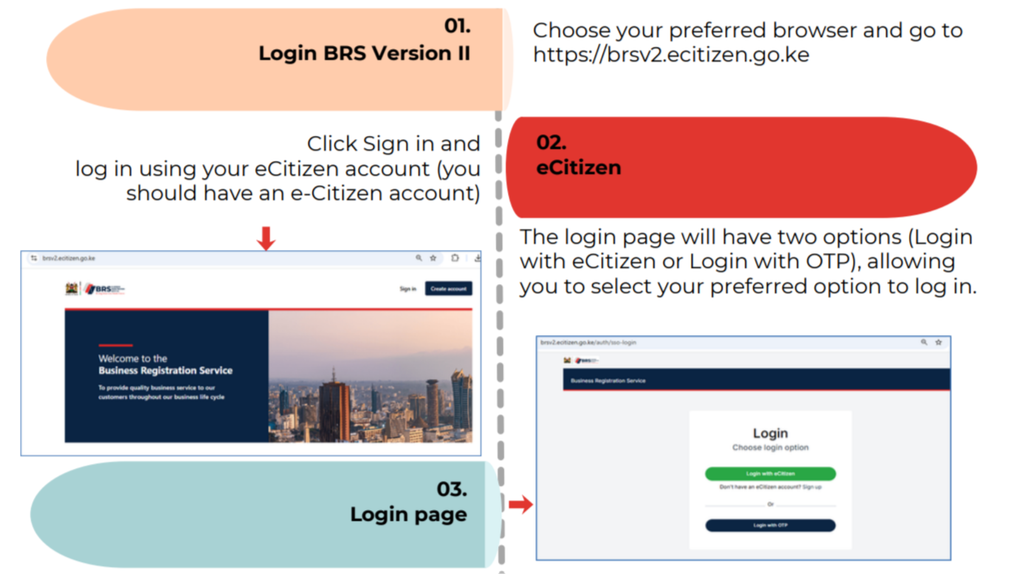
To get started, visit the official BRS Version 2 portal:
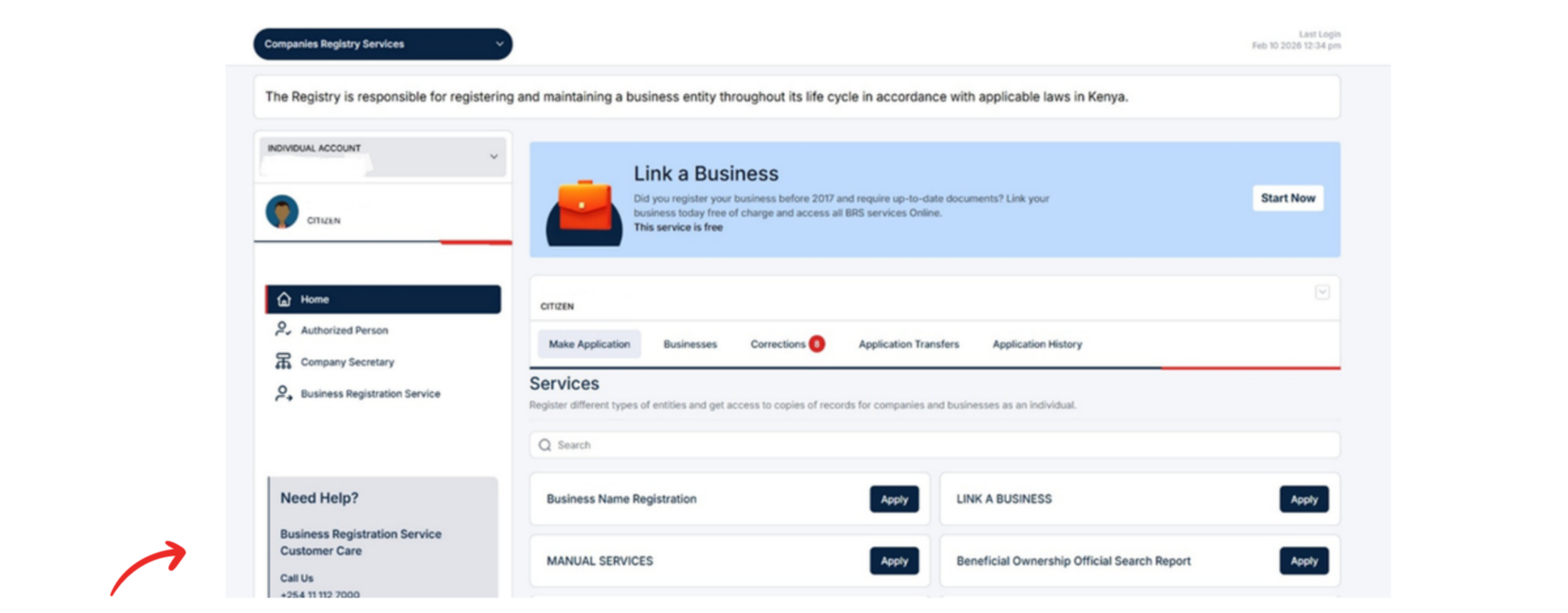
After logging in, locate the Accounts Switcher. This feature allows you to select the account through which you want to access the available services.
Choose the appropriate account associated with your application before proceeding.
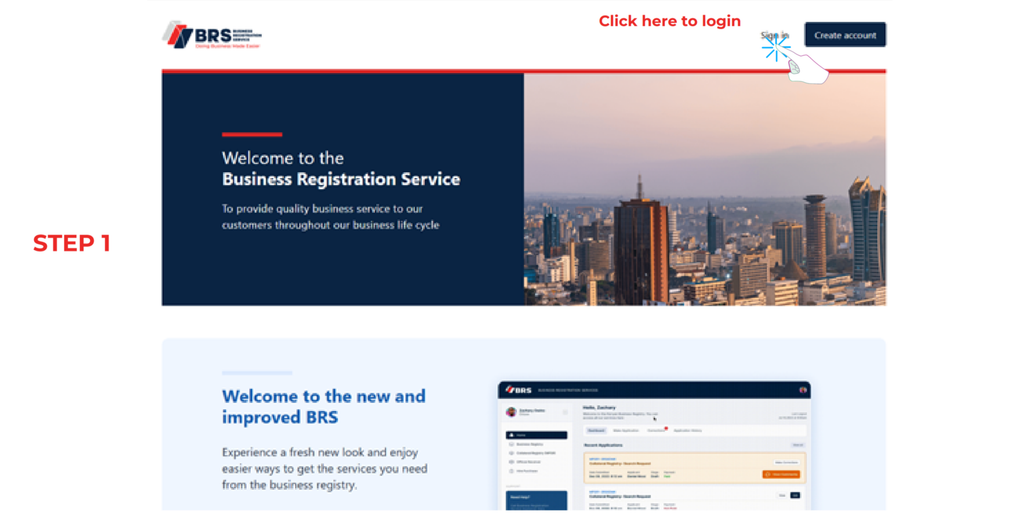
Step 1 of How to Download Company Documents on BRS eCitizen V2 in Kenya: Log In to Your eCitizen Account
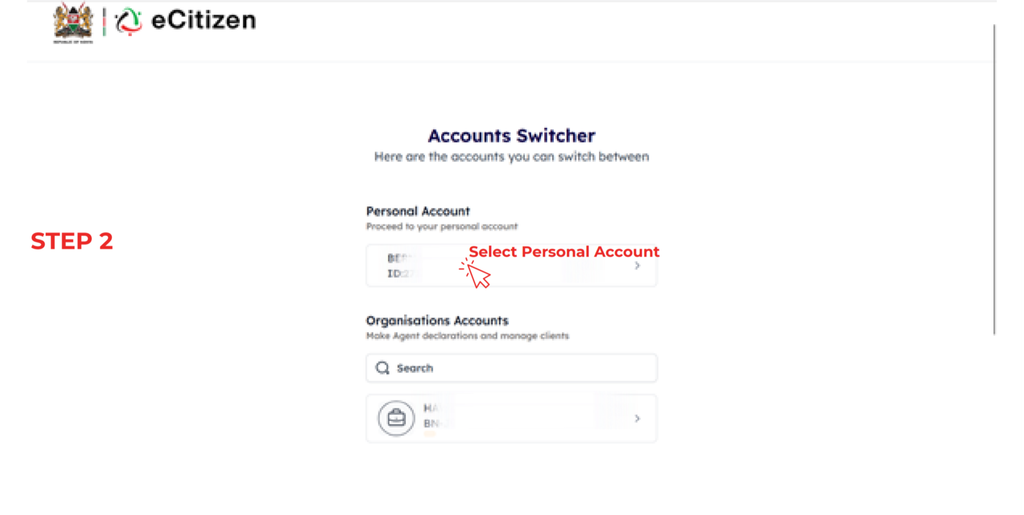
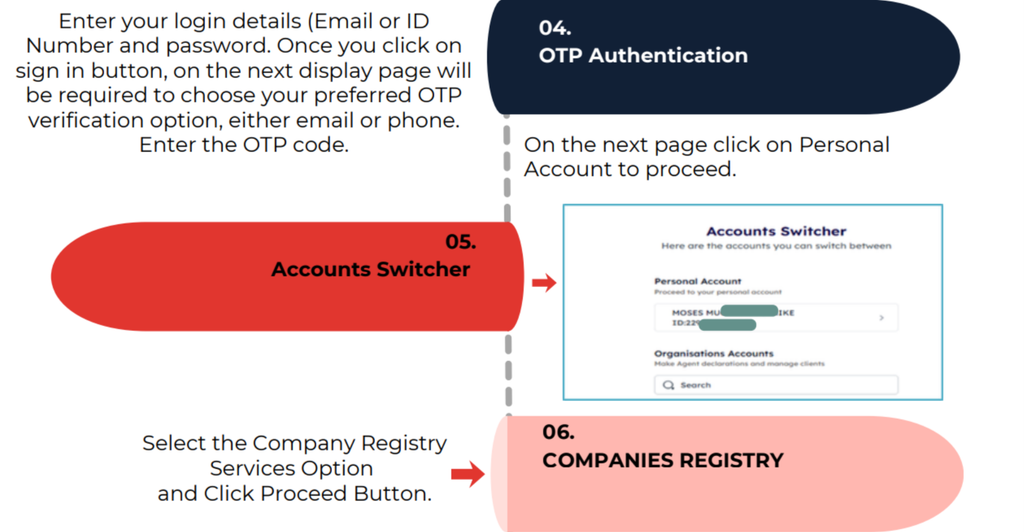
Step 2: Select Personal Account
In the Accounts Switcher, select Personal Account.
This is the account selection specified in the official BRS guide for accessing application records. Once selected, proceed to the available services.
Make sure you use the eCitizen account associated with the application you want to retrieve. Using a different account may prevent you from finding the relevant application history.
Step 2 of How to Download Company Documents on BRS eCitizen V2 in Kenya: Select Personal Account
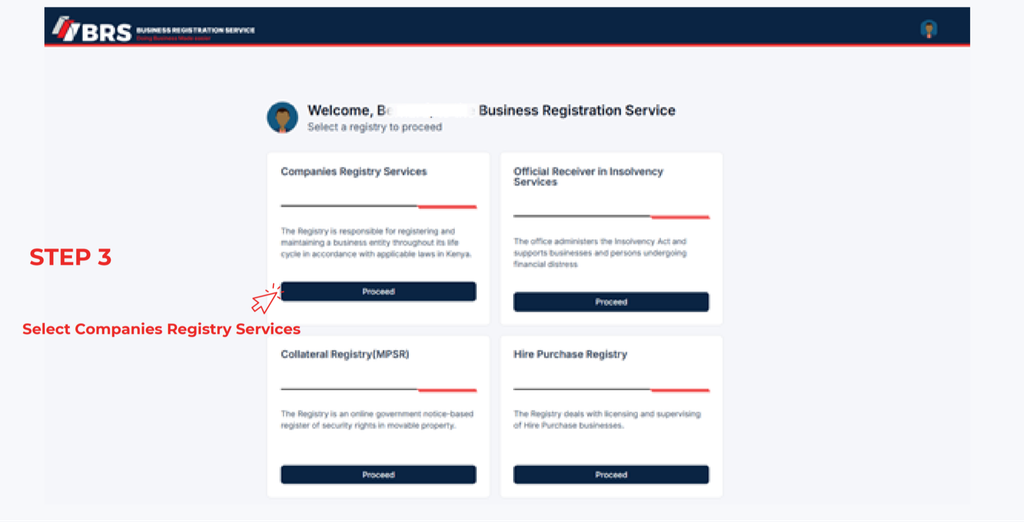
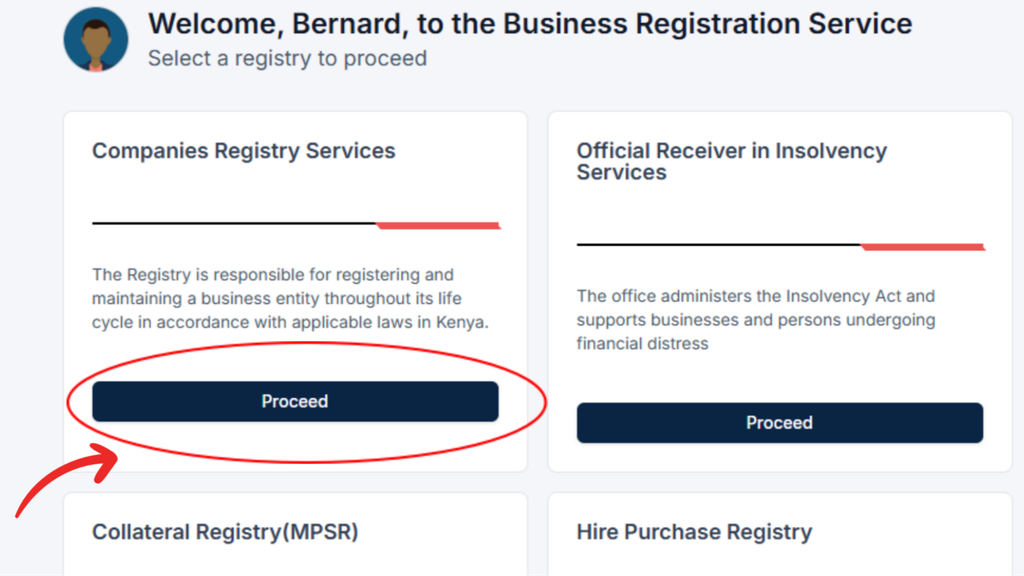
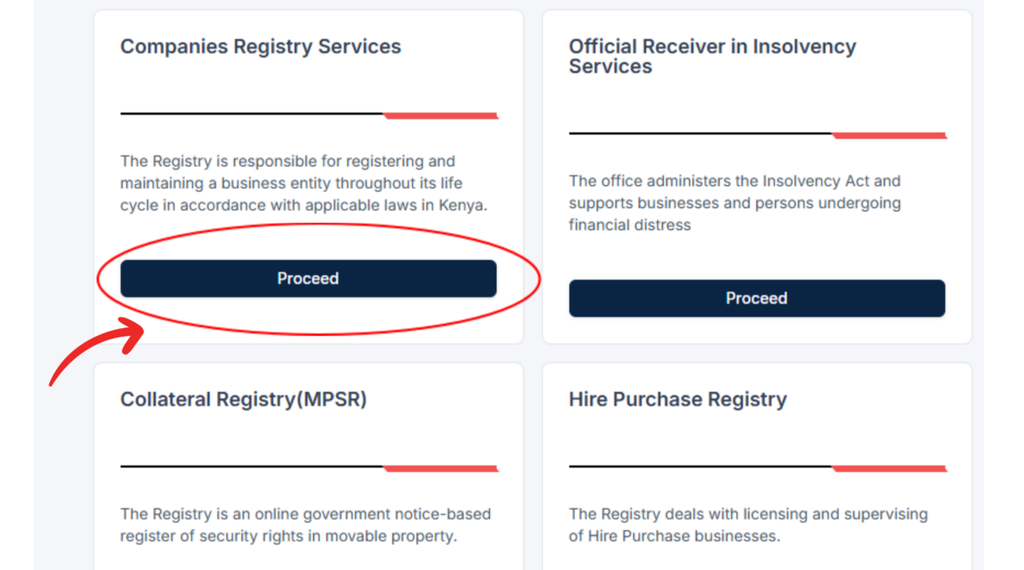
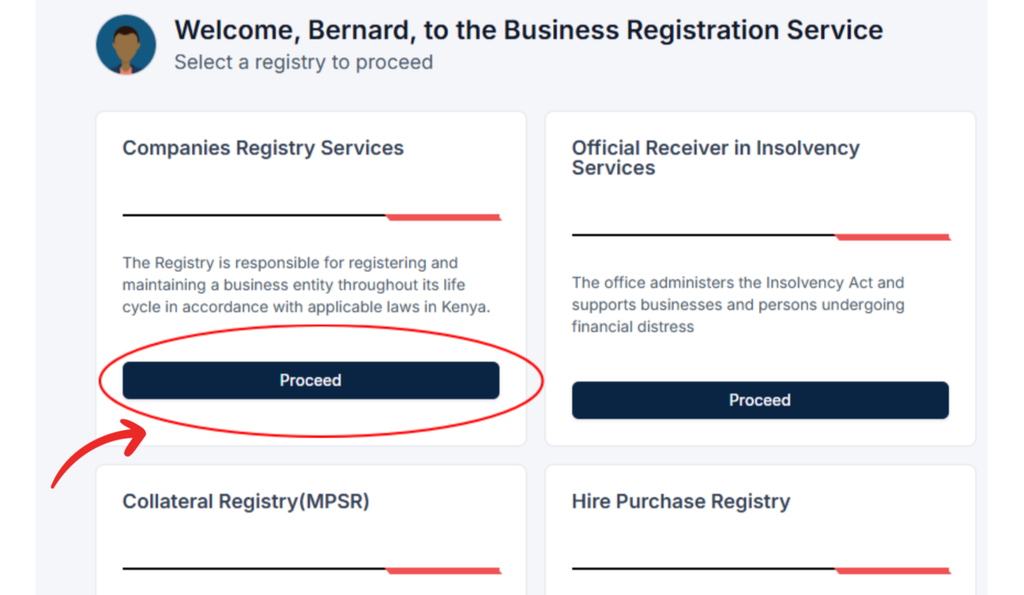
Step 3: Open Companies Registry Services
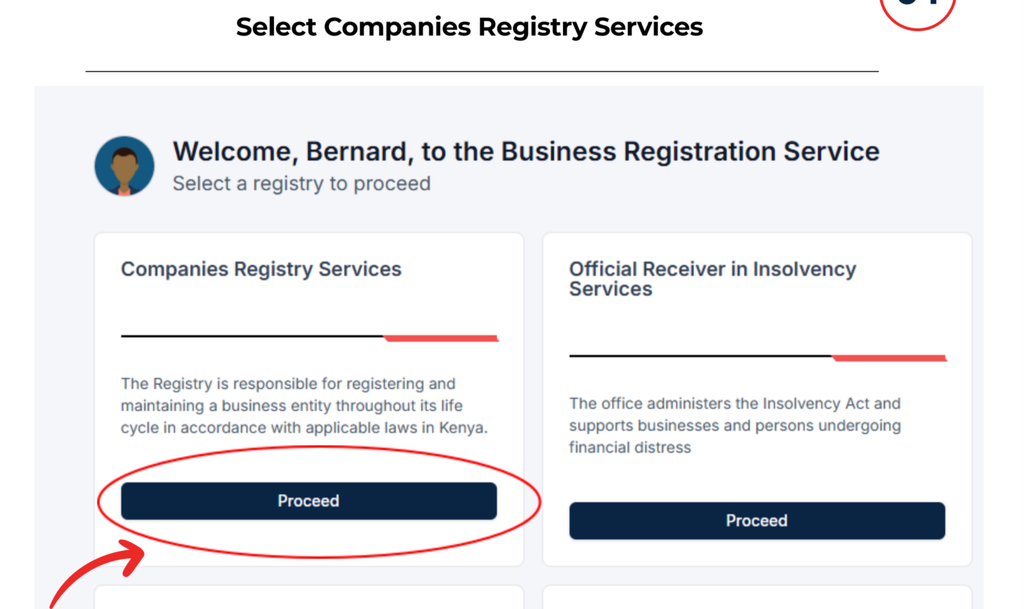
From the available services, select Companies Registry Services and click Proceed.
This section provides access to company registry services and the applications associated with your account.
After proceeding, locate the application management options to continue retrieving your company registration documents.
Step 3 of How to Download Company Documents on BRS eCitizen V2 in Kenya: Open Companies Registry Services
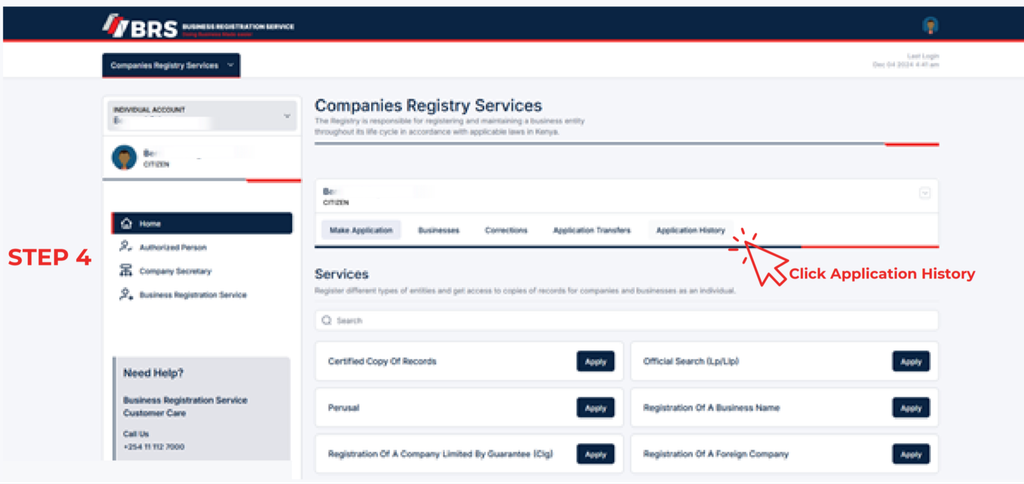
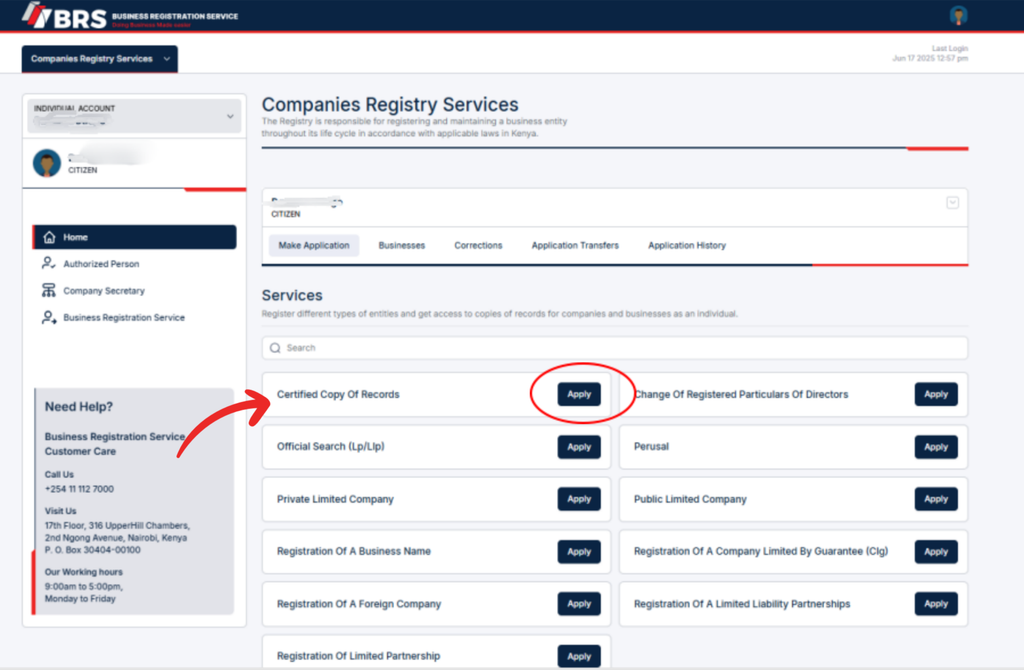
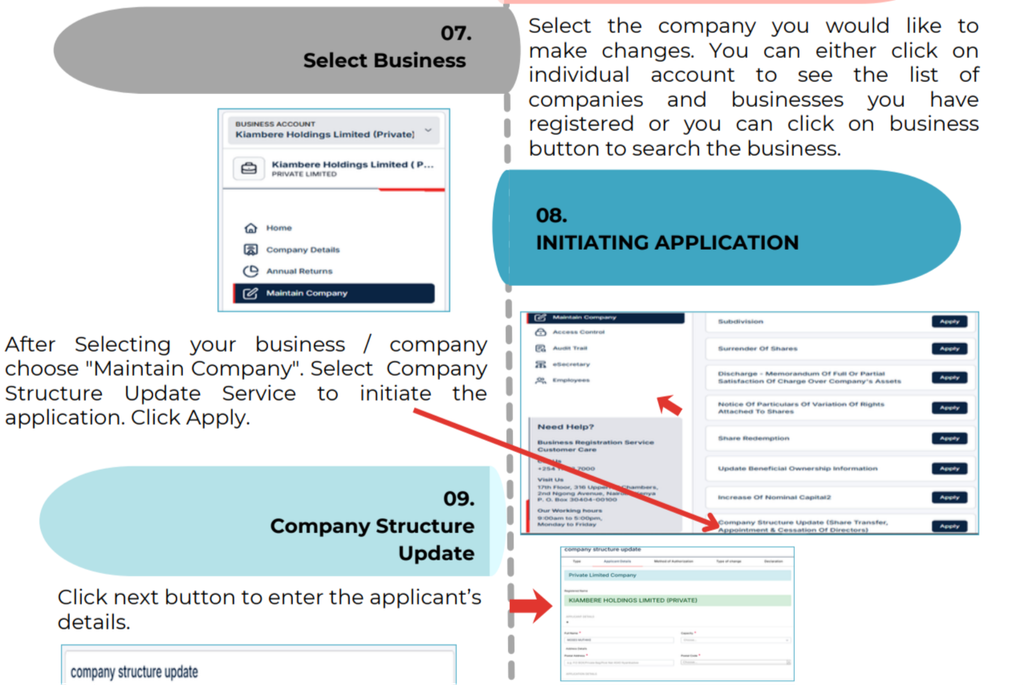
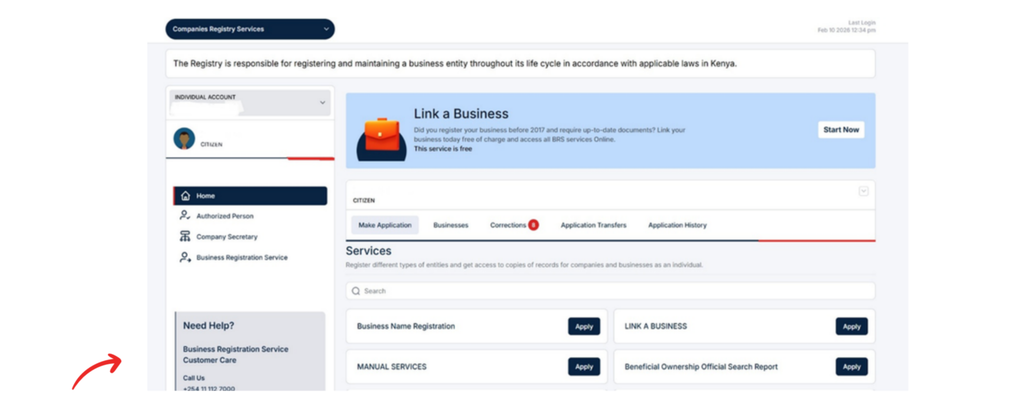
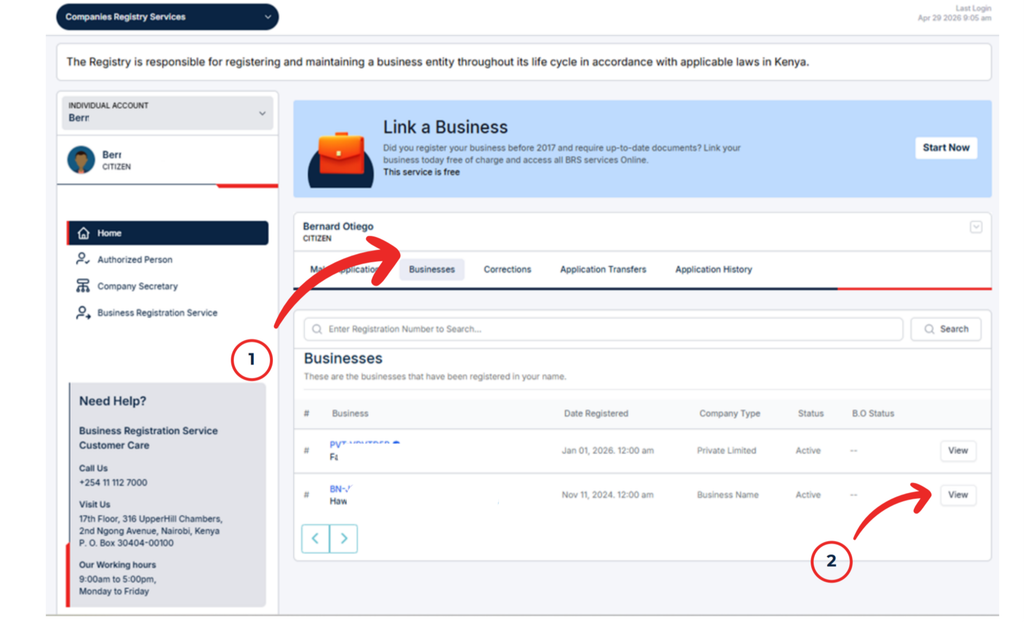
Step 4: Click Application History
On the Companies Registry Services interface, locate Application History, which the official guide identifies as being on the far right of the screen.
Click Application History to view the applications you have lodged through the BRS Version 2 portal.
This section allows you to review the status and progress of your applications and access available outputs.
If you have submitted multiple applications, identify the one associated with the business name, company registration, or other service for which you need documents.
Step 4 of How to Download Company Documents on BRS eCitizen V2 in Kenya: Click Application History
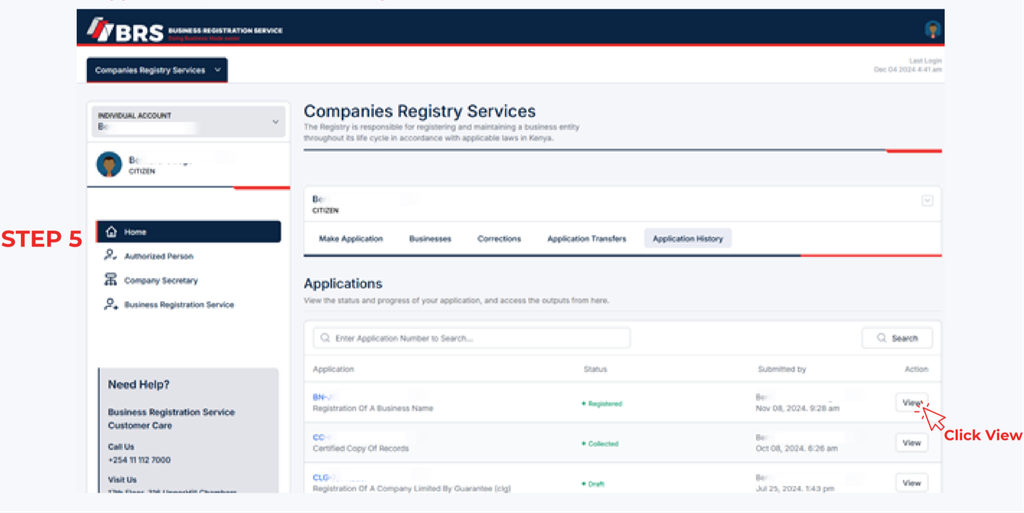
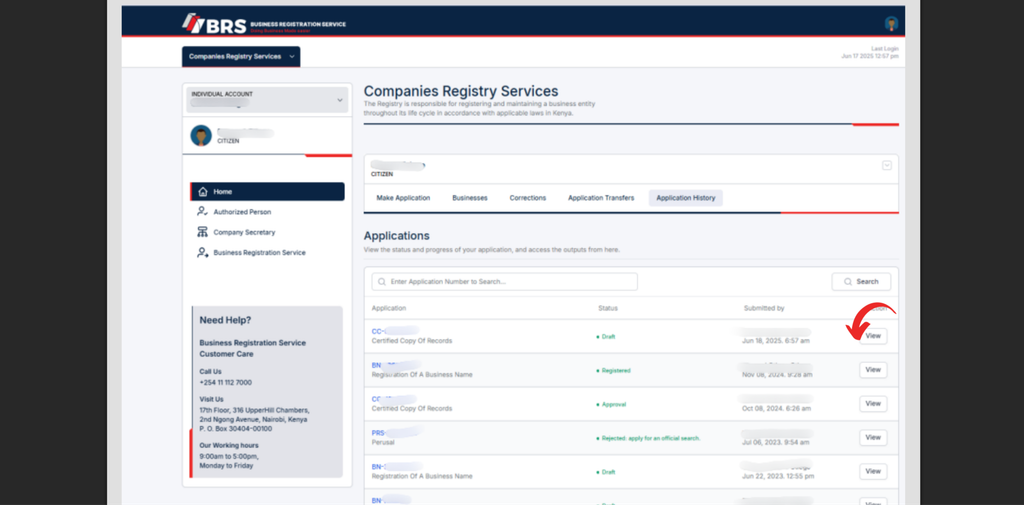
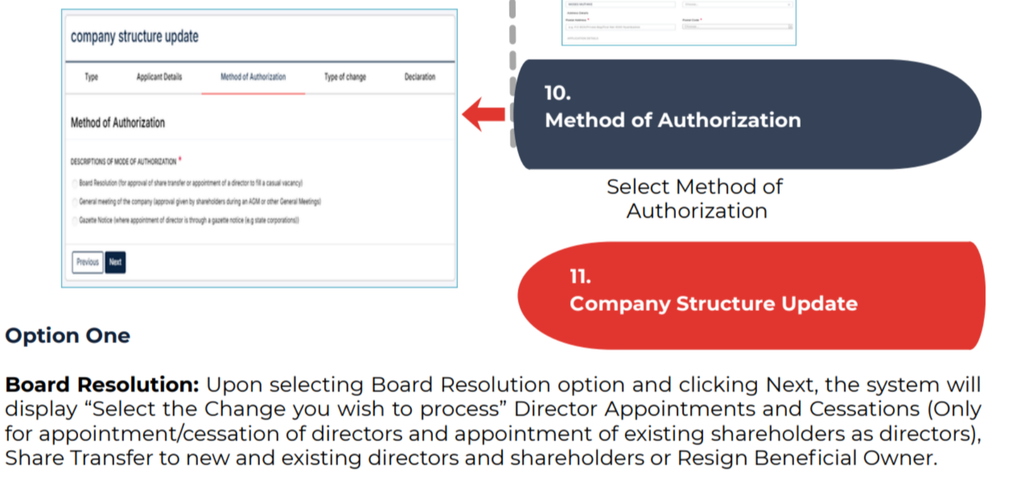
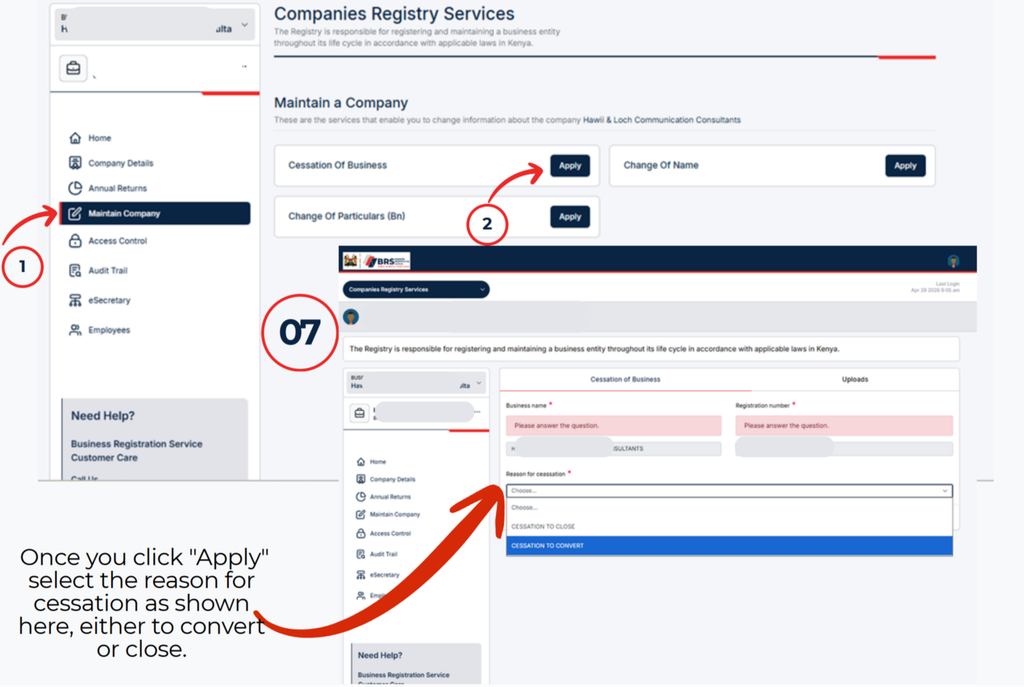
Step 5: Click View Beside the Relevant Application
Once Application History opens, review the listed applications and locate the relevant entry.
Click View beside the application you want to access.
A window will open displaying the records associated with that application. The available documents depend on the application and the outputs provided through the portal.
This step is important because you need to open the correct application before downloading its records.
Step 5 of How to Download Company Documents on BRS eCitizen V2 in Kenya: Click View Beside the Relevant Application
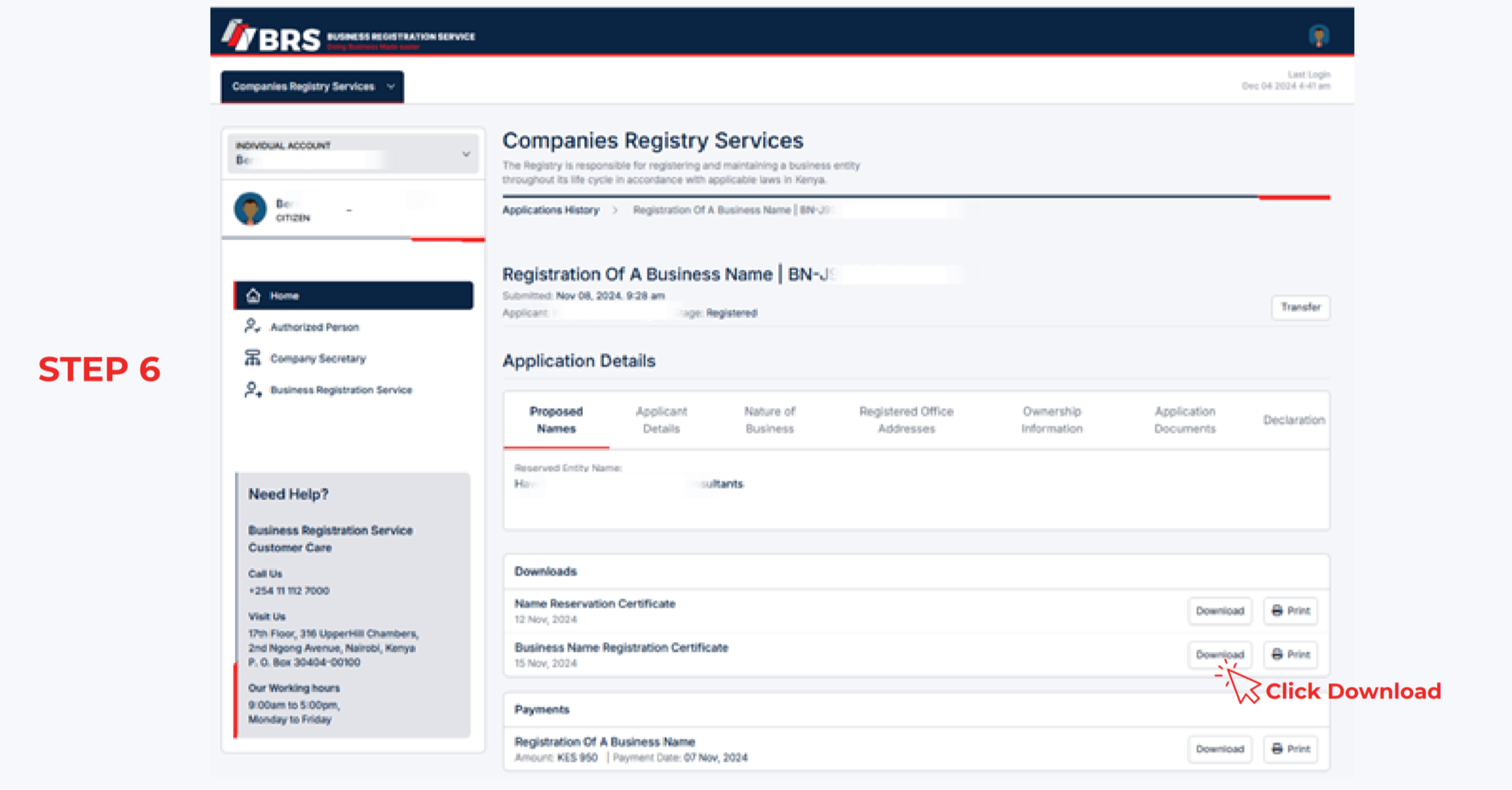
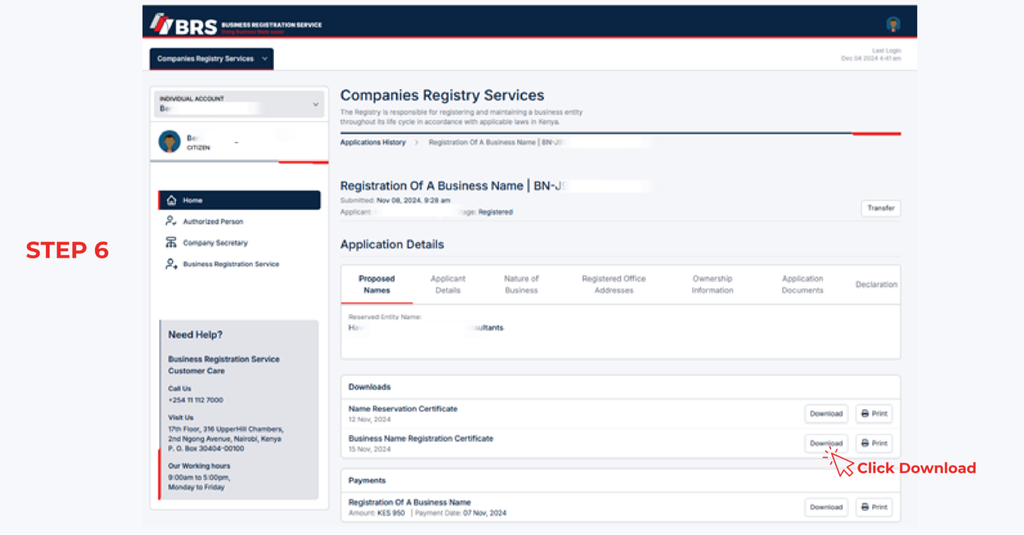
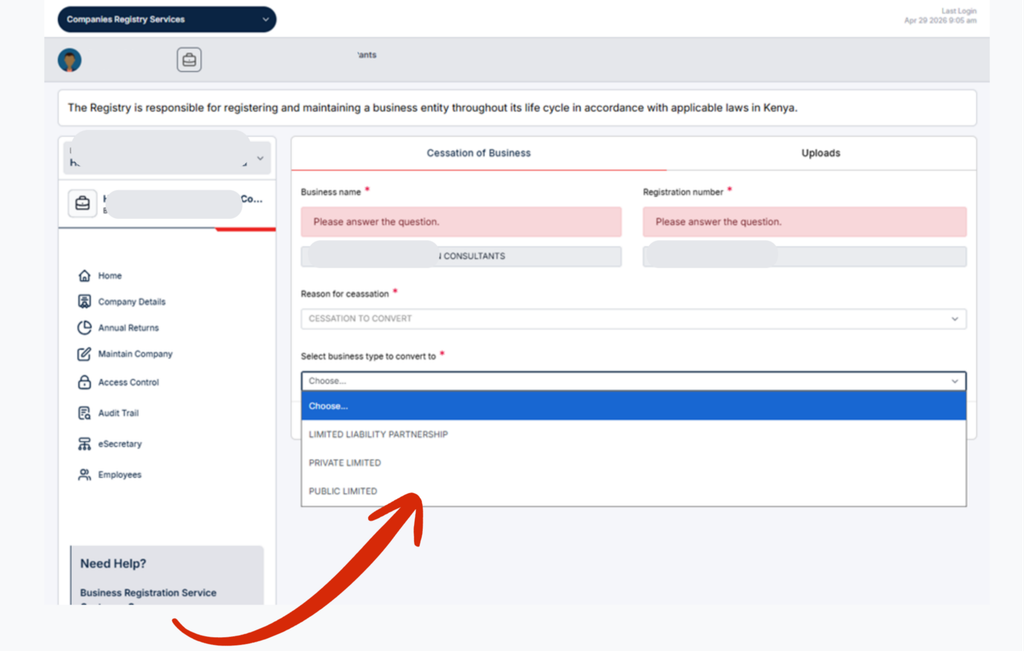
Step 6: Download and Print Your Documents
After clicking View, review the available records and locate the document you need.
Click Download to save the relevant file to your device. If you require a physical copy, open the downloaded document and use your device’s printing function.
Before closing the page, check that you have downloaded the correct document and that the file opens properly.
If several records are available, repeat the process for each document you need.
Step 6 of How to Download Company Documents on BRS eCitizen V2 in Kenya: Download and Print Your Documents
Which Documents Can You Download Through BRS eCitizen V2?
The records available through the portal depend on the service used, the application submitted, and the outputs issued by the Business Registration Service. The official list of entities registered by BRS can help you understand the types of business entities covered by the registry.
Documents you may be able to access include the following:
Business Registration Certificate
A business registration certificate serves as evidence of registration for a business name where such a certificate has been issued. Applicants can look for the relevant record under the application associated with their business name registration.
Company Incorporation Certificate
A company incorporation certificate is an important record confirming that a company has been incorporated. If the certificate is available in your application outputs, you can access it through Application History.
Business Name Registration Certificate
Business owners who registered a business name can check their application records for the corresponding business name registration certificate.
Other Company Registration Documents
The BRS portal may also provide other records or outputs associated with an application. These can include documents generated during the registration process or records made available through the relevant Companies Registry service.
Not every document will necessarily appear under every application. Check the records displayed when you select View.
How to Check Your BRS Application Status
The Application History section is useful not only for downloading documents but also for checking application progress.
After logging in and selecting Companies Registry Services, open Application History. The portal displays applications lodged through the relevant account, allowing you to review their status and progress.
If your business registration application is still being processed, the required certificate or other output may not yet be available for download.
In that situation, check the application status and return to the relevant record when the necessary output becomes available. If you need clarification about a pending application, contact the Business Registration Service through its official communication channels.
Troubleshooting BRS Certificate Downloads
Sometimes users may have difficulty finding or downloading company registration documents. The following checks can help resolve common problems.
Application Not Appearing in Application History
Confirm that you are logged in to the correct eCitizen account and have selected Personal Account, as specified in the official BRS guide.
If the application still does not appear, check whether it was submitted through another account or whether you have selected the appropriate registry service.
Certificate Not Available for Download
Review the application’s status and check whether the relevant output has been issued. An application that is still being processed may not yet have a downloadable certificate.
If the application appears complete but the document remains unavailable, contact BRS for assistance.
Downloaded Document Will Not Open
Try downloading the document again and opening it with a compatible PDF reader or browser. If you are using a mobile device, check that the file was saved successfully and that you can locate it in your downloads folder.
Need a Certified Copy of Company Records
Downloading an existing document is different from applying for a certified copy of records. If you need a certified copy for official, legal, banking, or compliance purposes, check the applicable Companies Registry service and its requirements.
Other BRS Services and Company Registration Guides
The Business Registration Service provides several services beyond downloading certificates. Depending on your needs, the following resources may help you complete related company registry procedures.
Before submitting a new application or requesting an additional service, review the applicable requirements and charges. The official BRS Companies Registry fee schedule provides information about relevant registry fees.
Contact the Business Registration Service
If you cannot access your application, locate the required document, or complete the BRS certificate download process, contact the Business Registration Service using the contact details provided in its official guide.
When requesting assistance, explain the problem clearly and provide the relevant application details requested by BRS. Avoid sharing your password or other sensitive login credentials.
Frequently Asked Questions
1. How do I download my company incorporation certificate from eCitizen?
Log in to the BRS eCitizen V2 portal, select Personal Account, open Companies Registry Services, and click Application History. Find the relevant application, click View, and download the available company incorporation certificate.
2. Why can’t I find my business registration certificate on BRS eCitizen V2?
The certificate may not be available because you are using the wrong eCitizen account, have selected the wrong registry service, or the application has not yet produced a downloadable output. Check your application history and status before contacting BRS for assistance.
3. Can I print company documents after downloading them from BRS?
Yes. According to the official BRS guide, users can download and print available records. After downloading the required document, open the file on your device and select the print option.
How to Use the MPSR Collateral Registry in Kenya: A Step-by-Step Guide
Learn how to use the MPSR collateral registry in Kenya, register security interests in movable property, complete online applications, search notices, and understand the Movable Property Security Rights Act.
The Movable Property Security Rights (MPSR) Registry is an electronic government register in Kenya that allows users to register and search notices of security rights in movable property. Administered by the Business Registration Service (BRS), the registry supports secured transactions by making information about registered security interests publicly accessible.
The collateral registry in Kenya provides a way for creditors to record security interests in movable assets, while businesses and individuals can use eligible movable property as collateral when seeking financing. Understanding the registration process, the information required, and how to access the online system can help users complete their applications accurately.
This guide explains how to access the MPSR registry, submit an initial notice, enter the required information, and review application records. For more practical business registration information, users can explore the business registration and compliance guides.
What Is the MPSR Collateral Registry in Kenya?
The MPSR Registry is an online, notice-based public register of security rights in movable property. It operates under Kenya’s Movable Property Security Rights Act, 2017, which provides a legal framework for using movable assets to secure obligations.
Unlike a system that focuses exclusively on land or buildings, the movable property security rights framework enables eligible movable assets to be used in secured transactions, subject to applicable legal requirements.
Role of the Business Registration Service
The Business Registration Service is a Kenyan State Corporation established under the Business Registration Service Act, 2015. Its responsibilities include administering laws and policies relating to the registration of companies, partnerships, business names, and other relevant matters, including security rights.
Through the MPSR system, the BRS provides electronic services that allow users to submit notices and search the registry without relying entirely on paper-based processes.
Businesses that need to verify the types of entities covered by the registration system can consult the official BRS list of registered entities.
Purpose of the Electronic Collateral Registry
The electronic collateral registry supports several important functions:
Recording notices of security interests in movable property.
Providing public access to registered notices.
Supporting lenders and borrowers involved in secured transactions.
Enabling searches for previously registered notices.
Maintaining application histories for users.
Improving transparency in movable asset financing.
It is important to understand that registering a notice does not, by itself, guarantee that a debt will be repaid or establish every aspect of a creditor’s legal rights. The underlying security agreement, applicable law, and relevant registration requirements remain important.
What Is Movable Property Collateral?
Movable property collateral refers to eligible assets that can be used to secure an obligation without being permanently attached to land.
Depending on the applicable law and the terms of the transaction, movable assets may include equipment, machinery, inventory, vehicles, agricultural assets, receivables, and certain other forms of personal property.
Examples of Assets Used as Collateral
Businesses may use different categories of movable property to support financing arrangements.
Machinery and equipment: Assets used in manufacturing, construction, agriculture, and other commercial activities.
Inventory: Goods held for sale or used in business operations.
Vehicles: Eligible vehicles used for commercial or personal purposes.
Receivables: Money owed to a business by its customers.
Agricultural assets: Certain livestock, crops, and related assets, where legally eligible.
The precise assets that may be offered as security depend on the transaction and applicable legislation. Borrowers should confirm that the asset can legally be used as collateral and that the security agreement adequately identifies it.
Why Is the MPSR Registry Important?
The collateral registry plays an important role in secured transactions in Kenya by providing a central electronic location for recording and searching notices.
Benefits for Borrowers
Businesses and individuals who own eligible movable assets may have additional options when seeking credit. They may not need to rely exclusively on land or buildings to support a financing arrangement.
For small businesses, this framework can be particularly relevant when machinery, inventory, vehicles, or receivables form a substantial part of their assets.
However, the availability of financing depends on the lender’s assessment, the value and eligibility of the collateral, the borrower’s financial position, and the terms of the loan.
Benefits for Creditors
Creditors can use the registry to record notices associated with security interests and search for existing notices.
These searches can help creditors assess potential competing claims involving particular grantors or collateral. The registry’s public notice function can therefore support better-informed lending decisions.
Transparency in Secured Transactions
The public notice registry improves access to information about registered security interests. Nevertheless, a search result should be interpreted carefully. A registry search is not necessarily a complete determination of ownership, enforceability, priority, or the current balance of a secured obligation.
Requirements for MPSR Online Registration
Before starting an MPSR online registration application, prepare the information required for the relevant transaction.
The official MPSR User Guide identifies several categories of information that applicants must provide when submitting an initial notice. Applicants who need the original procedural instructions can consult the MPSR User Manual and Collateral Registry Guide in Kenya.
Information About the Grantor
The grantor is the person or organisation that grants a security right in movable property.
Depending on the applicant’s circumstances, the system may require the grantor’s category and identifying particulars. The official guide illustrates selecting an appropriate type, such as Kenyan Citizen, before entering the remaining details.
Applicants should ensure that the information accurately identifies the grantor and corresponds with the relevant transaction documents.
Information About the Creditor
The application also requires the particulars of the creditor, who holds or is intended to hold the security interest under the relevant arrangement.
Enter the requested creditor information carefully. Errors in names or identifying particulars may create difficulties when searching for or interpreting a registered notice.
Description of the Collateral
The collateral description identifies the movable property covered by the notice.
Provide a description that corresponds with the security agreement and the assets involved in the transaction. The information should be sufficiently accurate to help identify the collateral, in accordance with the applicable legal and system requirements.
Secured Amount and Effectiveness Period
The application process includes fields for the maximum amount secured and the period of effectiveness.
These details should be completed using the information applicable to the transaction. Applicants should not assume that entering an amount or an effectiveness period independently determines the full scope or duration of their contractual rights.
Review the governing legislation and relevant transaction documents whenever the correct entry is uncertain.
How to Register an Initial Notice in the MPSR Registry
The following steps are based on the official Collateral Registry User Manual published by the Business Registration Service.
Step 1: Access the BRS Online Services
Visit the official Business Registration Service website at brs.go.ke and navigate to the relevant collateral registry services.
The registry is accessed through the online government service environment. Ensure that you are using the official platform before entering personal or business information.
Step 2: Sign In Through eCitizen
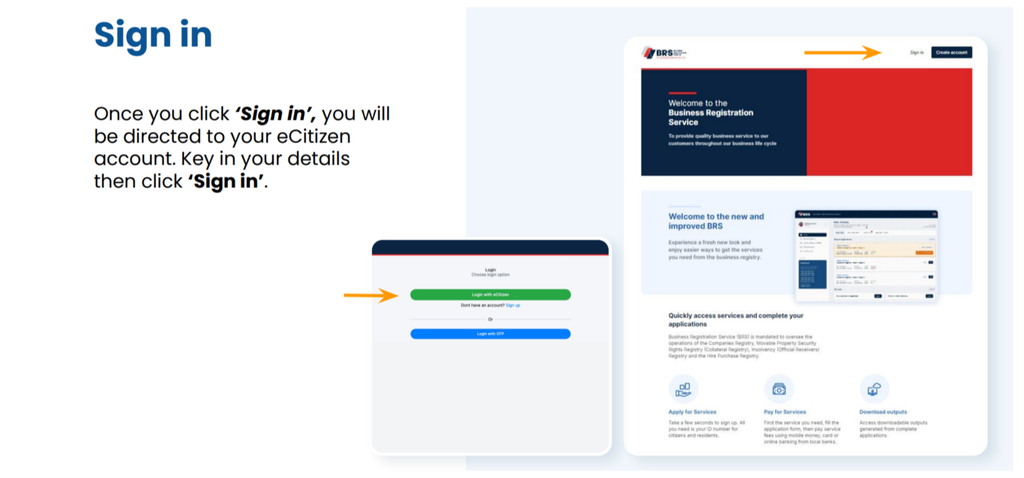
Select the Sign in option. You will be directed to your eCitizen account, where you must enter your login credentials.
Follow the instructions displayed on the screen to authenticate your account.
If you cannot access your account, resolve the login issue through the appropriate official support channel before proceeding with the application.
Step 2 of How to Use the MPSR Collateral Registry in Kenya: A Step-by-Step Guide: Sign In Through eCitizen
Step 3: Complete the One-Time Password Verification
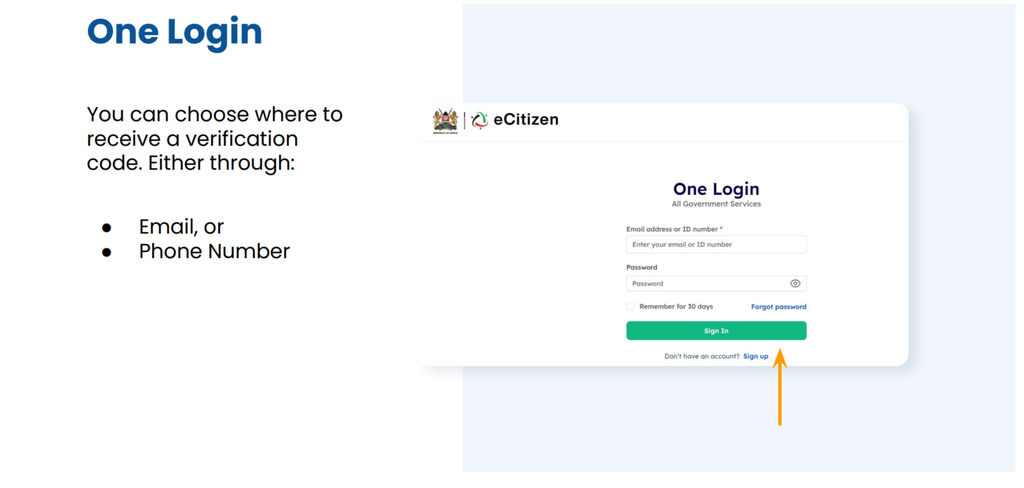
The sign-in process may require a one-time password (OTP).
According to the user guide, you can choose to receive the verification code through either your registered email address or your phone number.
If you choose email verification, enter the OTP sent to your email and select Next. If you choose phone verification, enter the code sent to your phone and select Next.
After successful verification, select Continue to proceed to the dashboard.
Never share your OTP or account password with an unauthorised person.
Step 3 of How to Use the MPSR Collateral Registry in Kenya: A Step-by-Step Guide: Complete the One-Time Password Verification
Step 4: Open the Collateral Registry
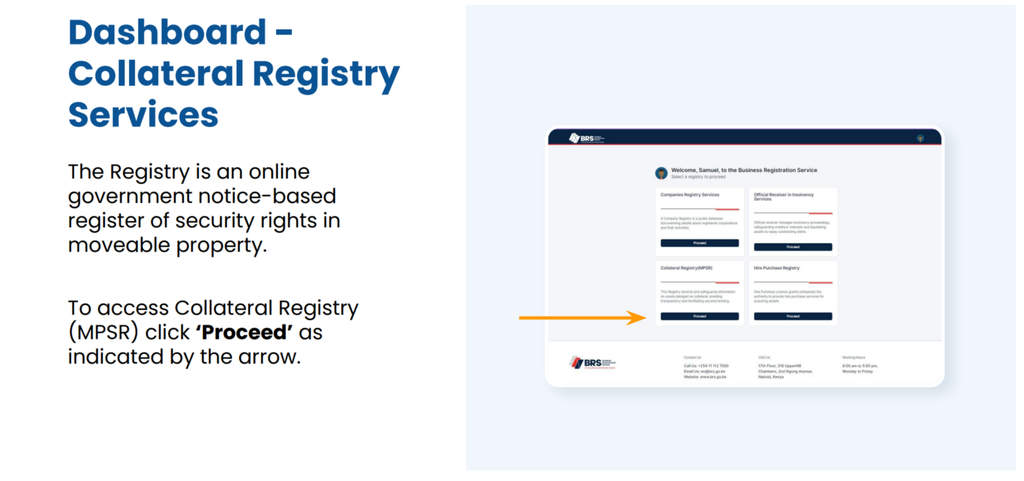
From the dashboard, locate the Collateral Registry Services section.
Select Proceed to access the MPSR registry system.
The registry provides access to services for submitting notices and searching existing records. The precise appearance of the dashboard may change as the government updates its online services.
Step 4 of How to Use the MPSR Collateral Registry in Kenya: A Step-by-Step Guide: Open the Collateral Registry
Step 5: Select the Initial Notice Application
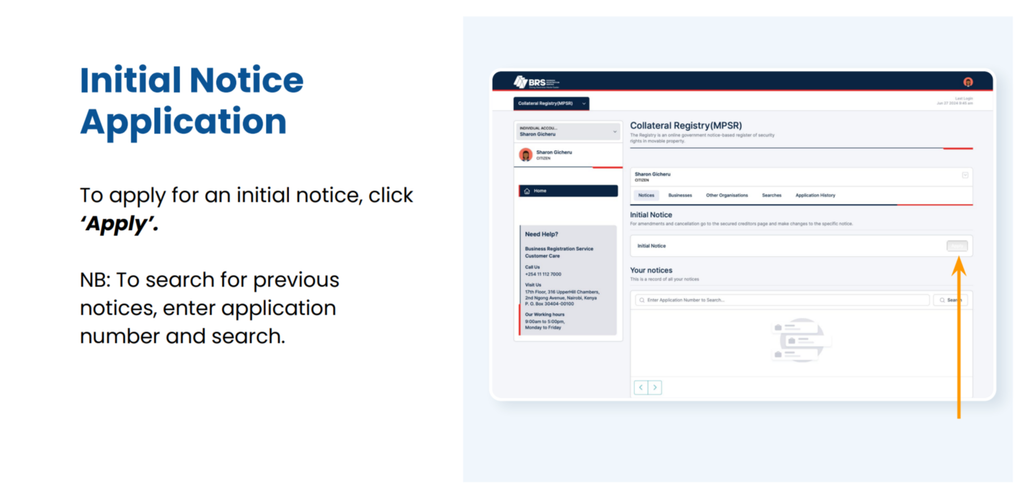
To register a new notice, select Apply under the initial notice application section.
If you need to locate an existing application or notice, the system also provides a search function where you can enter an application number, as applicable.
Before creating a new application, check whether the transaction has already been submitted to avoid unnecessary duplicate filings.
Step 5 of How to Use the MPSR Collateral Registry in Kenya: A Step-by-Step Guide: Select the Initial Notice Application
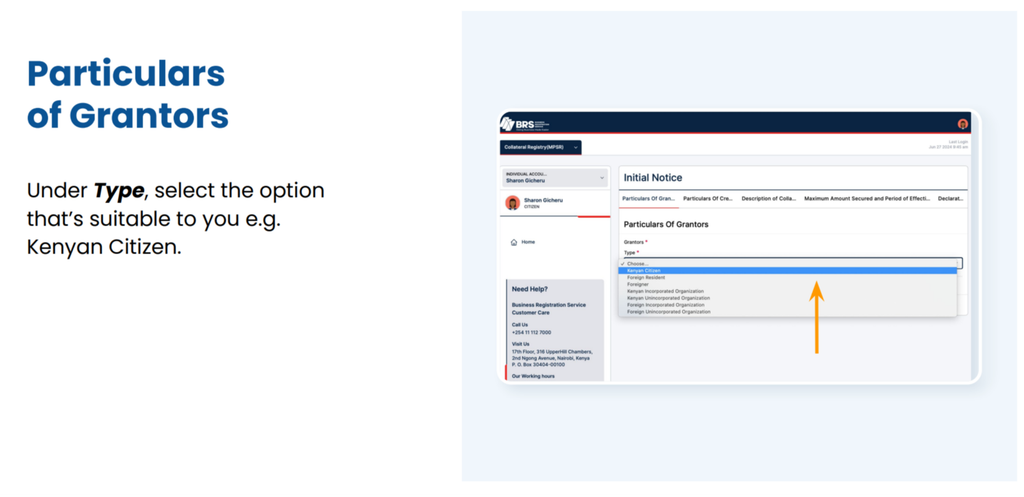
Step 6: Enter the Grantor’s Particulars
Select the appropriate grantor type from the available options.
For example, the user guide illustrates choosing Kenyan Citizen where that category applies. Other applicants should select the option that accurately reflects their circumstances.
Enter the remaining required details and select Next.
Check that the information matches the relevant identification or business records. Incorrect grantor particulars can make a notice more difficult to identify and may have legal consequences.
Step 6 of How to Use the MPSR Collateral Registry in Kenya: A Step-by-Step Guide: Enter the Grantor’s Particulars
Step 7: Enter the Creditor’s Particulars
Provide the creditor’s details in the fields presented by the system.
Confirm that the creditor is correctly identified and that the particulars are consistent with the transaction documentation.
Oncethe required fields are complete, select Next to continue.
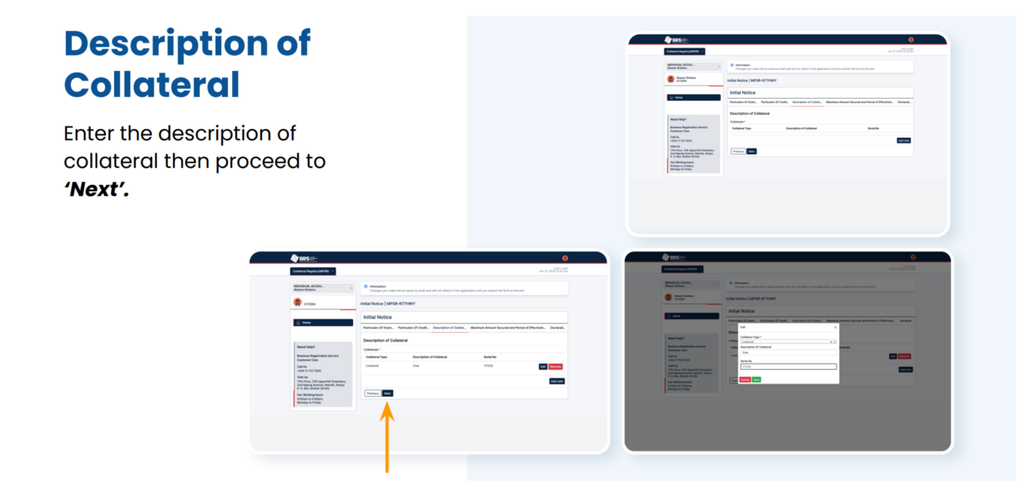
Step 8: Describe the Collateral
Enter the description of the movable property covered by the security arrangement.
The description should correspond with the underlying agreement and identify the relevant assets as accurately as the applicable requirements demand.
If several assets are involved, follow the system’s instructions for describing them. Avoid using vague descriptions that could create uncertainty about the property covered by the notice.
Proceed to the next section after reviewing the collateral information.
Step 8 of How to Use the MPSR Collateral Registry in Kenya: A Step-by-Step Guide: Describe the Collateral
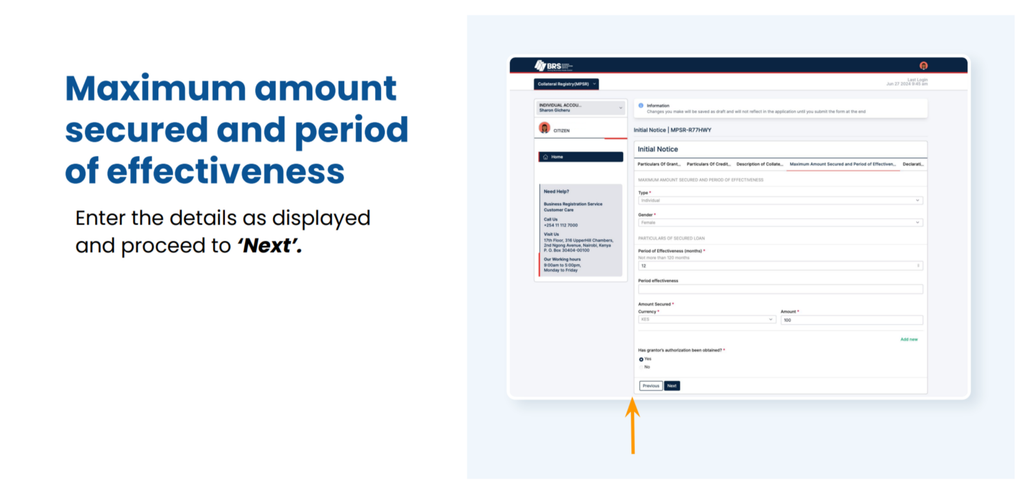
Step 9: Enter the Maximum Secured Amount and Effectiveness Period
Complete the fields for the maximum amount secured and the period of effectiveness.
Use the correct figures and dates or duration information required by the system and supported by the transaction documents.
Where the security arrangement contains complicated financial terms, multiple obligations, or changing collateral, obtain appropriate legal advice before submitting the notice.
Step 9 of How to Use the MPSR Collateral Registry in Kenya: A Step-by-Step Guide: Enter the Maximum Secured Amount and Effectiveness Period
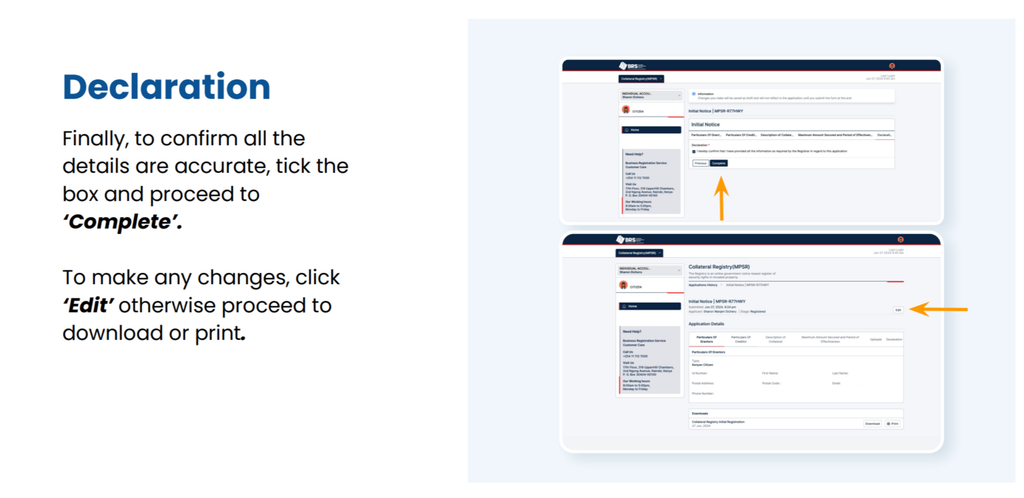
Step 10: Review the Declaration
Before completing the application, carefully review the information entered in each section.
The system provides an opportunity to confirm that the particulars are accurate. Tick the declaration box as instructed and select Complete when you are satisfied with the details.
If you identify an error, select Edit and correct it before finalising the application.
Step 10 of How to Use the MPSR Collateral Registry in Kenya: A Step-by-Step Guide: Review the Declaration
Step 11: Download or Print the Application Record
After completing the application, use the available options to download or print the relevant record.
Keep copies of the confirmation and associated transaction documents for your records. Where the system provides a reference or application number, retain it for future searches and correspondence.
A completed electronic submission should not automatically be interpreted as a guarantee that every legal requirement has been satisfied. Check the system’s confirmation and any further instructions provided.
Step 11 of How to Use the MPSR Collateral Registry in Kenya: A Step-by-Step Guide: Download or Print the Application Record
How to Search the Kenya Collateral Registry
The MPSR Registry also supports searches for previously registered notices.
A registry search can help a lender, borrower, adviser, or other authorised user investigate notices associated with a particular transaction.
Search Using an Application Number
Where you already have an application number, enter it in the relevant search field and submit the search.
This can help you locate a particular application or notice without having to start a new registration process.
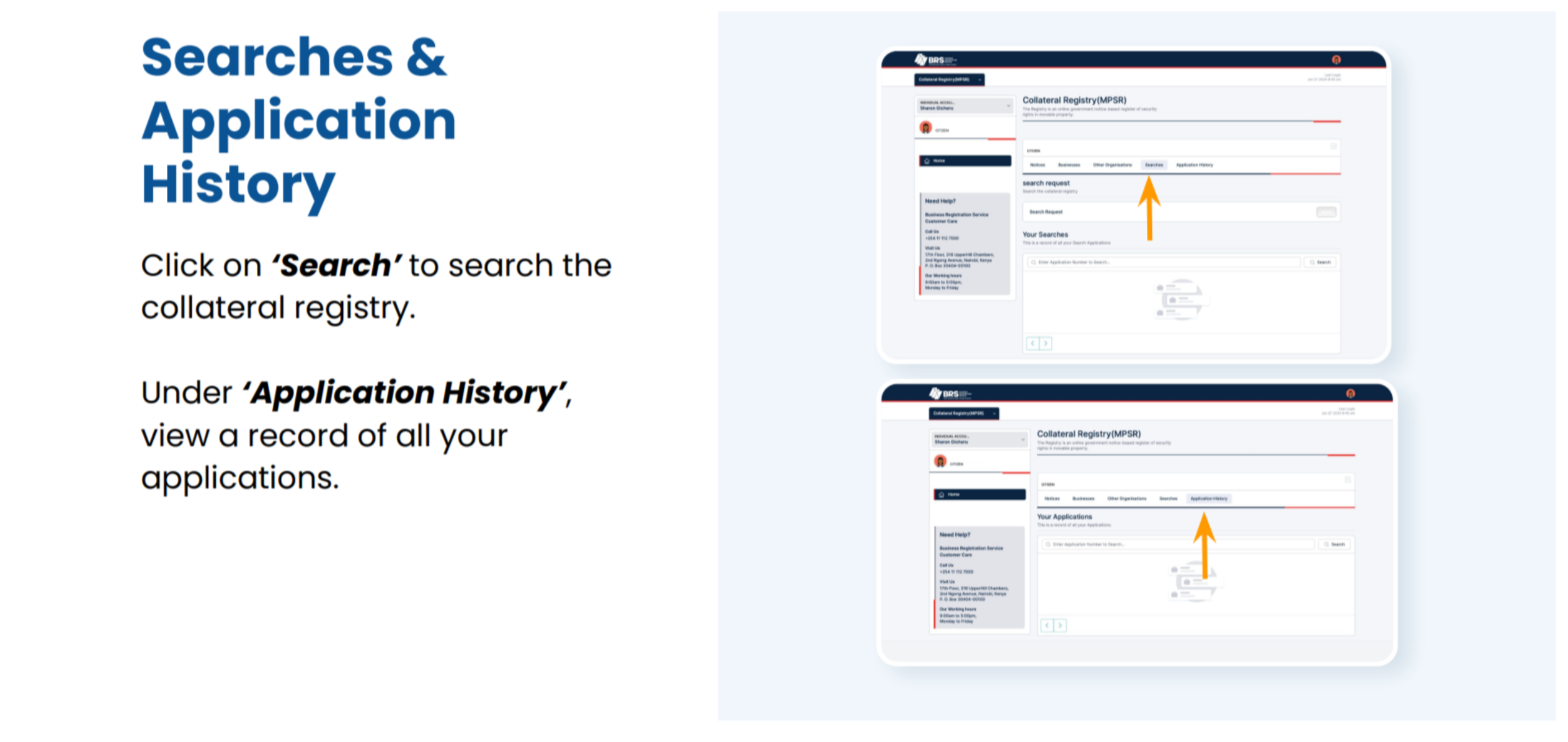
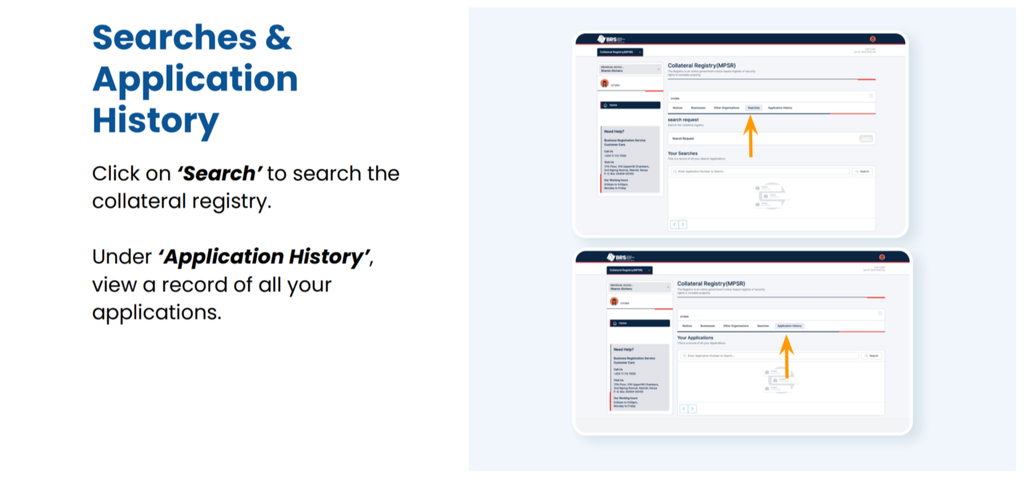
Review the Application History
The user guide identifies an Application History section where users can view a record of their applications.
This function can be useful for tracking previously submitted applications and retrieving relevant information when following up on a transaction.
Search Before Extending Credit
Creditors may wish to search the registry as part of their due diligence before accepting movable property as security.
A search may reveal existing notices that warrant further investigation. However, users should not assume that a search alone conclusively establishes whether an asset is unencumbered or determines the legal priority of competing claims.
Where necessary, seek legal advice and review the underlying agreements and relevant statutory provisions.
Businesses and Other Organisations in the MPSR System
The official user guide also describes sections for Businesses and Other Organisations.
The Businesses section allows users to view details of listed businesses registered in their name, as available through the platform.
The Other Organisations section provides an option to add other organisations for MPSR-specific purposes.
Users should follow the instructions displayed within their accounts and ensure that the correct organisation is associated with the intended transaction. These functions should not be confused with the separate procedures for incorporating a company or registering a business name.
Understanding Security Interest Registration in Kenya
Security interest registration is an important part of the framework governing secured transactions, but the registration process should be understood in its proper legal context.
The Movable Property Security Rights Act, 2017, provides the principal statutory framework for security rights in movable property. The applicable legal rules determine how security rights are created, made effective against third parties, prioritised, and enforced.
Registration Is Not the Same as Creating a Security Agreement
The underlying security agreement and the registry notice serve different functions.
A security agreement documents the arrangement between the relevant parties. A registry notice provides public notice of a claimed security interest.
The requirements for creating an enforceable security right and making it effective against third parties must be assessed under the applicable legislation. Filing a notice should not be treated as a substitute for preparing the necessary agreement.
Priority and Competing Security Interests
When more than one creditor claims rights over the same collateral, questions of priority may arise.
The outcome can depend on statutory priority rules, the circumstances of each transaction, the type of collateral, and other legally relevant factors. Registration timing may be important, but it should not be treated as the only factor in every case.
Creditors should conduct appropriate due diligence and obtain legal advice where competing claims or complex security arrangements exist.
Keep Registry Information Accurate
Applicants should take care when entering grantor details, creditor particulars, collateral descriptions, secured amounts, and effectiveness periods.
If information needs to be changed, users should consult the available registry procedures and applicable law to determine the correct method. Do not assume that editing an already submitted notice is always possible or that every correction has the same legal effect.
The BRS website lists the contact number +254 011 112 7000 in the referenced user guide. Confirm the current contact details through the official website before relying on them.
The manual provides procedural guidance for signing in, accessing the collateral registry, submitting an initial notice, entering the relevant particulars, completing the declaration, and reviewing application history.
Because online systems and administrative procedures can change, follow the instructions currently displayed on the official platform if they differ from older screenshots or documentation.
For questions about fees for other company registration services, the official BRS companies registry fee schedule provides a relevant reference. Do not assume that company registration fees also apply to MPSR notices.
Frequently Asked Questions About the MPSR Registry
1. What is the MPSR Registry in Kenya?
The MPSR Registry is an electronic, notice-based government register of security rights in movable property. It is administered by the Business Registration Service and supports the registration and searching of notices relating to secured transactions.
2. How do I register a security interest in the MPSR Registry?
Access the official BRS online services, sign in through eCitizen, complete any required OTP verification, and open Collateral Registry Services. Select Apply for an initial notice, enter the grantor and creditor particulars, describe the collateral, provide the secured amount and effectiveness period, review the declaration, and complete the application.
3. Can I search the collateral registry before accepting an asset as security?
Yes. The MPSR Registry provides search functionality for existing notices. A search can support due diligence before accepting movable property as collateral. However, search results should be assessed alongside the underlying agreements and applicable legal requirements, particularly where ownership, competing claims, or priority is uncertain.
LLP Registration in Kenya: Requirements, Procedure, Cost and Duration
Learn about LLP registration in Kenya, including requirements, online registration procedure, Form LLP-1, partner details, registration fees, costs, duration, and post-registration compliance.
Registering a Limited Liability Partnership (LLP) in Kenya provides professionals and business partners with a formal business structure that combines elements of a traditional partnership and a company. A limited liability partnership is a separate legal entity, offering partners a degree of protection from personal liability for the obligations of the business, subject to applicable law.
The Business Registration Service (BRS) administers LLP registration in Kenya through the government’s online registration system. Applicants must provide the proposed business name, partner and manager details, business address, nature of business, and other required documentation.
This guide explains the LLP registration procedure in Kenya, the documents and information required, registration fees, online application steps, and ongoing compliance obligations. For more guidance on business formation and regulatory procedures, explore the business registration and compliance articles.
What Is a Limited Liability Partnership in Kenya?
A limited liability partnership is a business structure that combines features of a partnership with the separate legal identity of a company. Under this arrangement, the LLP exists as a legal entity distinct from its individual partners.
The structure may be particularly suitable for professional firms and businesses operated by two or more partners who want a formal legal framework for their operations.
Benefits of a Limited Liability Partnership
Registering a limited liability partnership in Kenya offers several potential benefits:
Separate legal identity: The LLP exists independently of its partners.
Limited liability protection: Partners generally receive protection against certain liabilities of the LLP, subject to applicable legal exceptions.
Professional business structure: The arrangement may suit professional practices, including eligible legal and consultancy firms.
Continuity: The LLP can continue operating as a legal entity independently of changes involving individual partners, subject to the law.
Formal business operations: Registration establishes the partnership as a recognised legal entity.
An LLP is not automatically the best structure for every business. Applicants should consider the nature of their activities, professional regulations, tax obligations, and the legal responsibilities associated with the partnership. The Business Registration Service’s list of registered entities provides additional context on the types of business structures recognised in Kenya.
LLP Registration Requirements in Kenya
Understanding the LLP registration requirements before starting an application can help reduce errors and delays. Applicants should prepare the relevant information for the partners, manager, proposed business name, and business premises.
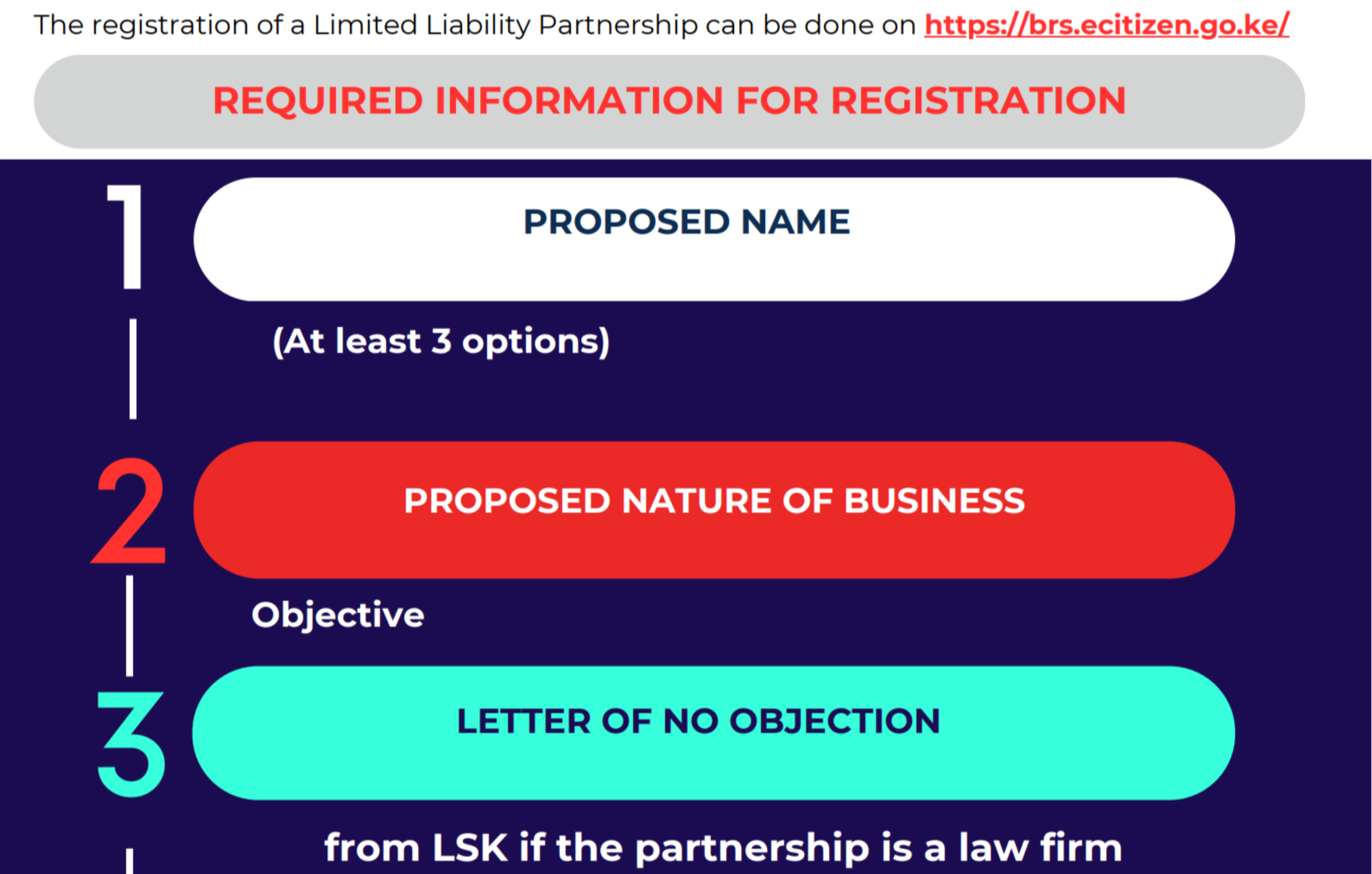
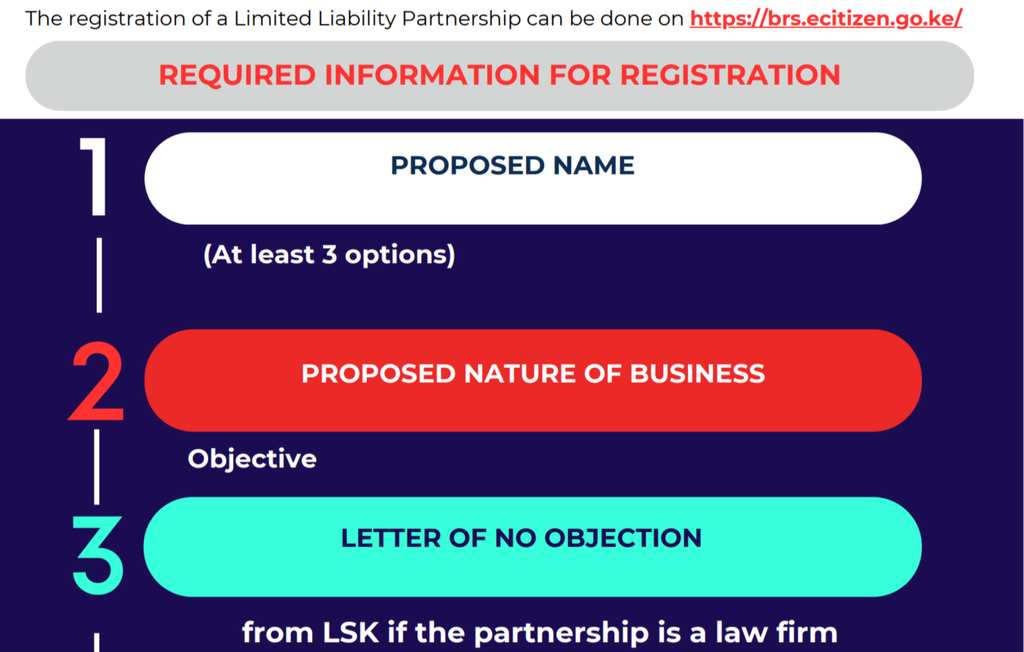
1. Proposed LLP Business Name
Applicants should prepare at least three proposed names for the limited liability partnership. Providing alternatives can help if the preferred name is unavailable or does not satisfy the applicable naming rules.
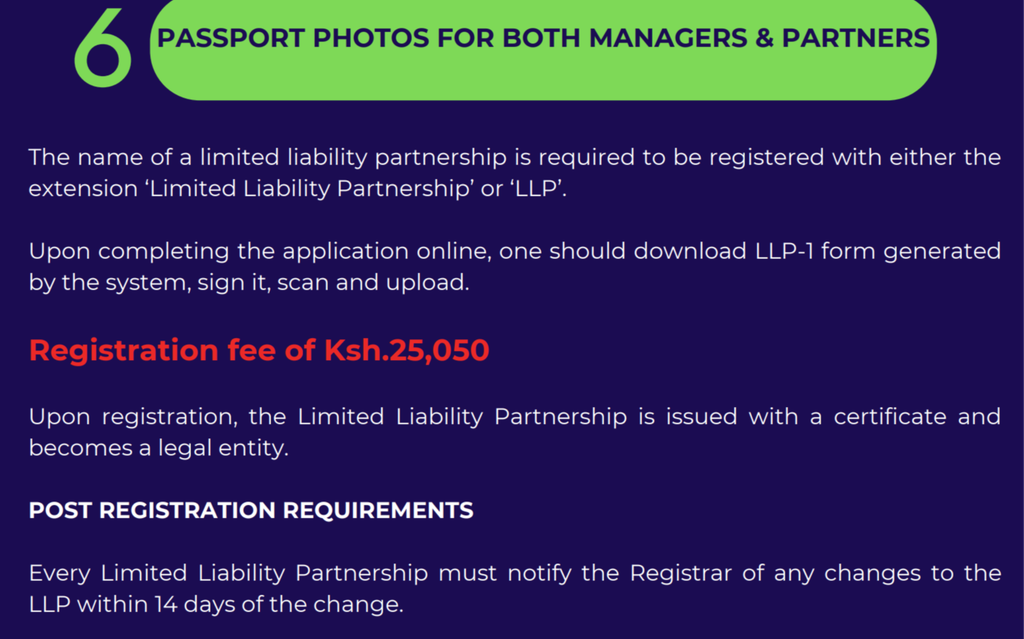
The registered name must include either the words Limited Liability Partnership or the abbreviation LLP, in accordance with the applicable requirements.
The proposed name should be distinctive and should not conflict with existing registered names or applicable naming restrictions.
2. LLP Partner Details
The application requires the full names and identification details of the proposed partners. Applicants should prepare the following information for each partner:
Full legal name.
National identification number or applicable passport details.
Email address.
Telephone number.
Physical or residential address.
Occupation.
Passport photograph, where required by the application.
The information submitted should be accurate and consistent with the relevant identification documents.
3. LLP Manager Details
A limited liability partnership must have at least one manager and at least two partners under the requirements described by the Business Registration Service.
The manager may also be one of the partners. Applicants should prepare the manager’s full name, identification details, occupation, contact information, physical address, and passport photograph where required.
The manager’s role is important because the LLP must have an individual responsible for the relevant management and statutory responsibilities.
4. Proposed Nature of Business
Applicants must describe the intended activities of the partnership. The proposed nature of business should clearly explain what the LLP will do.
For example, the description might cover legal services, accounting, consultancy, technology services, or another legitimate commercial activity.
Where the business operates in a regulated profession, applicants should establish whether additional licences, professional approvals, or supporting documents are required.
5. Registered Office Address
The application requires a proposed business address. Applicants should prepare the physical address of the LLP’s proposed office or principal place of business.
The address should accurately identify the location from which the business will operate or maintain its registered office, as applicable.
Applicants should also ensure that the proposed premises are suitable for the intended activities and satisfy any relevant licensing or regulatory requirements.
6. Letter of No Objection
A letter of no objection may be required for certain LLP registrations, depending on the nature of the business and the applicable regulatory requirements.
For example, the BRS guidance identifies a letter from the Law Society of Kenya (LSK) in connection with the registration of a law firm.
Applicants establishing a professional practice should confirm the applicable requirements with the relevant professional body and the BRS before submitting their applications.
LLP Registration Procedure in Kenya
The LLP registration process is conducted online through the Business Registration Service’s official registration platform.
Before starting the application, collect the proposed names, partner details, manager details, business address, nature of business, and any supporting documents that may be required.
Check that the identification information, contact details, and addresses are correct.
Preparing the information in advance makes it easier to complete the online form accurately.
Step 2: Apply for LLP Name Reservation
Submit the proposed LLP business name through the applicable online process.
The name reservation stage allows the registration authority to assess whether the proposed name is available and complies with the relevant naming requirements.
Providing alternative names can help prevent unnecessary delays if the first choice is rejected or unavailable.
Applicants should use the name approved through the official system when completing the subsequent registration steps.
Step 3: Complete the Online LLP Application
Log in to the eCitizen registration portal and access the relevant Business Registration Service application for a limited liability partnership.
Enter the required information, including:
The approved LLP name.
Details of the partners and manager.
The proposed nature of business.
The principal place of business or proposed registered address.
Contact information and other requested particulars.
Review the information carefully before proceeding to payment and submission.
Step 4: Download and Complete Form LLP-1
According to the BRS guidance, completing the online application generates Form LLP-1, which must be downloaded.
The form should be signed as required, scanned, and uploaded through the registration system.
Applicants should ensure that the signed document is legible and that the information matches the details entered in the online application. If you need help accessing registration documents after approval, consult this guide on downloading certificates and other records from BRS in Kenya.
Step 5: Upload Supporting Documents
Upload the documents requested by the registration portal. These may include identification information, passport photographs for the relevant managers and partners, and any applicable supporting letters or professional approvals.
The exact documents required should be confirmed through the current application instructions, particularly where the LLP will operate in a regulated profession. The official BRS forms directory can also help applicants locate relevant registration forms.
Step 6: Pay the LLP Registration Fees
Pay the registration fee displayed or prescribed for the application through the official payment process.
The BRS guidance supplied for this procedure states a registration fee of KSh 25,050. Applicants should verify the current amount on the official portal before making payment because government fees and administrative requirements can change.
Retain the payment confirmation for your records.
Step 7: Await Review and Registration
After submitting the application, signed form, supporting documents, and payment, monitor the application through the official system.
The registration authority may review the submission and request corrections or additional information if necessary.
Once the application is approved, the LLP is issued a certificate of registration and becomes a legal entity.
The LLP registration cost depends on the prescribed government charges and any additional expenses associated with preparing the application.
According to the BRS guidance provided for this registration procedure, the stated registration fee is KSh 25,050.
Applicants should distinguish between the official registration fee and the total cost of establishing the business.
Potential additional expenses may include:
Professional advice or assistance with the application.
Preparation of partnership documents.
Professional-body approvals, where applicable.
Business premises and related administrative expenses.
Licences or permits required for the intended business activities.
Not every LLP will incur all these additional expenses. The total cost depends on the circumstances of the partnership and the requirements applicable to its operations.
The LLP registration duration depends on the completeness of the application, the availability of the proposed name, the accuracy of the supporting documents, and the time required for official review.
An application that contains accurate information and all required documents may proceed more smoothly than one requiring corrections or additional approvals.
Factors that may affect the registration timeline include:
Delays in name reservation or approval.
Incorrect partner or manager identification details.
Missing signatures on Form LLP-1.
Incomplete supporting documentation.
Additional requirements imposed by a relevant professional body.
Requests for clarification from the registration authority.
The BRS guidance provided does not specify a guaranteed processing period. Applicants should therefore check the current status through the official portal rather than relying on an assumed completion date.
What Happens After LLP Registration?
Receiving the certificate of registration establishes the LLP as a legal entity, but registration is only the beginning of its compliance responsibilities.
Partners should understand the ongoing obligations that apply to their business.
Maintain at Least Two Partners
The LLP must maintain at least two partners during its existence, in accordance with the requirements described in the BRS guidance.
The partners should monitor changes in membership and take appropriate steps if the number of partners changes.
Notify the Registrar of Changes
The supplied BRS guidance states that an LLP must notify the Registrar of changes within 14 days of the change.
Changes may involve partner or manager details, business particulars, or other information recorded in the official register.
Because the precise notification requirements depend on the nature of the change, applicants should consult the applicable rules and current BRS procedures before submitting an amendment. For related guidance, read this step-by-step guide to changing particulars on BRS in Kenya.
File the Annual Declaration of Solvency
The guidance also identifies an annual declaration of solvency as an ongoing LLP compliance requirement.
Partners and managers should establish a compliance calendar to track the applicable filing dates and ensure that required declarations are submitted on time.
They should confirm the current filing procedure and any applicable deadlines through the BRS.
Maintain Appropriate Business Records
An LLP should maintain accurate financial, operational, and statutory records. Depending on its activities, it may also need to meet tax filing, accounting, employment, licensing, and other regulatory obligations.
Registration does not automatically satisfy every obligation imposed on a business operating in Kenya.
Although the LLP registration application records essential information about the partnership, the partners should also consider documenting their internal working arrangements.
An LLP partnership agreement can help establish clear expectations and reduce the risk of disputes.
Depending on the partners’ needs and the applicable law, the agreement may address:
Each partner’s responsibilities and authority.
Capital contributions and ownership-related arrangements.
Allocation of profits and losses.
Decision-making procedures.
Admission or departure of partners.
Procedures for resolving disputes.
Management responsibilities.
Dissolution or winding-up arrangements.
The partners should obtain appropriate professional advice to ensure that the agreement is consistent with Kenyan law and the LLP’s intended structure.
Common LLP Registration Mistakes to Avoid
Applicants can reduce the likelihood of delays by checking the application carefully before submission.
Submitting an unavailable name: Prepare alternative names and verify that the selected name meets the applicable requirements.
Providing inconsistent personal details: Ensure that partner and manager information matches the relevant identification documents.
Using an unclear business description: Describe the intended activities accurately and identify any regulated activities that may require additional approval.
Forgetting to sign Form LLP-1: Download the generated form, complete the required signatures, scan it clearly, and upload it as instructed.
Ignoring professional approvals: Where the LLP operates in a regulated profession, establish whether a letter of no objection or another approval is necessary.
Overlooking post-registration obligations: Keep track of changes that must be reported, annual declarations, and other statutory filings.
Relying on outdated fees: Verify the registration charge and current requirements directly through the official BRS platform before submitting payment.
Businesses that use secured financing may also wish to understand the applicable collateral registration framework. The Collateral Registry MPSR user guide for Kenya provides related information on that separate process.
Frequently Asked Questions
1. How much does it cost to register an LLP in Kenya?
The BRS guidance referenced in this article lists an LLP registration fee of KSh 25,050. Applicants should verify the current government fee through the official registration portal before paying.
2. How many partners are required to register an LLP in Kenya?
The supplied BRS guidance specifies at least two partners and at least one manager. A manager may also be a partner in the LLP.
3. Where can I register a limited liability partnership in Kenya?
You can access the official Business Registration Service website and its online registration platform at https://brs.ecitizen.go.ke/. The process involves submitting the required particulars, completing Form LLP-1, uploading supporting documents, paying the applicable fee, and awaiting approval.
Debtor Bankruptcy Proceedings in Kenya: A Step-by-Step Legal Guide
Learn about debtor bankruptcy proceedings in Kenya, bankruptcy law, bankruptcy order applications, Insolvency Act requirements, creditor rights, trustee appointments, and discharge after three years.
Debtor bankruptcy proceedings in Kenya provide a legal framework for individuals who cannot meet their financial obligations when they fall due. Governed by the Insolvency Act, 2015, and the applicable regulations, the process allows an eligible debtor to petition the High Court for a bankruptcy order and, subject to the law, obtain relief from qualifying debts after discharge.
Understanding the bankruptcy legal process is essential for debtors, creditors, and legal representatives. From preparing the required documents to appointing a bankruptcy trustee, administering the debtor’s estate, and obtaining discharge, each stage has specific legal requirements.
This guide explains the bankruptcy process in Kenya, the role of the Official Receiver, creditors’ rights, the consequences of a bankruptcy order, and the conditions for discharge. For additional information on business registration and related legal procedures, readers can explore the business registration and compliance guides.
What Is Bankruptcy Under Kenyan Insolvency Law?
Bankruptcy is a legal proceeding through which an individual who is unable to pay debts may seek a court order declaring them bankrupt. It provides a structured process for addressing outstanding debts, protecting the interests of creditors, and potentially allowing the debtor to make a financial fresh start.
In Kenya, bankruptcy law is primarily governed by the Insolvency Act, 2015, and the Insolvency Regulations. The High Court has jurisdiction over bankruptcy matters, including applications for bankruptcy orders and related proceedings.
Bankruptcy is not simply a private agreement between a debtor and creditors. It is a formal legal process involving court supervision, the Official Receiver, and, where applicable, a bankruptcy trustee. The general overview of debtor bankruptcy proceedings in Kenya provides further guidance on the relevant procedures and requirements.
Who Can Apply for Bankruptcy?
A debtor who meets the applicable statutory requirements may apply to the court for a bankruptcy order. Under Section 32 of the Insolvency Act, a debtor may make an application to be adjudged bankrupt.
The application must comply with the relevant legal and procedural requirements. The debtor may file the bankruptcy petition personally or through an advocate representing them.
Creditors may also initiate bankruptcy proceedings where the applicable statutory conditions are satisfied. The procedure and supporting evidence depend on whether the application is made by the debtor or a creditor.
Purpose of Debtor Bankruptcy Proceedings
Debtor insolvency proceedings serve several purposes:
Establishing a lawful process for dealing with debts that cannot be paid.
Providing an orderly mechanism for administering the debtor’s estate.
Ensuring eligible creditors can submit and prove their claims.
Distributing available assets according to the applicable legal priorities.
Providing a framework for the debtor’s eventual discharge from qualifying debts.
Bankruptcy does not necessarily eliminate every financial obligation immediately. The legal consequences depend on the bankruptcy order, the debts involved, applicable statutory exceptions, and the outcome of the proceedings.
Step-by-Step Bankruptcy Legal Process in Kenya
The bankruptcy legal process involves preparing the petition, obtaining confirmation of compliance, filing the necessary documents in court, notifying creditors, and attending the hearing.
Step 1: Prepare the Bankruptcy Petition
The process begins when the debtor prepares a bankruptcy petition seeking a court order declaring them bankrupt.
According to the Business Registration Service guidance on debtor bankruptcy proceedings, the principal documents include:
Bankruptcy Petition — Form No. 10: The formal application requesting a bankruptcy order.
Supporting Affidavit — Form No. 8: The supporting sworn statement setting out the relevant facts and information.
Application for Bankruptcy Trustee — Form No. 9: The prescribed application relating to the appointment of a bankruptcy trustee.
Statement of Affairs — Form No. 11: A statement setting out the debtor’s financial position, including relevant assets, liabilities, and creditor information.
The applicable forms should be completed accurately and accompanied by any supporting information required under the Insolvency Act and Regulations. The official Business Registration Service forms portal can help applicants locate relevant forms and verify current documentation requirements.
A statement of financial affairs is particularly important because it helps establish the debtor’s financial position and identifies the creditors whose claims may be addressed through the proceedings.
Step 2: Submit the Documents to the Official Receiver
The debtor submits the required documents to the Official Receiver for review and confirmation that the applicable statutory requirements have been met.
The Official Receiver performs an important administrative role in bankruptcy proceedings, including reviewing the documents submitted and undertaking the functions assigned under the insolvency legislation.
If any information or documentation is incomplete, the debtor may need to address the deficiencies before proceeding.
Step 3: Obtain the Certificate of Compliance
Once the Official Receiver confirms compliance with the applicable requirements, the debtor follows the prescribed payment procedure.
The Business Registration Service guidance specifies a statutory payment of KSh 30,000 to the Official Receiver, followed by the issuance of a Certificate of Compliance in relation to the petition.
Applicants should confirm the current prescribed amount, payment instructions, and administrative requirements directly with the relevant office before making payment, as procedures and fees may change.
The Certificate of Compliance confirms that the relevant compliance checks have been completed for the next stage of the application.
Step 4: File the Bankruptcy Petition in the High Court
After obtaining the required confirmation, the debtor proceeds to file the bankruptcy petition and supporting documents in the High Court with jurisdiction over the matter.
Court filing fees may apply in addition to the prescribed payment made during the compliance process. Applicants can consult the official companies registry fee schedule for relevant registry charges, while confirming whether separate bankruptcy-related fees apply to their particular filing.
The matter is then placed before the Deputy Registrar for the necessary procedural checks. The Deputy Registrar confirms whether the application satisfies the relevant requirements and is ready to be placed before a judge for hearing.
A properly prepared bankruptcy court application helps reduce avoidable delays arising from incomplete documents or procedural deficiencies.
Step 5: Publish Notice of the Bankruptcy Petition
Before the hearing, the debtor is required, under the applicable procedure described in the Business Registration Service guidance, to publish notice of the bankruptcy petition in one or more newspapers with wide circulation.
The notice informs creditors and gives them an opportunity to respond to the petition where appropriate.
This stage promotes transparency and helps ensure that affected creditors have an opportunity to participate in the proceedings.
Step 6: Attend the Bankruptcy Hearing
Under Section 34 of the Insolvency Act, the court considers the petition and determines whether the debtor should be adjudged bankrupt.
The court evaluates the evidence and the applicable legal requirements before making its decision. Filing a petition does not automatically mean that a bankruptcy order will be granted.
If the court is satisfied that the relevant conditions have been met, it may issue a bankruptcy order declaring the debtor bankrupt.
The Business Registration Service guidance describes the bankruptcy period as three years, subject to the statutory provisions governing discharge, objections, and other relevant circumstances.
Bankruptcy Order Requirements and Legal Effects
A bankruptcy order has significant legal consequences for the debtor, creditors, and the administration of the debtor’s property.
Once the court makes the order, the applicable provisions of the Insolvency Act govern how the debtor’s estate is managed and how creditors may pursue their claims.
Suspension of Debt Recovery Proceedings
Section 48 of the Insolvency Act provides for a stay of proceedings to recover the bankrupt’s debts following a bankruptcy order.
This helps prevent individual creditors from pursuing recovery independently in circumstances where the law requires claims to be dealt with through the bankruptcy process.
The precise effect of the stay depends on the relevant statutory provisions and the type of proceeding involved.
Vesting and Administration of the Debtor’s Property
Under Section 48, the bankrupt’s property and the powers the bankrupt would otherwise exercise over that property for their own benefit vest in the bankruptcy trustee, subject to the applicable law.
The trustee administers the estate in accordance with the statutory framework and the interests of creditors.
This does not mean that every item of property is necessarily available for distribution. The treatment of particular assets depends on the applicable legal rules, including any relevant exclusions or restrictions.
Publication of the Bankruptcy Order
Section 48(3) of the Insolvency Act provides for publication of notice of the bankruptcy order.
According to the Business Registration Service guidance, the Official Receiver should publish the notice once in the Kenya Gazette and once in a newspaper of wide circulation within 30 days after the order is made.
Publication provides formal notice of the order and supports the administration of the bankruptcy estate.
Bankruptcy Trustee Appointment and Responsibilities
The bankruptcy trustee plays a central role in administering the bankrupt’s estate, handling creditor claims, and overseeing the distribution of available assets.
The Official Receiver or a licensed insolvency practitioner may be appointed as bankruptcy trustee, subject to the applicable statutory requirements.
Powers of the Bankruptcy Trustee
Section 63 of the Insolvency Act sets out powers associated with the administration of a bankrupt’s estate.
These may include:
Managing the bankrupt’s estate or any part of it.
Carrying on the bankrupt’s business where appropriate and permitted by law for the benefit of creditors.
Administering estate assets according to the applicable legal requirements.
Taking steps necessary to identify, realize, and distribute available property.
Performing other functions authorized by the Act.
The trustee must administer the estate in accordance with the law rather than simply follow the preferences of an individual creditor.
Official Receiver Appointment and Role
The Official Receiver has responsibilities throughout the bankruptcy process, from reviewing the initial documents to undertaking statutory functions after a bankruptcy order is made.
The Official Receiver also convenes the first meeting of creditors in accordance with Section 52 of the Insolvency Act.
The guidance explains that the Official Receiver may decide not to convene the first meeting if no creditor requests one within 14 days after the notice is sent, subject to the applicable statutory requirements.
The Official Receiver’s role is therefore important both before the bankruptcy order and during the administration of the estate.
Creditors’ Rights in Bankruptcy Proceedings
Creditors retain important procedural rights during bankruptcy proceedings. These rights allow them to submit claims, participate in relevant meetings, and receive distributions where funds are available.
However, creditors must follow the applicable bankruptcy procedure rather than assume that ordinary debt recovery methods remain available without restriction.
Filing and Proving Debts
A creditor seeking payment from the bankrupt’s estate must submit a proof of debt in the prescribed manner.
The debt must be provable under the applicable law. The trustee considers the claim and administers it according to the statutory framework.
The debtor’s statement of affairs helps identify creditors and outstanding liabilities, but creditors may still need to provide supporting evidence to establish their individual claims.
Attending Creditors’ Meetings
Creditors’ meetings allow creditors to participate in relevant decisions concerning the bankruptcy administration.
Their principal roles may include:
Attending meetings convened under the Act.
Submitting proof of the debts owed to them.
Examining the bankrupt at meetings where permitted.
Considering reports on the administration of the estate.
Participating in decisions on proposals and other matters placed before them.
The purpose of these meetings is to support an orderly process for dealing with the estate and the claims against it.
Composition and Settlement Proposals
During a creditors’ meeting, the bankrupt may propose a composition to satisfy debts owed to creditors.
A composition is an arrangement under which creditors may agree to accept specified terms for resolving the relevant liabilities.
Creditors may consider or amend the proposed terms in accordance with the applicable procedure. The arrangement is not binding until the required court approval has been obtained.
Once approved, the bankrupt and the bankruptcy trustee execute the deed of composition, and the proposal takes effect according to its terms and the law.
This mechanism may provide an alternative to distributing the estate solely through the ordinary bankruptcy process.
Conduct and Completion of Bankruptcy Proceedings
After the bankruptcy order is made, the trustee administers the estate, considers creditors’ claims, and distributes available assets according to the applicable law.
The process may involve meetings, examinations, asset realization, and the preparation of reports.
Public Examination of the Bankrupt
The bankruptcy trustee may summon the bankrupt or other persons covered by Section 168(2) of the Insolvency Act to appear before the trustee or the court, as permitted by law.
A public examination may take place before an absolute order for discharge is made.
These procedures can assist in examining the debtor’s financial affairs and obtaining information relevant to the administration of the estate.
Distribution of the Bankruptcy Estate
The trustee distributes the bankrupt’s estate according to the applicable statutory priorities, including the relevant provisions of the Insolvency Act and its schedules.
After realizing available assets, the trustee determines whether dividends can be paid to creditors.
The trustee may issue a notice declaring final dividends, confirming that no dividends will be paid, or indicating that further dividends may be declared.
If a surplus remains after the relevant liabilities and expenses have been dealt with, it is handled in accordance with the applicable legal requirements.
Final Creditors’ Meeting
Under Section 253(1) of the Insolvency Act, a final creditors’ meeting is held where the trustee considers the administration of the estate complete, subject to the applicable requirements.
Creditors receive and consider the trustee’s report on the administration of the estate and determine whether the trustee should be discharged in accordance with the statutory procedure.
The completion of the estate administration is distinct from the bankrupt’s personal discharge. Each is governed by its own applicable legal requirements.
Consequences of Bankruptcy for the Debtor
A bankruptcy order can affect a debtor’s financial affairs, property, professional activities, and eligibility for certain public or corporate roles.
Understanding these consequences is essential before commencing debtor insolvency proceedings.
Restrictions on Company Management
The Business Registration Service guidance explains that a bankrupt person cannot act as a director of a company or participate in its management except with the leave of the court.
The applicable restrictions should be reviewed before the debtor accepts a directorship or takes part in company management. Further information about the types of entities registered in Kenya is available through the official registered entities directory.
Restrictions on Parliamentary Membership
The guidance also refers to Section 99(2)(f) of the Constitution of Kenya, 2010, concerning the disqualification of a bankrupt person from membership of Parliament.
The precise application of this constitutional provision depends on the relevant legal requirements and circumstances.
Restrictions on Legal Practice
The guidance identifies Section 32 of the Advocates Act as relevant to restrictions on a bankrupt person acting as an advocate.
Individuals in regulated professions should obtain advice on the consequences of bankruptcy for their professional status and any applicable licensing requirements.
Impact on Financial Obligations
Bankruptcy affects the treatment of the debts covered by the proceedings. During the process, claims are generally dealt with under the statutory framework rather than through unrestricted individual recovery.
However, a bankruptcy order should not be interpreted as an immediate, unconditional cancellation of every debt. The effect of bankruptcy and subsequent discharge depends on the applicable legislation and any relevant exceptions.
Discharge from Bankruptcy in Kenya
Discharge marks an important stage in the bankruptcy process because it determines when the bankrupt is relieved from the applicable bankruptcy-related debt obligations.
Automatic Discharge After Three Years
Section 254 of the Insolvency Act provides for automatic discharge after three years, subject to the statutory conditions and exceptions.
The Business Registration Service guidance states that a bankrupt may also apply for discharge earlier.
The timing and effect of discharge should be assessed against the relevant statutory provisions and the circumstances of the individual case.
Objections to Discharge
A discharge may not occur automatically at the end of the three-year period if a creditor or the bankruptcy trustee has lodged an objection under Section 256 and the objection remains unresolved.
An objection must comply with the prescribed form and procedure. If an objection remains outstanding, the bankrupt may be summoned for public examination before the court.
Where the grounds of objection are established, the court may quash the discharge in accordance with the law.
Consequently, debtors should not assume that the passage of three years alone guarantees discharge in every case.
Legal Effect of Discharge
Following a valid discharge, the bankrupt is generally relieved of the qualifying debts covered by the discharge, subject to applicable statutory exceptions.
The law may prevent creditors whose debts are covered by the discharge from continuing recovery action in respect of those debts.
Before relying on a discharge, the debtor should confirm its scope and whether any particular liability remains enforceable under the applicable legislation.
Common Bankruptcy Filing Mistakes to Avoid
A carefully prepared application can help reduce procedural delays and misunderstandings.
Common issues to avoid include:
Incomplete documentation: Ensure that the bankruptcy petition, supporting affidavit, statement of affairs, and other required forms are properly prepared.
Inaccurate financial disclosures: Provide accurate information about relevant assets, liabilities, and creditors.
Failure to confirm compliance: Obtain the required confirmation from the Official Receiver before proceeding to court.
Ignoring publication requirements: Follow the applicable rules for notifying creditors and publishing the bankruptcy notice.
Overlooking creditor claims: Ensure that known liabilities are disclosed and that creditors are given the opportunities required by law.
Assuming immediate debt cancellation: Understand that a bankruptcy order and a discharge have different legal effects.
Failing to obtain professional advice: Seek assistance where the application involves disputed debts, complex assets, business interests, or potential objections to discharge.
Applicants should also verify current forms, fees, filing procedures, and statutory requirements with the Business Registration Service, the Official Receiver, or a qualified Kenyan insolvency practitioner. The official Business Registration Service website is a useful starting point for locating government information and services.
Frequently Asked Questions About Bankruptcy in Kenya
Frequently Asked Questions About Bankruptcy in Kenya
1. How long do debtor bankruptcy proceedings take in Kenya?
The process depends on document preparation, compliance checks, court scheduling, creditor participation, and the administration of the estate. The Business Registration Service guidance describes a three-year bankruptcy period, subject to the statutory rules governing discharge and objections. This should not be confused with a guarantee that every stage of the proceedings will take exactly three years.
2. Can creditors recover their debts after a bankruptcy order?
A bankruptcy order generally places the relevant debt recovery proceedings under the applicable insolvency framework. Section 48 provides for a stay of proceedings to recover the bankrupt’s debts. Creditors may submit proof of debt and participate in the administration of the estate, subject to the law. The treatment of particular claims depends on the applicable statutory provisions.
3. Does bankruptcy automatically clear all debts after three years?
Not necessarily. Section 254 provides for discharge after three years, subject to statutory conditions, including the rules governing objections. The effect of discharge depends on which debts are covered and whether any legal exceptions apply. Debtors should obtain advice before assuming that a particular obligation has been extinguished.
Company Liquidation in Kenya: A Step-by-Step Guide
Learn the company liquidation process in Kenya, including appointment of liquidator, voluntary and court-ordered liquidation, creditor claims, asset distribution, legal requirements, and company dissolution under the Insolvency Act, 2015.
Company liquidation in Kenya is the legal process of winding up a company’s affairs, realising its assets, settling outstanding liabilities, and distributing any remaining funds according to applicable insolvency laws. The process is governed primarily by the Insolvency Act, 2015, and relevant company legislation and regulations.
Understanding the company liquidation process helps directors, shareholders, creditors, and other stakeholders comply with legal requirements and protect their interests. Whether liquidation begins voluntarily or through a court order, the procedure involves appointing a liquidator, notifying relevant authorities, collecting creditor claims, distributing assets, and formally dissolving the company.
This guide explains the main types of liquidation, the appointment of a liquidator, the responsibilities of stakeholders, and the steps involved in completing liquidation and removing a company from the Companies Register. For additional guidance on Kenyan business registration and compliance, explore these business registration resources.
What Is Company Liquidation in Kenya?
Company liquidation is the formal procedure through which a company brings its business affairs to an end. During liquidation, the company’s assets are identified, collected, and sold where necessary to settle debts and other liabilities.
The process is particularly important when a company becomes insolvent and cannot meet its financial obligations. However, certain companies may also undergo voluntary liquidation under the applicable legal framework.
Once a liquidator is appointed, the company’s directors generally cease to exercise their management powers, which are transferred to the liquidator to the extent provided by law. The company retains its corporate status during the liquidation process until it is formally dissolved.
The purpose of liquidation is to ensure that the company’s affairs are handled transparently and that creditors receive distributions in accordance with the applicable legal priorities.
Types of Company Liquidation Under Kenyan Law
The Insolvency Act, 2015, provides for different forms of liquidation depending on the company’s financial position and the circumstances leading to the winding-up process.
1. Members’ Voluntary Liquidation
Members’ voluntary liquidation is generally available to a solvent company whose shareholders decide to bring its operations to an end.
The process typically begins when the shareholders pass a special resolution to liquidate the company and appoint a qualified liquidator. A declaration of solvency may be required under the applicable legal provisions to establish that the company can pay its debts in full within the prescribed period.
The liquidator then realises the company’s assets, settles its liabilities, and distributes any surplus to shareholders in accordance with the law.
2. Creditors’ Voluntary Liquidation
Creditors’ voluntary liquidation is generally used when a company cannot pay its debts as they fall due and liquidation is initiated without a court directly ordering the winding up.
The process involves the relevant company resolutions and creditor procedures required by law. Creditors participate in the process, including decisions concerning the appointment of the liquidator where applicable.
The liquidator takes control of the company’s affairs, identifies its assets and liabilities, receives creditor claims, and distributes available funds according to the statutory order of priority.
3. Court-Ordered Liquidation
Court-ordered liquidation occurs when proceedings are brought before the High Court and the court issues a liquidation order.
The process may be initiated through a liquidation petition by a person or entity legally entitled to present one. Depending on the circumstances, the petition may involve a creditor seeking recovery of an unpaid debt or another party with the necessary legal standing.
Following the order, the appointed liquidator administers the company’s affairs in accordance with the court’s directions and the applicable insolvency framework.
This form of liquidation is subject to the relevant court procedures, statutory requirements, and restrictions on proceedings against the company.
The appointment of a liquidator is a central step in the company winding-up procedure. A liquidator is responsible for taking control of the company’s affairs, realising assets, examining liabilities, and distributing available funds to creditors and other entitled parties.
The appointment may arise through a members’ resolution, a creditors’ process, or a court order, depending on the type of liquidation.
Responsibilities of the Liquidator
The liquidator’s responsibilities generally include:
Taking control of the company’s assets and relevant records.
Investigating the company’s financial position and identifying its liabilities.
Collecting and realising company assets.
Receiving and examining claims submitted by creditors.
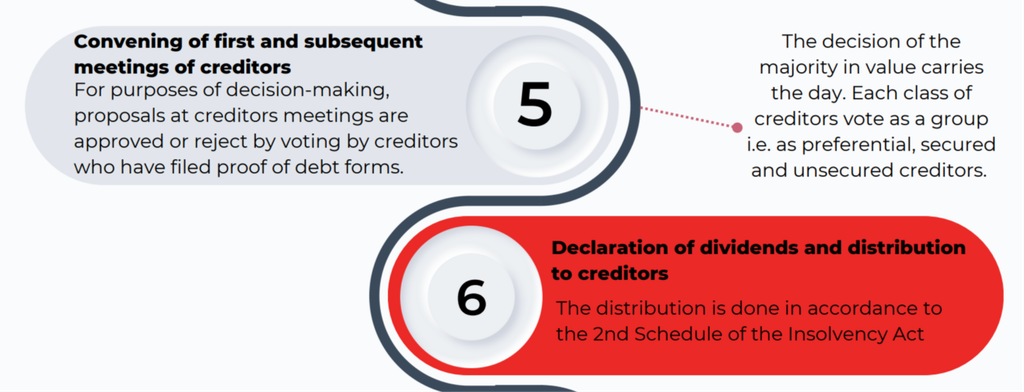
Convening meetings of creditors where required.
Distributing available funds according to statutory priorities.
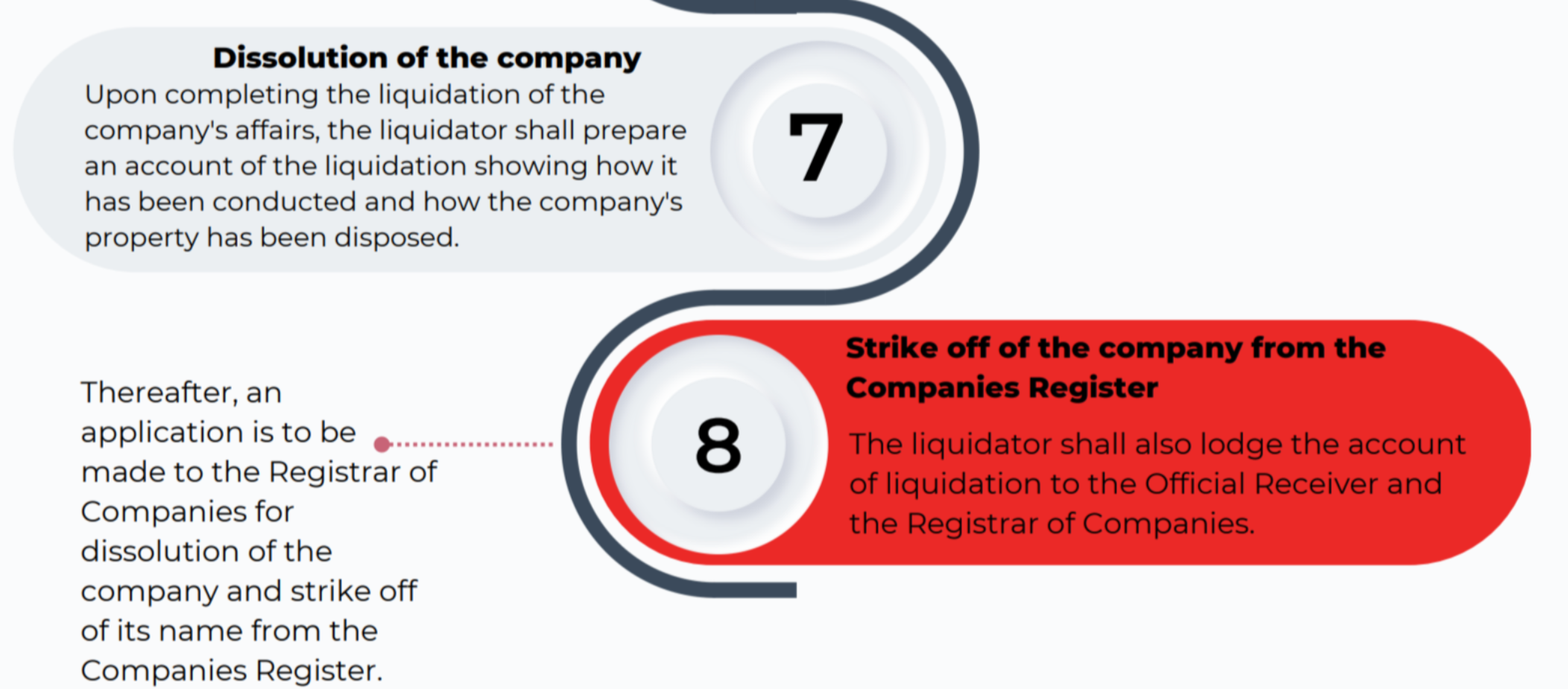
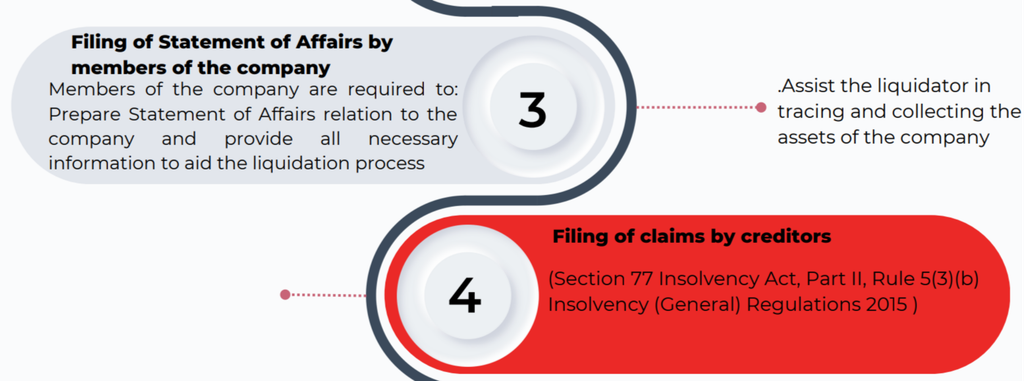
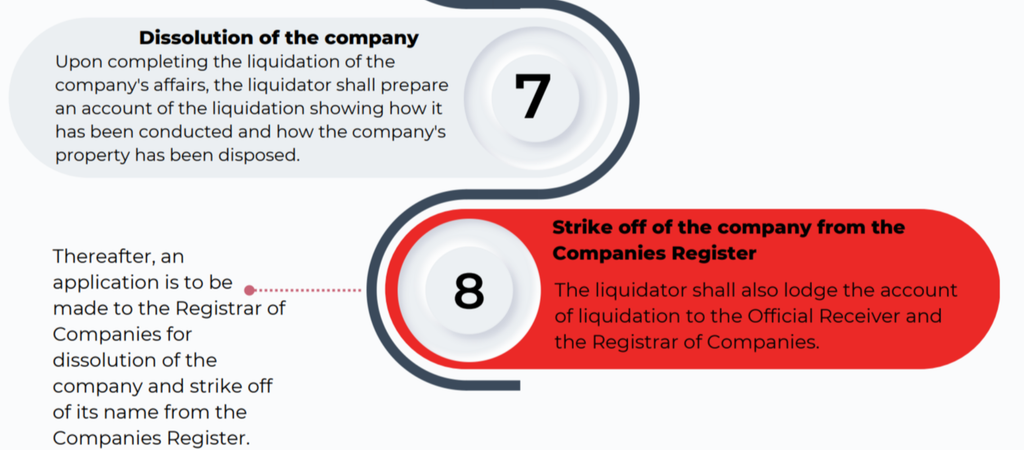
Preparing an account of the liquidation.
Filing the required notices, accounts, and reports with the relevant authorities.
Applying for the company’s formal dissolution when the process is complete.
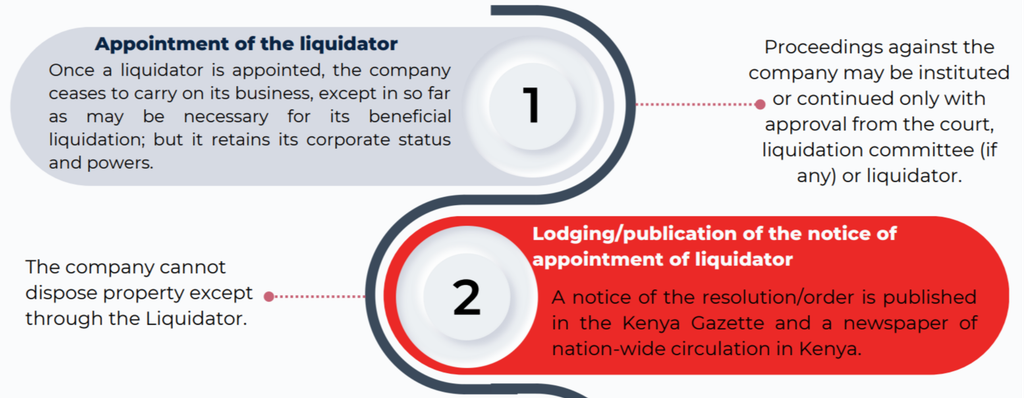
Once the liquidator is appointed, the company generally cannot dispose of its property independently of the liquidation process. Any continuation of business must be consistent with the purpose of beneficial liquidation and the applicable legal requirements.
Company Liquidation Process: Step-by-Step Guide
The company liquidation process involves a series of legal and administrative steps. The exact procedure depends on whether the liquidation is voluntary or court-ordered and on the company’s particular circumstances.
Liquidation begins when the legally required liquidation resolution is passed or a court issues a liquidation order.
For voluntary liquidation, the relevant company decision-making procedures must be followed. For court-ordered liquidation, the process generally involves presenting a liquidation petition and obtaining the appropriate court order.
The commencement date is important because it determines when various statutory obligations and procedural requirements take effect.
Step 2: Lodging and Publication of the Liquidator’s Appointment
Following commencement, the required notice of appointment of the liquidator must be lodged with the relevant authorities.
The Business Registration Service’s step-by-step guide identifies the Official Receiver and the Registrar of Companies as recipients of the appointment notice. It also describes publication of the relevant resolution or order in the Kenya Gazette and a newspaper of nationwide circulation, as applicable.
The guide states that the appointment notice should be lodged within seven days of commencement of the proceedings. The applicable filing deadlines and publication requirements should be confirmed for the particular liquidation.
These notices help inform creditors, stakeholders, and members of the public that the company is undergoing liquidation.
Step 2: Lodging and Publication of the Liquidator’s Appointment (Company Liquidation in Kenya: A Step-by-Step Guide)
Step 3: Preparation and Filing of the Statement of Affairs
The company’s members and other relevant persons may be required to prepare a Statement of Affairs containing information about the company’s financial position.
The document generally identifies the company’s assets, liabilities, creditors, and other relevant financial information. It assists the liquidator in understanding the company’s affairs and determining what resources are available to meet outstanding obligations.
Directors and other persons with relevant knowledge should cooperate by providing accurate records, financial statements, contracts, and supporting documents.
Incomplete or inaccurate information can delay the process and complicate the assessment of creditor claims.
Step 4: Filing of Claims by Creditors
Creditors must submit their claims in accordance with the applicable insolvency rules and any instructions issued during the liquidation.
The claims process allows the liquidator to examine the amounts owed, assess supporting evidence, and determine which claims can be admitted for distribution purposes.
Creditors may need to provide invoices, loan agreements, contracts, account statements, judgments, or other evidence supporting their claims.
Under the Insolvency Act and the relevant regulations, proof-of-debt procedures help establish the liabilities to be addressed during liquidation. Creditors should comply with any applicable deadlines and evidentiary requirements.
Step 4: Filing of Claims by Creditors (Company Liquidation in Kenya: A Step-by-Step Guide)
Step 5: Convening Meetings of Creditors
The liquidator may convene the first and subsequent meetings of creditors where required by the applicable procedure.
These meetings provide an opportunity to consider the company’s financial position, review relevant proposals, and make decisions on matters reserved for creditors.
The Business Registration Service guide explains that proposals are decided through voting by creditors who have filed proof-of-debt forms. Voting rights and outcomes depend on the applicable statutory rules, including any relevant creditor classification requirements.
Creditors should review the information provided before participating in decisions that affect the liquidation.
Step 6: Realisation of Company Assets
Company assets must be identified, secured, collected, and realised as necessary to meet the company’s liabilities.
The process may involve selling property, recovering outstanding debts, collecting money held in bank accounts, and dealing with other assets belonging to the company.
The liquidator is responsible for administering these assets in accordance with the law. Directors and other relevant persons should not independently transfer or dispose of company property outside the authorised process.
Proper documentation of asset valuations, sales, recoveries, and expenses helps maintain transparency and accountability.
Step 7: Declaration of Dividends and Distribution to Creditors
After assessing creditor claims and determining the funds available for distribution, the liquidator distributes the proceeds in accordance with the applicable statutory priorities.
The Insolvency Act provides rules governing the treatment of different categories of claims. Depending on the circumstances, these may include secured claims, preferential debts, and unsecured claims.
The Business Registration Service guide refers to the Second Schedule of the Insolvency Act in explaining distributions.
Creditors should not assume that all claims will be paid in full. The amount received depends on the assets realised, the costs of the liquidation, the nature and priority of each claim, and the funds available.
Step 7: Declaration of Dividends and Distribution to Creditors (Company Liquidation in Kenya: A Step-by-Step Guide)
Step 8: Preparation and Filing of the Liquidation Account
Once the company’s affairs have been dealt with, the liquidator prepares an account showing how the liquidation was conducted and how the company’s property was disposed of.
The account provides a record of the assets realised, liabilities addressed, expenses incurred, and distributions made.
The liquidator must lodge the required liquidation account and other documents with the relevant authorities, including the Official Receiver and the Registrar of Companies, as required by the applicable procedure.
This stage establishes an account of the liquidator’s work and supports the formal conclusion of the process.
Step 9: Company Dissolution and Strike-Off (Company Liquidation in Kenya: A Step-by-Step Guide)
Step 9: Company Dissolution and Strike-Off
After completing the liquidation and satisfying the applicable requirements, an application is made for the company’s dissolution and removal of its name from the Companies Register.
The precise filing procedure depends on the applicable legislation and the circumstances of the liquidation. Relevant records and filing requirements can be checked through the Business Registration Service website.
Dissolution marks the formal legal conclusion of the company’s existence. It should not be confused with merely ceasing business operations or submitting an ordinary company deregistration application.
The company’s records and liquidation documents should be retained in accordance with the relevant legal and regulatory requirements.
Liquidation Legal Requirements in Kenya
Compliance with liquidation legal requirements is essential to ensure that the process is conducted properly and that the interests of creditors, shareholders, and other stakeholders are addressed.
The principal legal framework includes the Insolvency Act, 2015, together with applicable regulations and relevant provisions of Kenyan company law.
Corporate Resolutions and Court Orders
Depending on the type of liquidation, the process may require a shareholder special resolution, a creditors’ decision, or a court order.
For members’ voluntary liquidation, the company must follow the prescribed procedures for approving liquidation and appointing a liquidator.
For court-ordered liquidation, the relevant petition, court proceedings, and resulting orders must be complied with.
Financial Records and Disclosure
The company must provide the information required for the liquidation, including relevant financial records and details of its assets and liabilities.
Company financial statements, accounting records, creditor information, and supporting documents may be needed to establish the company’s financial position and facilitate the liquidator’s work.
Directors and other relevant persons should avoid withholding records or providing misleading information.
Liquidation proceedings operate for the benefit of creditors collectively, subject to the applicable legal framework.
Creditors must submit claims through the prescribed process, while the liquidator assesses those claims and administers distributions according to statutory priorities.
Legal restrictions may also apply to proceedings against the company once liquidation has commenced. Depending on the circumstances, court, liquidator, or liquidation committee approval may be necessary before certain proceedings can be instituted or continued.
Tax and Regulatory Obligations
Liquidation does not automatically eliminate outstanding tax obligations or other regulatory responsibilities.
The company and liquidator should identify outstanding taxes, filing obligations, and any required clearances. A tax clearance certificate may be relevant in certain administrative or tax-related circumstances, but it should not be assumed to be a universal prerequisite for every form of liquidation.
The applicable requirements should be confirmed with the relevant tax and company registration authorities.
Company Liquidation vs. Company Deregistration in Kenya
Company liquidation and company deregistration are related but distinct procedures.
Liquidation involves administering the company’s assets and liabilities, dealing with creditor claims, and distributing available funds under the applicable legal framework.
Deregistration or strike-off generally concerns removing a company’s name from the Companies Register through the appropriate statutory procedure. It may be available in circumstances where a company qualifies for administrative removal without requiring a full liquidation.
A company with unresolved debts, disputed liabilities, or other circumstances requiring formal insolvency proceedings may need a liquidation procedure rather than an ordinary strike-off.
When Is Liquidation Appropriate?
Liquidation may be appropriate when the company’s affairs require a formal process for collecting assets, resolving creditor claims, and distributing available funds.
It may also be necessary where insolvency proceedings have been initiated or a court has issued the relevant order.
When Is Company Strike-Off Appropriate?
Company strike-off may be suitable for a company that qualifies under the applicable legal requirements and can use the relevant administrative process.
However, strike-off should not be treated as a substitute for addressing outstanding debts or complying with legal obligations. Directors should confirm that the company is eligible before pursuing this route.
Common Challenges During the Liquidation Process
Liquidation can become complicated when a company has incomplete records, disputed debts, insufficient assets, or competing creditor claims.
Common challenges include:
Missing or inaccurate accounting records.
Disputes concerning ownership or valuation of assets.
Failure by creditors to provide adequate proof of debt.
Delays in selling assets or recovering outstanding receivables.
Disagreements about creditor priorities and distributions.
Outstanding tax or regulatory obligations.
Failure to submit notices, reports, or other required documents on time.
These issues can increase costs and extend the time required to complete the liquidation.
Companies can reduce avoidable delays by maintaining proper records, cooperating with the liquidator, identifying creditors early, and obtaining appropriate professional advice. Businesses considering restructuring rather than immediate liquidation may also wish to review the company administration process in Kenya.
How Long Does Company Liquidation Take in Kenya?
There is no single timeline that applies to every company liquidation in Kenya.
The duration depends on factors such as the company’s financial complexity, the number of creditors, the value and liquidity of its assets, the existence of disputes, and whether court proceedings are involved.
A company with straightforward affairs and readily realisable assets may be easier to wind up than one with complex financial arrangements, ongoing litigation, or disputed ownership of property.
Timely submission of creditor claims, accurate financial disclosure, and compliance with filing requirements can help reduce unnecessary delays. However, the liquidation should not be considered complete until the applicable statutory procedures have been satisfied.
Frequently Asked Questions
1. What are the main steps in company liquidation in Kenya?
The main steps generally include commencing liquidation proceedings, appointing a liquidator, lodging and publishing the required notices, preparing a Statement of Affairs, receiving creditor claims, convening meetings where required, realising assets, distributing funds, filing the liquidation account, and applying for dissolution and removal from the Companies Register.
2. Who can appoint a liquidator in Kenya?
The appointment depends on the type of liquidation. Shareholders may appoint a liquidator through the appropriate voluntary liquidation procedure, creditors may participate in the appointment process for creditors’ voluntary liquidation, and the High Court may appoint or remove a liquidator in accordance with the law.
3. Can a company be deregistered without liquidation in Kenya?
Yes, a company may qualify for a strike-off or other dissolution procedure without undergoing a full liquidation. However, eligibility depends on the applicable legal requirements and the company’s circumstances. Companies with unresolved liabilities or insolvency issues should obtain appropriate advice before pursuing deregistration.
Company Administration Process in Kenya: A Complete Step-by-Step Guide
Learn the company administration process in Kenya under the Insolvency Act 2015, including administrator appointment, creditor rights, administration steps, timelines, and alternatives to liquidation.
The company administration process in Kenya is a legal procedure designed to help financially distressed companies restructure their operations, protect their assets, and explore alternatives to liquidation. Governed by the Insolvency Act, 2015, company administration provides a framework for rescuing struggling businesses, improving outcomes for creditors, and preserving business value where possible.
Understanding the company administration procedure is essential for directors, creditors, shareholders, and business owners facing financial challenges. This guide explains the objectives of administration, the appointment and responsibilities of an administrator, the key administration process steps, applicable legal protections, time limits, and possible outcomes under Kenyan insolvency law. For additional business compliance information, explore our business registration and compliance guides.
What Is the Company Administration Process?
Company administration is a formal insolvency procedure in which a qualified insolvency practitioner or the Official Receiver takes responsibility for managing a company’s affairs, business, and property.
The primary aim is to determine whether the company can continue operating as a going concern, be restructured into a viable business, or be sold in a way that preserves its value. Where business rescue is not achievable, administration may help secure a better financial outcome for creditors than immediate liquidation.
In Kenya, the process is governed by the Insolvency Act, 2015, particularly Part VIII, which establishes the legal framework for company administration. The official Business Registration Service website provides access to government information and business registration resources.
Objectives of Company Administration
The company administration process has three principal objectives:
Maintaining business continuity: Keeping the company operational where possible and giving it an opportunity to recover from financial difficulties.
Achieving better outcomes for creditors: Securing a more favourable return for creditors as a whole than would likely be available through immediate liquidation.
Realising company assets: Selling or otherwise realising company property to facilitate distributions to secured and preferential creditors in accordance with applicable law.
The administrator considers these objectives within the statutory framework and the circumstances of the company. Administration does not guarantee that the business will survive, but it provides a structured opportunity to pursue the most appropriate outcome.
Who Can Appoint an Administrator in Kenya?
The appointment of an administrator is a central stage in the company insolvency process. Under the applicable legal framework, an administrator may be appointed through the following routes.
1. Court Appointment
A court may appoint an administrator where the relevant statutory requirements are satisfied. This route is known as court order administration and may be used when judicial intervention is necessary to address a company’s financial position or protect the interests of relevant stakeholders.
The court considers the applicable legal requirements and the circumstances of the application before making an order.
2. Appointment by a Qualifying Floating Charge Holder
A holder of a qualifying floating charge may be entitled to appoint an administrator if the relevant conditions under the Insolvency Act are met.
A floating charge generally covers a changing pool of company assets. The appointment mechanism can enable a qualifying secured creditor to protect its security interests and support an orderly administration process. Businesses and creditors dealing with secured interests may also consult the Kenyan collateral registry user manual for relevant information about movable property security registration.
3. Appointment by the Company or Its Directors
A company or its directors may initiate administration when the business faces financial difficulties and the statutory requirements for appointment are satisfied.
Early consideration of administration can help directors assess whether restructuring is possible before the company’s financial position deteriorates further. Directors should obtain appropriate legal and insolvency advice to determine the correct procedure and comply with their obligations.
Who Is Qualified to Act as an Administrator?
An administrator must be a licensed insolvency practitioner or the Official Receiver of the Republic of Kenya, as provided for under the applicable legal framework.
The administrator must exercise the powers and perform the duties prescribed by law, taking account of the company’s circumstances and the interests of creditors.
Step-by-Step Company Administration Procedure
The company administration procedure involves several stages, from the appointment of the administrator to the preparation of proposals, creditor consideration, implementation, and eventual termination.
The process begins with a valid appointment through the appropriate legal route.
Once appointed, the administrator assumes responsibility for managing the company’s affairs, business, and property within the scope of the Insolvency Act.
The administrator must also issue the required appointment notices to the company, known creditors, and the Registrar. Publication of the appointment notice must be undertaken in the applicable local newspaper or the Kenya Gazette, as required by law.
Step 2: Obtain the Company’s Statement of Affairs
The administrator may request a statement of affairs from the relevant person, setting out the company’s financial position.
The statement helps establish the company’s assets, liabilities, creditors, and other information needed to assess its prospects.
Under the procedure outlined by the Business Registration Service, the relevant statement of affairs is provided within 12 days of the request. The applicable statutory requirements and circumstances should be checked when determining the precise deadline.
This information helps the administrator understand the extent of the company’s financial difficulties and evaluate the available restructuring options. Where company records are required for verification, the relevant procedure for obtaining certified copies of records from the BRS may also be useful.
Step 3: Develop a Company Continuity Proposal
After assessing the company’s position, the administrator prepares a statement of proposals explaining how the objectives of administration may be achieved.
A company continuity proposal may include measures intended to preserve the business as a going concern, restructure its liabilities, improve operational efficiency, or arrange a sale of the business or its assets.
Depending on the circumstances, the proposals may include:
A voluntary arrangement with creditors.
A compromise or arrangement under the Companies Act.
Operational restructuring to improve business viability.
Measures to realise assets and distribute proceeds where appropriate.
If the administrator concludes that the purpose of administration cannot be achieved, the proposals should explain the reasons for that conclusion and identify the appropriate next steps.
Step 4: Circulate the Proposals to Relevant Parties
The administrator sends the statement of proposals to known creditors, company members, and the Registrar for registration, as required by the applicable procedure.
Circulating the proposals gives relevant stakeholders an opportunity to understand the intended approach and consider its implications.
The proposals must respect applicable legal protections. In particular, the administrator’s statement of proposals should not include actions that improperly affect the rights of secured creditors or the rights attached to preferential debts.
Step 5: Follow the Creditors Meeting Procedure
The proposals are presented to creditors for consideration where a meeting is required.
During the creditors meeting procedure, creditors may approve the proposals without changes or approve them with modifications to which the administrator consents.
The administrator must consider the applicable statutory rules when convening and conducting the meeting and recording the outcome.
A creditors’ meeting may not be necessary in certain circumstances, including where the company has sufficient property to pay every creditor or where the objectives of administration cannot be achieved, subject to the applicable legal requirements.
Step 6: Report the Creditors’ Decision
Following the consideration of the proposals, the administrator reports the relevant decision to the court and lodges a copy with the Registrar as required.
Where modifications have been approved and accepted by the administrator, the revised proposals must be handled in accordance with the applicable procedure.
If the administrator believes a proposed revision is substantial, the statement of proposals may be revised and submitted for consideration under the relevant statutory requirements.
Step 7: Implement the Approved Proposals
Once the relevant proposals have been approved, the administrator proceeds with the measures necessary to achieve the purpose of administration.
These measures may include restructuring operations, negotiating arrangements with creditors, selling assets, or facilitating the sale of the business.
The precise actions depend on the company’s financial position, the approved proposals, applicable legal protections, and the administrator’s statutory powers.
If the proposals are not approved, whether in their original form or with acceptable modifications, the court may make an order terminating the administrator’s appointment in accordance with the applicable legal framework.
Effects of an Administration Order on a Company
An administration order has significant legal consequences for the company, its directors, and its creditors.
Protection Against Certain Legal Proceedings
The administration framework provides a moratorium during the administration period. Under the applicable statutory conditions, this restricts certain legal actions and enforcement measures against the company or its property unless the required consent or court permission is obtained.
The purpose is to give the administrator an opportunity to assess the business, preserve its value, and pursue an appropriate restructuring or realisation strategy without the process being undermined by individual enforcement actions.
Suspension of Liquidation Applications
Under the administration framework described by the Business Registration Service, an application for liquidation generally cannot be made while the administration order is in effect, and a pending liquidation application is suspended, subject to applicable law.
This protection supports the administration process by providing time to evaluate alternatives to immediate liquidation.
Protection of Company Assets
The administrator assumes control of the company’s property and affairs in accordance with the law. This helps preserve and manage assets while the administrator determines the most appropriate course of action.
The moratorium and asset-control arrangements are not unlimited. Secured creditor rights, court powers, statutory exceptions, and other applicable legal provisions must still be considered.
Functions and Powers of the Administrator
The Insolvency Act, 2015, sets out the administrator’s functions and powers, including those described in the Act’s Fourth Schedule.
These powers allow the administrator to manage the company effectively while pursuing the objectives of administration.
Taking Control of Company Affairs and Property
The administrator assumes control of the company’s affairs and property and takes the steps necessary to manage its business within the legal framework.
This may involve reviewing financial records, evaluating business operations, identifying liabilities, and protecting assets from unnecessary loss.
Convening Meetings
The administrator may convene meetings of company members and creditors where appropriate.
These meetings provide a formal mechanism for communicating proposals, obtaining decisions, and addressing matters arising during administration.
Appointing or Removing Directors
The administrator may have the power to remove a director from office or appoint a director, subject to the applicable legal requirements.
This power may be relevant when changes in management are necessary to support effective restructuring or protect the company’s interests.
Managing and Disposing of Assets
The administrator may take action to manage company property, dispose of assets subject to a floating charge, and deal with goods held by the company under credit-purchase arrangements where legally permitted.
Asset realisation must be conducted in accordance with the administrator’s powers, relevant security rights, and statutory requirements.
Distributing Proceeds to Creditors
Where appropriate, the administrator may distribute company assets or their proceeds to creditors according to the applicable statutory priorities and legal requirements.
The distribution process must take account of secured interests, preferential debts, and other relevant creditor entitlements.
Company Directors’ Responsibilities During Administration
Company directors’ responsibilities remain an important consideration when a business enters administration.
Although the administrator assumes control of the company’s affairs within the scope of the appointment, directors should ensure that they cooperate with the process and comply with their continuing legal obligations.
Providing Accurate Financial Information
Directors and other relevant officers may need to provide the administrator with financial records, details of company assets, information about liabilities, and other documents necessary to establish the company’s position.
Accurate and complete information helps the administrator assess restructuring options and develop realistic proposals.
Cooperating With the Administrator
Directors should respond appropriately to lawful requests, provide access to relevant company information, and avoid obstructing the administration process.
They should also seek professional advice about their continuing duties and any restrictions applicable to their role.
Avoiding Unauthorised Transactions
Transactions involving company assets or business operations should be handled in accordance with the administrator’s authority and the applicable legal framework.
Directors should not assume they retain unrestricted control over the company once an administrator has been appointed.
How Long Does the Company Administration Process Take?
Under the procedure described by the Business Registration Service, an administrator’s appointment ordinarily ends at the end of 12 months, including the date on which the appointment took effect, subject to the applicable statutory rules.
An extension may be soughtthrough a court application for a period not exceeding six months under the framework described in the guidance.
The actual duration may depend on the complexity of the company’s financial affairs, the number of creditors, the nature of its assets, the feasibility of restructuring, and the progress made towards achieving the objectives of administration.
Companies with complicated liabilities or difficult asset-sale arrangements may require more time to resolve outstanding issues.
Because statutory time limits and extension requirements can depend on the circumstances and applicable law, parties should confirm the current requirements before relying on a specific deadline.
Company Administration Exit Routes
The company administration exit routes depend on whether the administrator achieves the objectives of administration and what outcome is legally appropriate.
Successful Business Rescue
If the purpose of administration is achieved, the administrator takes the required steps to conclude the process and return the company to its directors where appropriate.
The company may then continue operating under its normal management, subject to any applicable arrangements or continuing legal obligations.
Restructuring or Compromise With Creditors
A company may emerge from administration following the implementation of a voluntary arrangement, compromise, or other restructuring arrangement permitted by law.
Such arrangements may help the company address its liabilities and continue trading, provided the relevant requirements are met.
Sale of the Business or Its Assets
Where continued operation under the existing ownership or structure is not viable, a sale may preserve some or all of the business’s economic value.
The proceeds may then be applied in accordance with applicable legal requirements and creditor entitlements.
Conversion to Liquidation
If the objectives of administration cannot be achieved, liquidation may become the appropriate next step.
Although administration is one of the principal liquidation alternatives in Kenya, it does not eliminate the possibility of liquidation. Instead, it provides an opportunity to evaluate rescue, restructuring, and asset-realisation options before proceeding to the relevant alternative.
The court may terminate an administrator’s appointment in circumstances permitted by law. For example, a creditor may apply for termination where there are allegations of improper motives, subject to the court’s assessment and applicable legal requirements.
Administration may also be terminated where the statutory purpose has been sufficiently achieved or where another legally recognised circumstance justifies termination.
When Does an Administrator’s Appointment End?
The termination of administration and the termination of an individual administrator’s appointment are related but distinct matters.
The administration process may end when its objectives have been achieved, when a court orders termination, or when another applicable statutory ground arises.
An individual administrator’s appointment may also end because of resignation, death, loss of the required professional status, or a court decision that the administrator should no longer remain in office.
The applicable procedures must be followed to ensure that the relevant parties and authorities receive the required notices and documents.
Once the appointment ends, the administrator’s discharge from liability for acts done or omitted in the role is governed by the applicable law and should not be interpreted as automatic immunity from every possible claim.
Dissolution of a Company Under Administration
Dissolution may arise where the administrator concludes that the company has no property that could support a distribution to creditors.
Under the procedure outlined in the Business Registration Service guidance, the administrator lodges a notice of this position with the court, the Registrar, and each known creditor.
The company is then dissolved at the end of three months, subject to the applicable statutory conditions and any relevant legal requirements.
This procedure differs from a successful company rescue. It addresses circumstances in which the available assets are insufficient to support a distribution and continued administration is not considered appropriate.
Company Administration vs Company Liquidation Process
Company administration and the company liquidation process are both insolvency-related procedures, but they serve different purposes.
Feature
Company Administration
Company Liquidation
Primary purpose
To pursue business rescue, a better outcome for creditors, or appropriate asset realisation
To wind up the company and realise its assets for distribution
Management
An administrator assumes control within the statutory framework
A liquidator manages the winding-up process
Business continuity
May allow the company to continue trading or be sold as a going concern
Generally focuses on winding up the company’s affairs
Creditor interests
Seeks the statutory objectives of administration, including a potentially better outcome for creditors
Distributes available assets according to applicable priorities and legal requirements
Potential outcome
Restructuring, business sale, return to directors, or another lawful exit
Completion of winding up and eventual dissolution where applicable
The appropriate procedure depends on the company’s financial position, the prospects for rescue, creditor interests, and the relevant statutory requirements. Administration should not be assumed to be preferable in every case, particularly where the business has no realistic prospect of achieving its objectives.
Insolvency Law Kenya: Legal Framework and Compliance
The Insolvency Act, 2015, provides the principal statutory framework for company administration in Kenya. Part VIII addresses administration, while the Act’s relevant schedules set out additional provisions concerning the administrator’s functions and powers.
The Companies Act may also be relevant where an administration proposal involves a compromise or arrangement requiring action under that legislation.
The Business Registration Service provides official guidance on the administration process and related company procedures. Businesses, directors, and creditors should consult the current legislation and official guidance when making decisions because statutory requirements, procedural rules, and legal interpretations may change.
For complex cases, professional advice from a qualified Kenyan insolvency practitioner or an advocate familiar with insolvency law can help clarify appointment requirements, creditor rights, deadlines, and potential outcomes.
Company Administration Process in Kenya: A Complete Step-by-Step Guide
Frequently Asked Questions
1. What is the main purpose of company administration in Kenya?
The main purpose is to keep a company operating as a going concern where possible, achieve a better outcome for creditors than immediate liquidation would likely provide, or realise company assets for distribution to eligible creditors. The appropriate objective depends on the company’s circumstances and the statutory framework.
2. How long does company administration take in Kenya?
An administrator’s appointment ordinarily ends after 12 months under the procedure described in the Business Registration Service guidance. A court extension of up to six months may be available under the applicable framework. The exact duration and extension requirements should be verified against current legislation.
3. Can a company return to normal operations after administration?
Yes. If the objectives of administration are achieved, the administrator may conclude the process and return the company to its directors where appropriate. Other outcomes may include a restructuring arrangement, a business sale, or liquidation if rescue is not feasible.
Additional relevant resources
For related business registration and insolvency procedures, see these guides:
How to Submit, Download and Access a Certified Copy of Records on BRS eCitizen in Kenya: Step by Step Guide
Learn how to apply for, submit, download and access a certified copy of records through the BRS eCitizen portal, including application tracking, payment, corrections and password-protected company documents.
Obtaining a certified copy of company records in Kenya is an important process for businesses, directors, shareholders, and other applicants who need official company documents for legal, financial, or administrative purposes. The Business Registration Service (BRS) provides an online process through the eCitizen platform that allows applicants to request, pay for, and download certified company records.
This guide explains how to apply for a certified copy of records, track an application, complete payment, download certified documents, and access password-protected files using the BRS eCitizen portal.
What Is a Certified Copy of Records?
A certified copy of records is an official copy of company information or documents issued through the relevant company registry process. These records may be required when dealing with government agencies, financial institutions, legal representatives, or other organisations that request verified company documentation.
The Business Registration Service Kenya provides access to company registry services through its online platform, allowing applicants to request available records without necessarily visiting a physical office. For additional business registration information and guidance, applicants can consult the Business Registration Service website.
Depending on the company’s registry file and the documents available, applicants can request relevant company registration documents and other records maintained by the Registrar of Companies. You can also review the official list of entities registered by BRS to understand the types of entities covered by its registration services.
Why Do You Need Certified Company Documents?
Certified company documents may be required for several purposes, including:
Opening or maintaining a business bank account.
Completing due diligence checks.
Supporting legal or regulatory procedures.
Verifying company registration information.
Submitting documents to government institutions.
Confirming company details for commercial transactions.
Applicants should identify the specific documents required before starting the application to reduce the likelihood of corrections or delays. For more business-related guidance, explore the Start a Business in Africa blog.
Requirements for Applying Through the BRS eCitizen Portal
Before beginning the application, ensure you have access to the BRS Version 2 platform and the information needed to identify the company.
The main requirements include:
Access to an eCitizen account.
The company’s registered name or registration number.
Details of the specific records being requested.
The applicant’s personal information.
A valid phone number for application notifications.
A payment method accepted by the portal.
You should also have a clear understanding of the purpose of your request so that you can provide an appropriate explanation in the application comment box. Where necessary, consult the official BRS forms page for relevant registry forms and documentation.
Step-by-Step Guide to Apply for a Certified Copy of Records
Log in using your eCitizen account credentials. Ensure that you are accessing the official portal before entering personal information or making payments.
Step 2: Select Companies Registry Services
After logging in, locate and select Companies Registry Services.
This section provides access to services relating to company registration, registry records, and other company-related applications.
Step 2: Select Companies Registry Services (How to Submit, Download and Access a Certified Copy of Records on BRS eCitizen in Kenya: Step by Step Guide)
Step 3: Choose Certified Copy of Records
Under the available services, select Certified Copy of Records.
Click Apply to proceed to the application form.
Check that you have selected the correct service before continuing, particularly if you need a certified copy of a specific company document rather than another registry service.
Under the available services, select Certified Copy of Records. (How to Submit, Download and Access a Certified Copy of Records on BRS eCitizen in Kenya: Step by Step Guide)
Step 4: Search for the Company
Choose the appropriate search criterion. You can search using either:
The registered company name.
The company’s registration number.
Enter the relevant information and perform the search.
When the correct company appears in the search results, select it to continue.
Using the correct registration number can help you identify the intended company, especially when multiple businesses have similar names.
Step 4: Search for the Company (How to Submit, Download and Access a Certified Copy of Records on BRS eCitizen in Kenya: Step by Step Guide)
Step 5: Select the Required Documents
After selecting the company, choose the documents you want to obtain.
Review the available options carefully and select only the records required for your purpose. Availability may depend on the company’s registry file.
Provide a brief explanation in the comment box describing the purpose or nature of your request.
Next, enter the applicant’s information and click Preview to review the application.
Check that the company details, selected documents, comments, and applicant information are accurate before proceeding.
Step 6: Submit the Application and Pay the Assessed Fee
After completing the application, submit it for assessment.
You will receive an SMS notification requesting you to log in and pay the assessed fee when payment is required.
To locate the application:
Log in to the BRS eCitizen portal.
Open Application History.
Find the relevant application.
Click Pay.
Follow the payment instructions displayed on the portal.
The applicable fee should be confirmed through the official Companies Registry fee schedule. Do not assume that all document requests have the same charges.
Keep your payment receipt and application reference number for future tracking.
Step 7: Respond to Corrections if Necessary
The registry may issue a correction if the requested documents are unavailable or if further action is required.
Read the correction carefully and determine what needs to be changed before resubmitting the application.
Important: If the requested records cannot be located, resubmitting the same application without making the required amendments may result in rejection with a message stating that the file cannot be found.
Review the correction instructions and update the application appropriately rather than repeatedly submitting unchanged information.
Step 8: Track the Application Status
After submitting the application and completing the required payment, monitor its progress through the portal.
To check the status:
Log in to your eCitizen account.
Select Companies Registry Services.
Open Application History.
Locate the application using its reference number.
Check the current status and any instructions provided.
Step 8: Track the Application Status (How to Submit, Download and Access a Certified Copy of Records on BRS eCitizen in Kenya: Step by Step Guide)
Processing times may vary depending on the application and the availability of the requested records. Allow time for the registry to assess and process your request.
How to Download a Certified Copy of Records
Once the application has been processed, you can retrieve the certified document through the application history section. For further instructions on downloading certificates and other records, see this guide to downloading company documents on BRS Version 2.
Step 1: Open Application History
Log in to the BRS eCitizen portal and select Companies Registry Services.
Navigate to Application History to view your submitted applications.
Step 2: Find the Application Reference Number
Locate the relevant application and confirm its reference number.
Select the corresponding View option to open the application details and access the processed documents.
Step 3: Download the Certified Document
When the document is available, click the Download button.
Save the file to a secure location on your device. Open it to confirm that the document is accessible and that it corresponds to the company and records you requested.
This process enables company records download directly through the online registry service, subject to the application’s successful processing.
Step 4: Download the Payment Receipt
Your payment receipt should also be available within the relevant application details.
Download and retain the receipt as evidence of payment. It may also contain information needed to access the protected certified document.
Keeping both the receipt and the certified document together makes it easier to retrieve the records when required.
How to Open a Password-Protected Certified Document
Some certified documents downloaded from the BRS platform are password-protected. This is particularly important when submitting documents to government institutions or financial institutions.
The downloaded file may open with a forwarding letter explaining how to access the certified document.
Step 1: Open the Downloaded File
Locate the downloaded document and open it using a compatible document reader.
If a forwarding letter appears, follow the instructions provided to access the certified records.
Step 2: Scan the QR Code
The forwarding letter may contain a password-protected QR code that must be scanned to access the certified document.
Use a compatible QR code scanner and follow the instructions displayed.
Step 3: Locate the Password on the Receipt
According to the BRS guide, the password required to access the certified document can be found by checking the ID No. field on the payment receipt.
Open the receipt associated with the application and locate the relevant information.
Step 3: Locate the Password on the Receipt (How to Submit, Download and Access a Certified Copy of Records on BRS eCitizen in Kenya: Step by Step Guide)
Step 4: Enter the Password Exactly as Displayed
Enter the password in the required field, matching the characters shown on the receipt.
Check for typing errors, including incorrect characters or accidental spaces. If access fails, verify the information against the receipt and follow the instructions provided by the portal.
Step 5: Share the Document Securely
If you are submitting the certified records to a bank, government agency, or another institution, ensure that the recipient receives the information necessary to access the protected document.
Because the password may be derived from information displayed on the receipt, share it securely and only with the intended recipient.
Do not assume that forwarding the protected document alone will allow the receiving institution to open it.
Common Problems When Accessing Certified Company Records
Applicants may encounter issues when searching for company records, completing payments, or opening downloaded documents.
The Company Does Not Appear in Search Results
Confirm that the company name or registration number has been entered correctly. Check for spelling errors and verify that you have selected the appropriate search criterion.
If the company still cannot be found, consult the registry’s official support channels.
The Application Is Returned for Corrections
Review the correction notice and make the requested amendments before resubmitting the application.
If the system indicates that the file cannot be found, do not repeatedly submit the same unchanged request. Follow the correction instructions or seek assistance from the registry.
The Payment Option Is Not Available
Check the application’s current status and confirm whether an assessment has been completed. Follow any payment instructions displayed in Application History.
If payment has already been made, retain the receipt and verify the transaction status before attempting another payment.
The Downloaded Document Will Not Open
Confirm that the file has downloaded completely and that you are using a compatible document reader.
If the file is password-protected, consult the forwarding letter and payment receipt for the required access instructions.
The Receiving Institution Cannot Access the Document
Confirm that the institution has received the correct file and the necessary password or access information. Verify that the password has been entered exactly as displayed on the receipt.
If the problem continues, consult the BRS support channels for assistance.
Other Useful BRS and Company Registration Services
The BRS eCitizen portal provides access to more than certified company records. Depending on your business needs, other registry services may help you maintain accurate company information and meet regulatory requirements.
These resources address different business and regulatory procedures. Always confirm the applicable requirements with the relevant authority before submitting an application.
Best Practices for Successful Company Records Access
To make the application process more efficient, follow these practical recommendations:
Verify company details: Use the correct registered name or registration number before selecting the company.
Specify the documents required: Select the relevant records and explain the purpose of the request clearly.
Review the application: Use the preview function to identify errors before submission.
Monitor notifications: Check SMS messages and Application History for assessment, payment, and correction instructions.
Retain the receipt: Keep the payment receipt because it provides proof of payment and may contain the document access password.
Protect confidential information: Store downloaded documents securely and share passwords only with authorised recipients.
Use official channels: Access the BRS portal directly and confirm fees and procedural requirements through official guidance.
These practices can help minimise avoidable errors and make it easier to obtain and submit certified company documents.
Frequently Asked Questions
1. How do I apply for a certified copy of records in Kenya?
Log in to the BRS eCitizen portal, select Companies Registry Services, choose Certified Copy of Records, and click Apply. Search for the company, select the required documents, enter the applicant’s details, review the application, and submit it. Pay the assessed fee when instructed and monitor Application History for updates.
2. Where can I download my certified company documents?
After the application has been processed, log in to the BRS eCitizen portal and open Companies Registry Services. Select Application History, locate the relevant application using its reference number, click View, and select Download when the certified document is available.
3. Where can I find the password for a certified document?
The BRS guide instructs applicants to check the ID No. field on the payment receipt for the password needed to access the certified document. Open the forwarding letter, follow the QR code instructions where applicable, and enter the password exactly as shown on the receipt.
Step-by-Step Guide to Changing Company Particulars on the BRS Version 2 Platform in Kenya
Learn how to change company particulars in Kenya using the BRS Version 2 platform, including director appointments, share transfers, company structure updates, authorization methods, and eCitizen business registration steps.
Updating company information is an important responsibility for businesses registered in Kenya. Whether you need to appoint a director, cease a director’s appointment, transfer shares, or update company records, the Business Registration Service (BRS) provides an online process through the eCitizen platform.
The BRS Version 2 platform enables businesses to initiate company structure updates and submit applications electronically. Understanding the application process, authorization requirements, and available services can help applicants complete a company particulars amendment more efficiently. For additional guidance on business registration and compliance, explore the business registration resources and guides.
This guide explains how to access the BRS eCitizen portal, initiate a company structure update, select the appropriate authorization method, and submit changes involving directors and shareholders.
What Is the BRS Version 2 Platform?
The BRS Version 2 platform is an online system used to access company registry services through Kenya’s eCitizen infrastructure. It allows eligible applicants to initiate company structure updates and other supported changes to registered business information.
The Business Registration Service Kenya oversees business registration and company registry functions. Through its online services, applicants can access available company records and begin applications to update information where the relevant service is supported.
Common company structure changes covered by the process described in the official BRS guide include:
Appointment of a new director.
Cessation of an existing director.
Appointment of an existing shareholder as a director.
Transfer of shares to existing or new shareholders and directors.
Resignation of a beneficial owner, where the relevant option is available.
These services help companies maintain accurate records and document changes to their ownership and management structures.
Requirements for Changing Company Particulars in Kenya
Before starting the company changes application process, prepare the information and documents relevant to the proposed change.
1. An eCitizen Account
Applicants should have an active eCitizen account to access the BRS Version 2 platform. Keep your login credentials available because the system may require authentication before allowing you to proceed.
2. Company Registration Details
Identify the registered company or business you want to update. Ensure that you select the correct entity from the list associated with your account or locate it using the available business search function.
You can also consult the official BRS list of registered entities when checking information about registered business entities.
3. Appropriate Authorization
The application requires an authorization method appropriate to the proposed company change. The official BRS guide identifies three options:
Board Resolution.
General Meeting of the Company.
Gazette Notice.
The appropriate option depends on the nature of the change and the applicable legal and procedural requirements. Applicants should confirm which authorization method applies before submitting an application.
4. Supporting Information and Documents
Depending on the requested change, you may need resolution details, director information, shareholder information, or share transfer details. Prepare accurate information before proceeding to reduce the likelihood of errors or requests for clarification.
The official BRS forms page can help applicants identify relevant forms and supporting documentation where applicable.
How to Log In to the BRS Version 2 Platform
Follow these steps to access the online company registry services.
Check that you are accessing the official government platform before entering your personal information.
Step 1: Open the BRS Version 2 Website (Step-by-Step Guide to Changing Company Particulars on the BRS Version 2 Platform in Kenya)
Step 2: Select Your Login Method
On the login page, choose your preferred authentication method. The platform may offer:
Login with eCitizen.
Login with OTP.
If you select the eCitizen option, enter the requested login credentials, such as your email address or identification number and password.
Step 3: Complete OTP Authentication
If prompted to verify your identity, select the available verification option, such as email or phone, and enter the one-time password (OTP) sent to you.
An OTP is a temporary verification code used to confirm access to your account. Keep it private and do not share it with anyone.
Step 4: Open Your Personal Account
After successfully signing in and completing any required verification, select Personal Account to continue.
This takes you to the account interface where you can access the relevant business and company records associated with your account.
Step 4: Open Your Personal Account (Step-by-Step Guide to Changing Company Particulars on the BRS Version 2 Platform in Kenya)
How to Access Company Registry Services on eCitizen
Once logged in, follow the steps below to access the appropriate registry service.
Step 5: Select Company Registry Services
Choose the Company Registry Services option and click Proceed.
This opens the company registry section, where the available services can be accessed.
Step 6: Select the Company or Business
Locate the company you want to update. Depending on the available account options, you may select an individual account to view registered businesses or use the business option to search for the relevant entity.
Check the company details carefully before proceeding. Selecting the wrong entity may result in an application being initiated against an unintended company.
Step 7: Choose Maintain Company
After selecting the correct business or company, choose Maintain Company.
This option provides access to supported services for maintaining registered company information.
Step 8: Initiate a Company Structure Update
Select Company Structure Update Service and click Apply to initiate the application.
Follow the on-screen instructions and click Next when required to proceed to the applicant details and authorization stages.
How to Access Company Registry Services on eCitizen (Step-by-Step Guide to Changing Company Particulars on the BRS Version 2 Platform in Kenya)
How to Select the Authorization Method
The BRS Version 2 platform provides different authorization routes for company structure changes. Selecting the appropriate route is an important part of the application process.
Option 1: Board Resolution
Choose Board Resolution when the proposed change is supported by the appropriate board resolution under the applicable requirements.
After selecting this option and clicking Next, the system displays the available changes that can be processed through this route.
These may include:
Director appointments and cessations.
Appointment of existing shareholders as directors.
Share transfers involving new or existing directors and shareholders.
Resignation of a beneficial owner, where supported by the selected application route.
How to Select the Authorization Method (Step-by-Step Guide to Changing Company Particulars on the BRS Version 2 Platform in Kenya)
Select the relevant change and follow the instructions displayed by the system.
A board resolution for company changes should be prepared and approved in accordance with the company’s governing documents and applicable legal requirements. Do not assume that every company change can be authorized solely through a board resolution.
Option 2: General Meeting of the Company
Select General Meeting of the Company if the proposed change is being authorized through the relevant company meeting process.
After selecting this option, enter the requested details of the ordinary or special resolution, as applicable. Click Next to continue to the page where you can select the change to be processed.
Ensure that the resolution details match the company’s actual decision and supporting records. The appropriate resolution type and approval requirements depend on the proposed action and applicable law.
Option 3: Gazette Notice
Select Gazette Notice when the applicable procedure requires or permits the relevant change to be processed using this authorization route.
Click Next and follow the instructions to select the proposed change.
Before proceeding, verify that the Gazette Notice option applies to your circumstances and that you have the required supporting information. The availability of an option on the platform does not, by itself, establish that it is legally appropriate for every application.
How to Change Company Directors on BRS Version 2
The BRS Version 2 platform supports certain director appointment and cessation applications through the company structure update service.
Appoint a New Director
To appoint a new director:
Log in to the BRS Version 2 platform.
Select the company you want to update.
Open Maintain Company.
Select Company Structure Update Service and click Apply.
Choose the applicable authorization method.
Select the director appointment option.
Enter the requested details and proceed through the application.
Review the information and follow the submission instructions.
Ensure that the proposed director’s details are accurate and that the necessary company approvals and supporting documents are available.
Cease an Existing Director
If a director is leaving the company, select the relevant director cessation option when it is available under the chosen authorization route.
Enter the requested information and follow the on-screen instructions to complete the application.
Before submitting, confirm the director’s details and ensure that the cessation is supported by the appropriate company records and complies with applicable legal requirements.
Appoint an Existing Shareholder as a Director
Where an existing shareholder is being appointed as a director, select the corresponding option if it is available for the chosen authorization method.
Follow the instructions to identify the relevant shareholder and provide the required details.
An appointment should be recorded accurately so that the company’s management information reflects the approved change.
How to Transfer Company Shares on BRS Version 2
Share transfers may involve an existing shareholder, a new shareholder, an existing director, or another eligible recipient identified by the platform.
How to Transfer Company Shares on BRS Version 2 (Step-by-Step Guide to Changing Company Particulars on the BRS Version 2 Platform in Kenya)
Step 1: Select the Share Transfer Option
On the page displaying the available changes, select Share Transfer to New and Existing Directors and Shareholders.
This option is intended for supported share transfers involving the categories of recipients identified in the BRS guide.
Step 2: Enter the Required Share Transfer Details
Follow the instructions provided by the system and enter the requested information about the transfer.
Depending on the transaction, this may involve details relating to the transferor, recipient, and shares being transferred. Ensure that the information agrees with the relevant company records and transfer documentation.
Step 3: Review the Application
Check all the information before proceeding. Confirm that the intended parties and transaction details are correct.
Share transfers may also involve additional legal, tax, company approval, or documentation requirements. The online application should not be treated as a substitute for satisfying those requirements.
Step 4: Proceed With the Submission
Click Next and follow the remaining instructions displayed by the platform.
Retain any application reference, acknowledgement, or confirmation generated by the system. Check the application status through the available official channels and respond to any requests for additional information.
Selecting Multiple Company Changes
The BRS guide explains that applicants may select one or more changes on the relevant selection page, subject to the options supported by the system.
The platform may allow applicants to select up to three changes at once, depending on the available workflow.
Before proceeding, consider the following:
Select only the changes that are relevant to your application.
Confirm that the selected changes are compatible with the authorization method.
Ensure that the required supporting information is available for each change.
Review the selections before clicking Next.
If a particular combination is unavailable, follow the options presented by the system rather than attempting to bypass the application’s restrictions.
How to Update Company Information and Maintain Accurate Records
Keeping company information accurate is important for regulatory compliance, corporate governance, and business administration.
The phrase change of company particulars can refer to different types of updates. Not all changes follow the same procedure, and not every company detail is necessarily managed through the Company Structure Update Service.
Company Structure Changes
These include supported changes to directors, shareholders, and share ownership. Applicants should select the specific service that corresponds to the proposed transaction.
A change of registered office address is distinct from a director appointment or share transfer. To change a registered business address, identify the relevant address-change service and confirm its current requirements on the official BRS platform.
Change of Company Name
A company name change may require a separate application and the appropriate approvals. Applicants seeking a company name change in Kenya should use the applicable official service rather than assuming that the director and shareholder structure update process will change the registered name.
Change of Nature of Business
A change in the nature of business may also require a separate procedure, depending on the company’s registration details and the nature of the proposed change. Confirm which service is available and whether supporting documentation or additional approvals are necessary.
Company Officials and Other Particulars
Other changes, including updates to company officials or particular business registration details, should be initiated through the appropriate service within the official portal.
To update company information successfully, identify the exact record that needs changing, select the correct service, and follow the requirements applicable to that transaction.
Common Mistakes to Avoid When Changing Company Details in Kenya
Applicants can reduce delays by reviewing their applications carefully before submission.
Selecting the Wrong Company
If several companies are associated with your account, verify the company name and registration details before initiating the application.
Choosing the Wrong Authorization Method
Board resolutions, general meeting resolutions, and Gazette Notices are not interchangeable in every situation. Confirm the appropriate method before selecting an option.
Entering Incorrect Director or Shareholder Details
Errors in names, identification information, or transaction details may create inconsistencies with existing records. Review all information before proceeding.
Using an Incorrect Service
The Company Structure Update Service is intended for supported structural changes. A name change, registered office address change, or other amendment may require a different service.
Failing to Keep Application Records
Retain relevant resolutions, supporting documents, application references, and submission confirmations. These records can help when tracking an application or responding to a request for clarification.
For current instructions, service requirements, and guidance on the company changes application process, consult the official Business Registration Service website.
The BRS guide lists 011 112 7000 as a contact number for further information. Confirm the current contact details on the official website if you need assistance.
Because online services and administrative requirements can change, always follow the latest instructions displayed by the official platform and consult a qualified legal professional when a proposed change raises questions about company law or shareholder rights.
Frequently Asked Questions
1. How do I change company particulars on the BRS Version 2 platform?
Log in through the BRS Version 2 eCitizen portal, select Company Registry Services, choose the relevant company, open Maintain Company, and select Company Structure Update Service. Click Apply, choose the appropriate authorization method, and follow the instructions for the proposed change.
2. Which authorization methods are available for company structure updates?
The BRS guide identifies three options: Board Resolution, General Meeting of the Company, and Gazette Notice. The appropriate method depends on the nature of the proposed change and the applicable legal and procedural requirements.
3. Can I change directors and transfer shares through BRS Version 2?
The platform supports specified director appointments, director cessations, appointments of existing shareholders as directors, and share transfers involving eligible new or existing shareholders and directors. Available options depend on the authorization route and the current application workflow.
BRS Consent Process in Kenya: A Step-by-Step Guide to Giving Consent Using OTP
Learn how to complete the BRS consent process in Kenya using OTP verification, approve director appointments, confirm share transfers, resolve eCitizen consent issues, and manage company changes through the Business Registration Service portal.
The Business Registration Service (BRS) in Kenya uses an online consent process to verify and approve certain company-related transactions, including director appointments, director resignations, and share transfers. This process helps confirm that the individuals involved are aware of and agree to the proposed changes before an application proceeds.
The BRS consent process is completed through the eCitizen platform and requires a valid account, access to the phone number or email address registered with the Registrar of Companies, and a One-Time Passcode (OTP). Applicants must review the transaction details and submit their decision accurately to ensure the application is processed correctly.
In this guide, we explain how to complete eCitizen consent approval, how to respond to an OTP request, and what to do if you approve or decline a transaction. For more practical information on business registration and company compliance, explore our business registration and company services blog.
What Is the BRS Consent Process?
The BRS consent process is an online verification procedure administered by the Business Registration Service Kenya. It allows individuals to confirm whether they agree to specific company transactions submitted through the Companies Registry.
When an application involves appointing or resigning a director or transferring shares, the relevant person may receive a consent request. The request includes details of the proposed transaction and instructions for submitting a decision.
The process uses a One-Time Passcode to help verify the authenticity of the transaction. Consent must be submitted through the designated online process, and the application may remain pending until all required parties have responded.
Transactions That Require Consent
The BRS consent process may apply to several company-related transactions, including:
Director appointment approval: Confirming agreement to a proposed appointment as a company director.
Director resignation: Verifying a resignation application involving a director.
Share transfer consent: Confirming agreement to a proposed transfer of company shares.
Company officials changes: Verifying relevant changes to the individuals holding official positions within a company.
Shareholder changes: Confirming consent where a proposed transaction affects shareholding arrangements.
The precise consent requirements depend on the transaction and the parties involved. Applicants should review the information displayed on the consent page before making a decision.
Requirements for eCitizen Consent Approval
Before starting the consent procedure, ensure that you have the necessary account access and contact details.
1. An Active eCitizen Account
You must have an eCitizen account to access the online Companies Registry services. If you do not have an account, complete the applicable account registration process before attempting to submit consent.
2. Access to Your Registered Phone Number or Email Address
The OTP and consent notification are sent using the contact details registered with the Registrar of Companies, including details provided during registration or updated subsequently.
Ensure that you can access the registered email account or phone number. If your contact details have changed, you may need to update them through the appropriate official procedure. For further information about updating company records, consult this step-by-step guide to changing particulars on BRS.
3. Ability to Receive OTP Messages
Your phone must be able to receive the required SMS messages. The official BRS guide also advises users to ensure that their phone numbers are enabled to receive promotional messages to facilitate OTP delivery.
For email notifications, check your inbox and spam or junk folders if the message does not appear immediately.
4. Company Information
You should know the company name or registration number associated with the proposed transaction. This information helps you identify the relevant company within the online BRS portal.
You can also consult the official list of entities registered by BRS to understand the types of entities handled through the registration service.
How to Give Consent Using OTP: Step-by-Step Guide
Follow these steps to complete the consent approval procedure through the BRS online system.
Log in using your eCitizen account credentials. Select whether you want the login OTP to be sent to your registered email address or phone number, then complete the login verification process.
Keep your login credentials and verification codes confidential.
Step 1: Log In to the eCitizen Platform – BRS Consent Process in Kenya: A Step-by-Step Guide to Giving Consent Using OTP
Step 2: Select Your Personal Account
After logging in, proceed to the account switcher page and select your personal account.
This allows you to access the relevant services and respond to consent requests associated with your identity.
Step 3: Open Companies Registry Services
From your dashboard, select Companies Registry Services.
The system will direct you to the Companies Registry landing page, where you can access the relevant company services.
Step 3: Open Companies Registry Services – BRS Consent Process in Kenya: A Step-by-Step Guide to Giving Consent Using OTP
Step 4: Search for the Relevant Company
Choose your search criteria. Depending on the available options, you can search using the company name or registration number.
Enter the required information carefully and identify the correct company before proceeding. Verifying the company details helps reduce the risk of responding to a request involving the wrong entity.
Step 4: Search for the Relevant Company – BRS Consent Process in Kenya: A Step-by-Step Guide to Giving Consent Using OTP
Step 5: Retrieve the Consent Notification
Retrieve the message sent to your registered phone number or email address. Open the notification and click the link provided to access the consent page.
If you cannot find the email, check your spam or junk folder. If the notification was sent by SMS, review your messages and confirm that you are checking the correct registered number.
Use the official portal and verify that the request relates to the expected company transaction before continuing.
Step 5: Retrieve the Consent Notification – BRS Consent Process in Kenya: A Step-by-Step Guide to Giving Consent Using OTP
Step 6: Review the Transaction Details
The consent page displays the company details and a summary of the proposed transaction.
Read the information carefully before deciding whether to approve or decline the request.
Check the following details where applicable:
The company name and registration information.
The nature of the proposed transaction.
Whether the request relates to a director appointment, director resignation, or share transfer.
Whether you recognise and agree with the proposed change.
If you did not initiate the transaction or do not recognise the request, do not approve it without further verification.
Step 7: Enter Your Consent Decision
The BRS consent page requires you to enter one of two responses:
Approved: Select this response if you agree to the transaction.
Declined: Select this response if you do not agree to the transaction.
The response must be entered exactly as specified. According to the official guide, the system will not accept variations of these terms.
If you decline the request, you may provide additional information explaining your decision. For example, you can explain that you were unaware of the transaction or do not agree with the proposed change.
Step 7: Enter Your Consent Decision – BRS Consent Process in Kenya: A Step-by-Step Guide to Giving Consent Using OTP
Step 8: Complete One-Time Password Verification
Enter the OTP sent to your registered phone number or email address in the appropriate field on the consent page.
Check the code carefully before submitting your response. An incorrect or expired code may prevent successful verification, in which case you should follow the instructions provided by the portal.
An OTP is intended for verification and should not be shared with another person.
Step 9: Submit Your Response
Review your decision and the transaction details once more before submitting the consent.
If you select Approved, the application will be automatically approved once your consent has been recorded, provided there are no outstanding consents required from other parties.
If you select Declined, the application will not proceed and will be marked as declined.
Follow any on-screen instructions to confirm that your response has been submitted.
The next step depends on the decision you submit and whether other parties must also provide consent.
If You Approve the Transaction
When you approve the request and complete OTP verification, the system records your consent. If all required parties have also provided their consent, no further action is required from you or with BRS in relation to the pending consent requests described in the guide.
However, approval of your consent should not be confused with confirmation that every aspect of a company transaction has been completed. Where applicable, check the application status through the official portal.
If You Decline the Transaction
A declined application will not proceed. You may also provide an explanation indicating why you do not consent.
If the request is unfamiliar or appears unauthorised, retain any relevant notifications and seek clarification through official BRS support channels before taking further action.
If Other Parties Have Not Responded
Some applications require consent from more than one person. In such cases, approving your own request may not be sufficient to complete the transaction.
The application can remain pending until all outstanding consent requirements have been addressed.
Common BRS Consent Problems and How to Resolve Them
Although the online process is designed to be straightforward, users may experience difficulties with account access, OTP delivery, or transaction verification.
OTP Not Received
If you do not receive your OTP:
Confirm that you selected the correct registered phone number or email address.
Check your email inbox and spam or junk folders.
Ensure your phone can receive SMS messages and is enabled to receive promotional messages, as advised in the BRS guide.
Verify that your registered contact details are current.
Follow the official portal’s instructions if you need another code.
If the problem continues, contact BRS support for assistance.
Unable to Access the Consent Link
If the consent link does not open the expected page, confirm that the notification relates to a legitimate BRS transaction and try accessing the official portal again.
Avoid entering your personal information or OTP on unfamiliar websites. If the link remains inaccessible, seek assistance through the official BRS website.
Incorrect Consent Response
The consent system requires the exact responses Approved or Declined. Alternative wording may not be accepted.
Enter the required response precisely as displayed in the instructions, and review your selection before submitting it.
Company Details Do Not Match
If the company name, registration number, or transaction details do not match your expectations, do not approve the request until you have verified the information.
You can use the available company search information to check the relevant entity and contact BRS support if you cannot establish whether the request is correct.
Application Remains Pending
An application may remain pending if other required parties have not yet submitted their consent.
Check the application status and determine whether additional consent is outstanding. If all required parties have responded but the status does not change, seek clarification from BRS.
How the BRS Consent Process Relates to Company Registration in Kenya – BRS Consent Process in Kenya: A Step-by-Step Guide to Giving Consent Using OTP
How the BRS Consent Process Relates to Company Registration in Kenya
The BRS consent procedure is one part of Kenya’s wider business registration process. Company formation and subsequent changes to company records are managed through the applicable Companies Registry procedures.
People researching company registration Kenya should distinguish between incorporating a company and approving a later transaction involving an existing company.
Private Limited Company Registration
Private limited company registration generally involves selecting an appropriate business structure, conducting a business name search, reserving a suitable name where applicable, preparing company incorporation documents, and submitting the application through the prescribed registration channel.
The specific company formation requirements depend on the entity type and applicable regulations.
Business Name Search and Name Reservation
A business name search helps applicants determine whether a proposed name is available for use under the relevant registration rules.
Name reservation eCitizen procedures may form part of the applicable registration workflow. Applicants should confirm the current requirements and fees through official BRS resources before submitting an application.
Business Name Conversion
A business name conversion involves changing the registered business structure to a company structure where the applicable procedure permits it.
This process is distinct from giving consent to a director appointment, resignation, or share transfer. Applicants should follow the relevant conversion instructions and provide the required documentation. Our guide to cessation and conversion of a business name in Kenya provides additional information about this process.
Company Incorporation Documents
Company incorporation documents support the formal registration of a company and may include information about its proposed structure, directors, shareholders, and other required particulars.
The documents required depend on the registration type and applicable rules. Consent requests for subsequent company changes should be handled separately through the appropriate BRS procedure. Applicants can consult the official BRS forms directory for relevant registration and company administration forms.
Business Registration Checklist
Before submitting a company registration application or responding to a consent request, use a checklist to confirm that you have:
Access to the appropriate eCitizen account.
Accurate company identification details.
Current registered contact information.
The relevant incorporation or transaction documents, where applicable.
Access to the registered phone number or email address for OTP verification.
Reviewed the transaction details and understood the consequences of approving or declining.
A checklist helps reduce avoidable errors, but it does not replace the official instructions for the specific transaction.
Downloading Company Certificates and Records
After completing company registration or making changes to company records, you may need copies of official documents for compliance, banking, contractual, or administrative purposes.
Companies may also have separate obligations to maintain accurate beneficial ownership information. These requirements are distinct from consent for director appointments, resignations, and share transfers.
Kenya’s business registration framework covers different legal structures and company-related services. For example, people establishing a limited liability partnership can consult the guide to registering a limited liability partnership in Kenya.
Businesses using movable property as collateral may also need information about the applicable collateral registry procedures. The MPSR collateral registry user guide provides related guidance.
These services address different legal and administrative requirements, so it is important to follow the instructions applicable to the particular entity or transaction.
The official step-by-step guide explains how to access the consent page, review company transaction details, enter the required decision, and complete OTP verification.
The guide lists the BRS support telephone number as 0112 700 000. If you experience persistent difficulties, use the official website to confirm the available support channels and any updated contact information.
For current company registration and service costs, consult the official Companies Registry fee schedule. Fees and procedures may vary according to the service requested, so confirm the applicable requirements before submitting an application.
Always rely on official BRS instructions for current procedures, eligibility requirements, fees, and application status.
Frequently Asked Questions
1. How do I give consent on the BRS portal in Kenya?
Log in to your eCitizen account, select your personal account, open Companies Registry Services, search for the relevant company, and access the consent notification sent to your registered phone number or email address. Review the transaction, enter Approved or Declined, provide the OTP, and submit your response.
2. What happens if I decline a BRS consent request?
If you select Declined, the application will not proceed and will be marked as declined. You may provide additional information explaining why you do not consent, particularly if you were unaware of the transaction or disagree with the proposed change.
3. Why is my BRS consent application still pending after approval?
Your consent may have been recorded successfully, but the application can remain pending if other parties are required to approve the transaction. Check the application status and confirm whether all outstanding consent requirements have been completed.
How to Convert a Business Name to a Company in Kenya: Step-by-Step Guide
Learn how to convert a business name to a company in Kenya through BRS eCitizen. Discover Form BN 6 requirements, cessation fees, company registration steps, documents, and timelines.
Converting a business name into a company in Kenya is an important step for entrepreneurs who want to expand their operations, establish a formal corporate structure, and separate their business activities from their personal affairs. The Business Registration Service (BRS) provides an online process through the eCitizen platform that allows eligible business owners to cease an existing business name and proceed with registering a new company or another business entity.
This guide explains how to convert a business name to a company in Kenya, including the business cessation process, Form BN 6 requirements, registration fees, application steps, and what to do after approval. For more business registration resources, explore the Start a Business in Africa blog.
Understanding Business Name Conversion in Kenya
A business name is commonly used by sole proprietors and partnerships to conduct business. However, as a business grows, its owners may decide to adopt a different legal structure to support expansion, improve governance, or accommodate additional investment.
The business name conversion process involves applying to cease the existing business name and, after the cessation application is approved, initiating an application for the intended entity type through the Business Registration Services portal.
According to the BRS step-by-step guide, a business name can be ceased for closure or converted into one of the following entity types:
Private Limited Company
Limited Liability Partnership (LLP)
Public Limited Company
Choosing the appropriate structure depends on the business’s objectives, ownership arrangements, funding requirements, and legal obligations. The official BRS list of registered entities provides further information about the types of entities registered in Kenya.
Sole Proprietorship to Company Conversion
A sole proprietorship to company transition can help a business owner establish a separate legal entity. A private limited company generally has a legal identity distinct from its shareholders, and shareholder liability is usually limited, subject to applicable law and circumstances.
This structure may be suitable for businesses planning to employ more people, enter larger commercial contracts, bring in investors, or establish more formal management arrangements.
However, converting a business name does not automatically transfer every existing asset, contract, licence, debt, or tax obligation to the new company. Business owners should assess these matters separately and obtain professional advice where necessary.
Step-by-Step Business Name Conversion Procedure
The Business Registration Service manages the process through its online registration platform. Follow the steps below to submit a cessation application and initiate the conversion.
Log in using your individual account rather than the business account. Select whether you want the one-time password (OTP) sent to your registered email address or phone number.
Enter the OTP when prompted to complete the authentication process.
Using the correct account is important because the official procedure directs applicants to access the relevant business through their personal account.
Step 1: Log In to the eCitizen Business Registration Portal (How to Convert a Business Name to a Company in Kenya: Step-by-Step Guide)
Step 2: Open Companies Registry Services
After logging in, navigate to the dashboard and select Companies Registry Services.
Open the Businesses section and locate the business name you intend to cease and convert. Select the relevant business and click View to access its available services.
Confirm that you have selected the correct business name before proceeding with the application.
Step 2: Open Companies Registry Services (How to Convert a Business Name to a Company in Kenya: Step-by-Step Guide)
Step 3: Select Cessation of Business Name
Within the business record, open the maintenance options. Depending on the interface displayed, the relevant option may appear as Maintain or Maintain Company.
Select Cessation of Business Name to begin the business cessation process.
The portal will prompt you to select the reason for cessation. The available choices include closing the business or ceasing the existing business name for conversion into another entity.
Step 3: Select Cessation of Business Name (How to Convert a Business Name to a Company in Kenya: Step-by-Step Guide)
Step 4: Choose Conversion as the Reason for Cessation
Select the conversion option if you intend to establish a company or another eligible business entity rather than permanently close the business.
Step 4: Choose Conversion as the Reason for Cessation (How to Convert a Business Name to a Company in Kenya: Step-by-Step Guide)
You will then be prompted to select the intended entity type. The options identified in the BRS guide include:
Private Limited Company
Limited Liability Partnership
Public Limited Company
Choose the appropriate entity type based on your business requirements.
Choose the appropriate entity type based on your business requirements. (How to Convert a Business Name to a Company in Kenya: Step-by-Step Guide)
Selecting the correct reason is essential because the subsequent steps depend on whether the existing business name is being closed or converted.
Step 5: Download and Complete Form BN 6
The next stage involves downloading Form BN 6, which is used for the business name cessation application.
Review the form carefully, provide the required information, and sign it where indicated. Scan the completed and signed form so that it can be uploaded to the online application.
Ensure that the uploaded document is legible and complete. Incorrect information, missing signatures, or unclear attachments may delay the review process.
The Form BN6 deregistration requirement is an important part of the official cessation procedure. Applicants can consult the official BRS forms page for available registration forms and related documentation.
Step 6: Pay the Business Cessation Fee
The BRS step-by-step guide specifies a business cessation application fee of KES 250.
Complete the payment through the prescribed payment process on the portal. Confirm the amount shown before paying, as applicable fees and payment instructions may change.
This amount relates to the cessation application described in the guide. It should not be treated as the total cost of registering the new company.
Step 6: Pay the Business Cessation Fee (How to Convert a Business Name to a Company in Kenya: Step-by-Step Guide)
Step 7: Submit the Cessation Application for Review
After uploading Form BN 6 and completing the payment, submit the application for review.
The Business Registration Service will review the application and determine whether it can be approved. Monitor your eCitizen account for application updates or requests for additional information.
Do not assume that the conversion can begin immediately after submission. The cessation application must first be approved.
What Happens After Business Cessation Approval?
Approval of the cessation application is the point at which the next stage of the business name conversion procedure becomes available.
According to the BRS guide, applicants who select conversion can access the existing business name record and initiate the application for the new entity type after approval.
Initiating Private Limited Company Registration
Once the cessation application is approved, log back into the BRS eCitizen portal and access the relevant business name record.
Proceed with the available conversion option and complete the application details required for the new company type.
For private limited company registration, ensure that you provide the information requested by the portal, including the relevant company and ownership details. Review the application before submission and complete the applicable payment.
The process may require additional information or documents depending on the company structure and the circumstances of the application.
Obtaining the Certificate of Incorporation
After submitting the company application and completing the required payment, monitor its status through the official portal.
If the application is approved, the company can receive its Certificate of Incorporation in accordance with the applicable registration process.
The Certificate of Incorporation serves as evidence that the company has been incorporated. It is distinct from the cessation approval for the former business name.
Once incorporated, the company should ensure that its banking arrangements, tax records, licences, contracts, and other relevant business records reflect the correct legal entity.
Company Registration Requirements in Kenya
The company registration requirements in Kenya depend on the type of entity being established and the information requested by the Business Registration Service.
For a business name conversion, applicants should prepare for both the cessation stage and the subsequent company registration stage.
Business Registration Documents
The initial cessation application requires the completed and signed Form BN 6 described in the BRS guide.
For the subsequent company application, applicants should be prepared to provide the information and supporting documents requested by the portal. Depending on the company type and circumstances, these may include:
Proposed company name details.
Information about the company’s shareholders or members.
Details of the directors and other relevant officeholders.
Registered office and contact information.
Identification and other supporting information required for the relevant individuals.
Any additional declarations or documents requested by the registration system.
This is a general preparation checklist, not an exhaustive official document list. Applicants should rely on the requirements displayed in the live application rather than assume that every item applies to every company.
Before proceeding, consider whether a private limited company, limited liability partnership, or public limited company best suits your business.
A private limited company may be appropriate for an owner-managed business seeking a separate legal identity. An LLP may be more suitable for certain professional or partnership-based activities, while a public limited company is subject to a different set of requirements and governance considerations.
Understanding the cost and timeline helps business owners plan the transition without unnecessary interruptions.
Company Registration Fees Kenya
The official BRS guide specifies a KES 250 fee for the business name cessation application.
The total cost of the full conversion process may be higher because the subsequent company registration stage has its own applicable fees. The final amount depends on the entity type, the services required, and the current official fee schedule.
Before paying, review the official BRS Companies Registry fee schedule and confirm the amounts displayed by the portal. Avoid relying on outdated fee estimates from unofficial sources.
Business Registration Timeline
The business registration timeline depends on the completeness of the application, the accuracy of the submitted documents, the review process, and any additional information requested by the registry.
The BRS guide describes the sequence of steps but does not specify a guaranteed processing period.
To reduce avoidable delays:
Check the accuracy of all application details.
Ensure Form BN 6 is signed where required.
Upload clear and complete documents.
Complete the prescribed payment.
Monitor the portal for application updates.
Respond promptly to requests for clarification or additional documentation.
Applicants should wait for the cessation approval before attempting the next stage of the conversion process.
Business Cessation Versus Permanent Closure
Business cessation does not always mean that the owner intends to stop trading permanently. The correct application option depends on the intended outcome.
Cessation for Conversion
Choose conversion when you intend to cease the existing business name and proceed with an eligible company or other business entity.
After approval, follow the instructions provided by the portal to initiate the next application.
Cessation for Closure
Choose closure when you no longer intend to operate the business under that business name and do not plan to proceed with the conversion process.
Closing a business name does not necessarily settle outstanding tax obligations, debts, contractual commitments, or regulatory requirements. These matters should be addressed separately where applicable.
Business name deregistration should be completed through the official process. Before submitting a closure application, check whether the business has outstanding obligations that need to be addressed.
If the objective is to establish a company, select the conversion option rather than the closure option. This helps ensure that the application follows the intended process.
Common Mistakes to Avoid During Business Name Conversion
Applicants can reduce delays and confusion by paying attention to the following issues.
Using the Wrong Account
The official guide instructs applicants to log in using their individual eCitizen account rather than the business account. Follow this instruction when starting the cessation application.
Selecting the Wrong Cessation Reason
Choose conversion if you intend to proceed with a new entity. Selecting closure instead may not follow the intended conversion pathway.
Submitting an Incomplete Form BN 6
Check that the form has been completed and signed where required. Upload a clear scan and ensure that the document corresponds to the correct business name.
Confusing Cessation Fees With Company Registration Fees
The KES 250 specified in the guide is the cessation application fee. Do not assume that it covers the subsequent company registration application.
Assuming Existing Obligations Transfer Automatically
The establishment of a new company does not, by itself, establish that all assets, contracts, permits, liabilities, or tax records have transferred. Review each relevant obligation and complete any additional procedures required.
Where the business has secured borrowing against movable assets, review any relevant registration obligations using this MPSR collateral registry user guide.
Frequently Asked Questions
1. How do I convert a business name to a private limited company in Kenya?
Log in to the official BRS eCitizen portal using your individual account, open Companies Registry Services, locate the business name, and select the cessation option. Choose conversion, complete and upload Form BN 6, and pay the prescribed KES 250 cessation fee. After approval, access the business record and initiate the private limited company registration application.
2. How much does it cost to convert a business name into a company in Kenya?
The BRS guide specifies KES 250 for the business cessation application. The subsequent company registration application may attract additional fees. Check the current official fee schedule and the amounts displayed on the portal to establish the total cost.
3. How long does business name conversion take in Kenya?
The BRS guide does not provide a guaranteed processing period. The timeline depends on the completeness of the application, the registry’s review, and whether further information is required. Applicants should monitor their eCitizen accounts and wait for cessation approval before initiating the next stage.
How to Update Beneficial Ownership Information in Kenya: Step-by-Step Guide
Learn how to update beneficial ownership information in Kenya through the BRS online portal, add or remove beneficial owners, update company records, and meet beneficial ownership compliance requirements.
Updating beneficial ownership information is an important compliance requirement for companies registered in Kenya. The Business Registration Service (BRS) provides an online process that enables companies to report changes in their beneficial ownership structure, including the appointment of new beneficial owners, updates to existing owners’ details, and the cessation of beneficial ownership.
The beneficial ownership update process is available through the BRS platform on eCitizen. Companies can access the relevant service, enter the required information, download and sign the Beneficial Ownership Form (BOF), and submit it electronically.
This guide explains how to update beneficial ownership information, navigate the BRS online portal, report beneficial owner changes, and maintain accurate company ownership records. For more company registration and compliance resources, explore our business registration guides and articles.
What Is Beneficial Ownership Information?
Beneficial ownership information identifies the natural persons who ultimately own or control a company, directly or indirectly. These individuals are known as beneficial owners, and they may exercise control through shareholding, voting rights, or other arrangements.
An ultimate beneficial owner is the individual who ultimately benefits from or exercises effective control over a legal entity, even when ownership is held through another company or intermediary.
Beneficial ownership details help establish transparency in corporate structures and support efforts to prevent money laundering, corruption, terrorist financing, tax evasion, and other financial crimes.
Why Is Beneficial Ownership Disclosure Important?
Accurate beneficial ownership records help regulators and other competent authorities understand who owns or controls a company. They also support due diligence by financial institutions, business partners, and other relevant parties.
Kenya’s beneficial ownership disclosure framework follows recommendations developed by the Financial Action Task Force (FATF), which promotes transparency and measures to prevent the misuse of legal persons and legal arrangements.
Companies should therefore ensure that their beneficial ownership information remains accurate and up to date whenever relevant ownership or control arrangements change.
Beneficial Ownership Requirements in Kenya
The beneficial ownership requirements in Kenya are established under Section 93A of the Companies Act, Cap 486, and the Companies (Beneficial Ownership Information) Regulations, 2020, as referenced in the Business Registration Service’s official guidance.
The Business Registration Service Kenya operationalised its Beneficial Ownership Information e-Register on 13 October 2020. Under the framework described by BRS, companies registered under the Companies Act are required to prepare and submit their beneficial ownership information register to the Registrar of Companies.
Companies should maintain complete records of their beneficial owners and report relevant changes through the prescribed process. Businesses can also consult the official list of entities registered by BRS to learn more about the types of legal entities handled by the registry.
When Should a Company Update Its Beneficial Ownership Register?
A company may need to update its beneficial ownership register when there are changes to the individuals who ultimately own or control it, or when previously submitted information needs correction.
Common circumstances include:
Appointment of a new beneficial owner.
Cessation of an existing beneficial owner’s status.
Changes to the particulars of an existing beneficial owner.
Changes in ownership or control arrangements that affect beneficial ownership.
Corrections to previously submitted beneficial ownership information.
Companies should assess the applicable legal requirements and filing timelines whenever such changes occur.
How to Update Beneficial Ownership Information Through BRS
The BRS online portal allows companies to submit changes through the Companies Registry Services section. The following steps are based on the official BRS step-by-step guide for updating beneficial ownership information on BRS Version 2. For additional instructions, see our step-by-step guide to updating beneficial ownership information on BRS in Kenya.
When prompted, select whether you want the login one-time password (OTP) sent to your registered email address or phone number. Complete the authentication process to access your account.
Step 1 of How to Update Beneficial Ownership Information in Kenya: Step-by-Step Guide: Log In to the BRS eCitizen Portal
Step 2: Select Your Personal Account
After logging in, you will be directed to the account switcher page.
Select your personal account to continue to the dashboard. Ensure that you are using the appropriate account to access the company whose beneficial ownership information you intend to update.
Step 3: Open Companies Registry Services
On the dashboard, select Companies Registry Services.
This section provides access to company registration and maintenance services, including the beneficial ownership information update service.
Step 3 of How to Update Beneficial Ownership Information in Kenya: Step-by-Step Guide: Open Companies Registry Services
Step 4: Select the Relevant Business
Click the Businesses tab to view the businesses associated with your account.
Locate the company for which you need to update the beneficial ownership details and click View.
Check the company information carefully before proceeding to ensure that you are making changes to the correct legal entity.
Step 5: Choose Update Beneficial Ownership Information
Once the company record is open, select the Maintain Company tab.
The available company maintenance services will appear. Choose Update Beneficial Ownership Information and click Apply.
A subsequent screen will appear, allowing you to continue with the beneficial ownership update process.
Step 6: Save the Application
After clicking Apply, the platform will display the next application screen.
Click Save to continue. Follow the instructions displayed by the system and enter the information requested for the proposed change.
Ensure that the information you provide corresponds to the company’s actual ownership and control arrangements.
Step 7: Select the Type of Beneficial Owner Change
The system will ask you to select the type of change you intend to make.
Depending on the circumstances, the process may involve appointing a new beneficial owner, recording the cessation of an existing beneficial owner, or updating the details of a current beneficial owner.
Select the appropriate change type and save your selection to proceed.
Choosing the correct category helps ensure that the company’s beneficial ownership records accurately reflect the intended change.
Step 8: Add or Update Beneficial Owner Details
The existing beneficial owners associated with the company will be displayed.
The next action depends on the type of change selected.
How to Add a Beneficial Owner
If you need to add beneficial owner information, enter the required details for the newly appointed beneficial owner in the fields provided.
Ensure that the information is accurate and consistent with the company’s supporting records. After saving, the newly appointed beneficial owner should appear alongside the existing beneficial owners in the application.
If the company has additional beneficial owners to report, use the relevant option to add them as required.
How to Update Existing Beneficial Ownership Details
If the change concerns an existing beneficial owner rather than a new appointment, update the relevant particulars as instructed by the platform.
Review the information carefully before saving to reduce the risk of errors or inconsistencies in the beneficial ownership register. If the change also involves other company particulars, our guide to changing company particulars on BRS in Kenya provides related information.
How to Record the Cessation of a Beneficial Owner
If an individual no longer qualifies as a beneficial owner, select the applicable cessation option and follow the instructions provided by the system.
The information submitted should accurately reflect the change in ownership or control. Do not record cessation simply because an individual’s contact details have changed; the selected action should correspond to the actual circumstances.
Step 9: Download and Sign the Beneficial Ownership Form
After entering the relevant information, use the option provided to download the Beneficial Ownership Form (BOF).
Review the form to confirm that the information reflects the intended changes. Sign the form as required, scan the signed document, and prepare it for upload.
Make sure the scanned document is legible and complete before submitting it through the portal. The official BRS forms page provides access to forms published by the registry.
Step 10: Upload the Signed Form
Return to the application and select the file-upload option.
Choose the scanned and signed Beneficial Ownership Form from your device and upload it to the system.
Click Save to continue. Before moving to the final submission stage, confirm that the correct document has been attached and that the information entered in the application matches the signed form.
Step 11: Confirm and Submit the Application
The final stage requires you to confirm the submission.
Tick the confirmation box displayed on the platform and click Complete to submit the beneficial ownership form.
Follow any additional instructions provided by the system. Keep a copy of the signed form and any available submission confirmation for the company’s records.
Submitting the form completes the steps described in the official BRS guide. If the portal requests further information or displays an error, address the issue through the available instructions or contact BRS for assistance.
Step 11 of How to Update Beneficial Ownership Information in Kenya: Step-by-Step Guide: Confirm and Submit the Application
How to Maintain Accurate Beneficial Ownership Records
Updating the online register is only one part of beneficial ownership compliance. Companies should also maintain appropriate internal records and procedures to ensure that ownership information remains accurate over time.
Keep Supporting Documentation
Maintain relevant documents supporting the information reported about beneficial owners. Depending on the circumstances, these may include ownership records, shareholding information, control arrangements, and documents relating to changes in ownership.
Supporting records make it easier to verify the information submitted to the Registrar of Companies and respond to legitimate requests for clarification.
Companies should review their ownership and control arrangements whenever significant changes occur. A change in shareholding, voting rights, or an indirect ownership structure may affect who qualifies as a beneficial owner.
Where necessary, reassess the beneficial ownership information and complete the relevant filing.
Ensure Consistency Across Company Records
The beneficial ownership register should be consistent with the company’s underlying records and other relevant filings.
Check names, identifying particulars, ownership information, and the nature of control before submitting updates. Where discrepancies exist, determine which records require correction and follow the applicable procedures.
Beneficial ownership records contain personal and company information. Limit access to authorised individuals, store supporting documents securely, and use appropriate safeguards when preparing or submitting files.
Companies should also ensure that anyone responsible for maintaining these records understands their role in protecting confidential information.
How the BRS Online Portal Supports Beneficial Ownership Compliance
The beneficial ownership information system provides an electronic channel for companies to submit information to the Registrar of Companies.
Using the BRS online portal, eligible users can access the relevant company, initiate an update, enter details of beneficial owner changes, upload the required signed form, and complete the submission.
The electronic process helps centralise the filing process and provides a structured way to report changes to company ownership information.
However, completing an online application does not remove the company’s responsibility to ensure that the information is accurate, complete, and supported by appropriate records.
Companies may also need to use other registry services as their circumstances change. For example, our guide to obtaining consent on BRS in Kenya explains a separate process that may be relevant to certain company transactions.
Common Mistakes to Avoid When Updating Beneficial Ownership Information
Companies can reduce delays and filing errors by reviewing their applications before submission.
Common mistakes include:
Selecting the wrong change type: Confirm whether the application concerns an appointment, cessation, or update to existing details.
Entering inaccurate information: Verify all particulars against reliable company records and supporting documents.
Uploading an incomplete form: Ensure the Beneficial Ownership Form has been completed and signed as required.
Attaching the wrong document: Check the selected file before uploading it.
Failing to complete the submission: Follow the final confirmation process and click Complete.
Ignoring subsequent changes: Review beneficial ownership information when ownership or control arrangements change.
Failing to retain records: Keep copies of the signed form and available submission evidence for internal reference.
Careful preparation helps companies maintain reliable beneficial ownership records and supports ongoing compliance with the applicable Kenyan framework.
Where to Get Help With Beneficial Ownership Filing in Kenya
The Business Registration Service provides guidance on the beneficial ownership filing process through its official website at brs.go.ke.
Companies experiencing difficulties with the BRS online portal should consult the official instructions or contact the Business Registration Service through its published support channels.
The official step-by-step guide also explains how to access the relevant service, select the type of change, enter beneficial owner information, upload the signed BOF, and complete the submission.
The service is described as free in the supplied BRS guide. Companies should verify any additional requirements directly with BRS rather than relying on unofficial claims about filing fees or processing times. For other company registry services that may involve charges, consult the official Companies Registry fee schedule.
Where a business name needs to be discontinued or converted, the applicable procedure also differs from a beneficial ownership update. Refer to our guide to business name cessation and conversion in Kenya for related information.
For businesses using the Movable Property Security Rights Registry, our MPSR user guide for Kenya covers a separate registry system.
Frequently Asked Questions
1. How do I update beneficial ownership information in Kenya?
Log in to the BRS Version 2 eCitizen portal, select your personal account, open Companies Registry Services, and view the relevant business. Under Maintain Company, select Update Beneficial Ownership Information, click Apply, enter the required changes, download and sign the BOF, upload the completed form, and submit the application.
2. Can I add or remove a beneficial owner through the BRS online portal?
The BRS process supports reporting the appointment and cessation of beneficial owners, as well as updating existing beneficial owner details. Select the appropriate change type and follow the instructions displayed in the application.
3. Is there a fee to update beneficial ownership information?
The official BRS step-by-step guide describes the service as free. For confirmation of current requirements or any circumstances that may affect your filing, consult the Business Registration Service directly.
Free Consultation
Talk to a consultant
Tell us about your business and we’ll get back to you within a few minutes.
No spam. We only use your details to respond to this inquiry.