Step-by-Step Guide to Changing Company Particulars on the BRS Version 2 Platform in Kenya
Learn how to change company particulars in Kenya using the BRS Version 2 platform, including director appointments, share transfers, company structure updates, authorization methods, and eCitizen business registration steps.
Updating company information is an important responsibility for businesses registered in Kenya. Whether you need to appoint a director, cease a director’s appointment, transfer shares, or update company records, the Business Registration Service (BRS) provides an online process through the eCitizen platform.
The BRS Version 2 platform enables businesses to initiate company structure updates and submit applications electronically. Understanding the application process, authorization requirements, and available services can help applicants complete a company particulars amendment more efficiently. For additional guidance on business registration and compliance, explore the business registration resources and guides.
This guide explains how to access the BRS eCitizen portal, initiate a company structure update, select the appropriate authorization method, and submit changes involving directors and shareholders.
What Is the BRS Version 2 Platform?
The BRS Version 2 platform is an online system used to access company registry services through Kenya’s eCitizen infrastructure. It allows eligible applicants to initiate company structure updates and other supported changes to registered business information.
The Business Registration Service Kenya oversees business registration and company registry functions. Through its online services, applicants can access available company records and begin applications to update information where the relevant service is supported.
Common company structure changes covered by the process described in the official BRS guide include:
- Appointment of a new director.
- Cessation of an existing director.
- Appointment of an existing shareholder as a director.
- Transfer of shares to existing or new shareholders and directors.
- Resignation of a beneficial owner, where the relevant option is available.
These services help companies maintain accurate records and document changes to their ownership and management structures.
Requirements for Changing Company Particulars in Kenya
Before starting the company changes application process, prepare the information and documents relevant to the proposed change.
1. An eCitizen Account
Applicants should have an active eCitizen account to access the BRS Version 2 platform. Keep your login credentials available because the system may require authentication before allowing you to proceed.
2. Company Registration Details
Identify the registered company or business you want to update. Ensure that you select the correct entity from the list associated with your account or locate it using the available business search function.
You can also consult the official BRS list of registered entities when checking information about registered business entities.
3. Appropriate Authorization
The application requires an authorization method appropriate to the proposed company change. The official BRS guide identifies three options:
- Board Resolution.
- General Meeting of the Company.
- Gazette Notice.
The appropriate option depends on the nature of the change and the applicable legal and procedural requirements. Applicants should confirm which authorization method applies before submitting an application.
4. Supporting Information and Documents
Depending on the requested change, you may need resolution details, director information, shareholder information, or share transfer details. Prepare accurate information before proceeding to reduce the likelihood of errors or requests for clarification.
The official BRS forms page can help applicants identify relevant forms and supporting documentation where applicable.
How to Log In to the BRS Version 2 Platform
Follow these steps to access the online company registry services.
Step 1: Open the BRS Version 2 Website
Open your preferred web browser and visit:
Check that you are accessing the official government platform before entering your personal information.
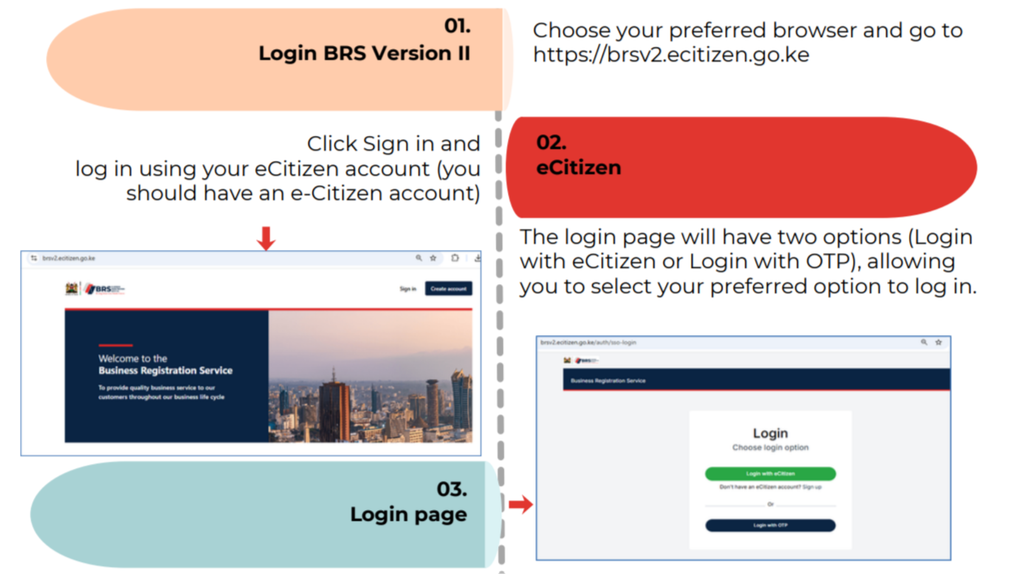
Step 2: Select Your Login Method
On the login page, choose your preferred authentication method. The platform may offer:
- Login with eCitizen.
- Login with OTP.
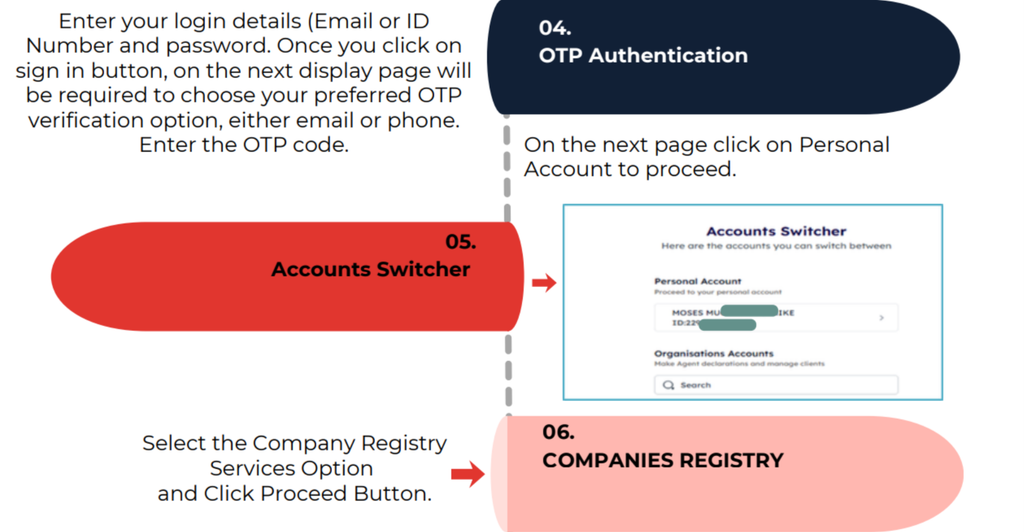
If you select the eCitizen option, enter the requested login credentials, such as your email address or identification number and password.
Step 3: Complete OTP Authentication
If prompted to verify your identity, select the available verification option, such as email or phone, and enter the one-time password (OTP) sent to you.
An OTP is a temporary verification code used to confirm access to your account. Keep it private and do not share it with anyone.
Step 4: Open Your Personal Account
After successfully signing in and completing any required verification, select Personal Account to continue.
This takes you to the account interface where you can access the relevant business and company records associated with your account.
How to Access Company Registry Services on eCitizen
Once logged in, follow the steps below to access the appropriate registry service.
Step 5: Select Company Registry Services
Choose the Company Registry Services option and click Proceed.
This opens the company registry section, where the available services can be accessed.
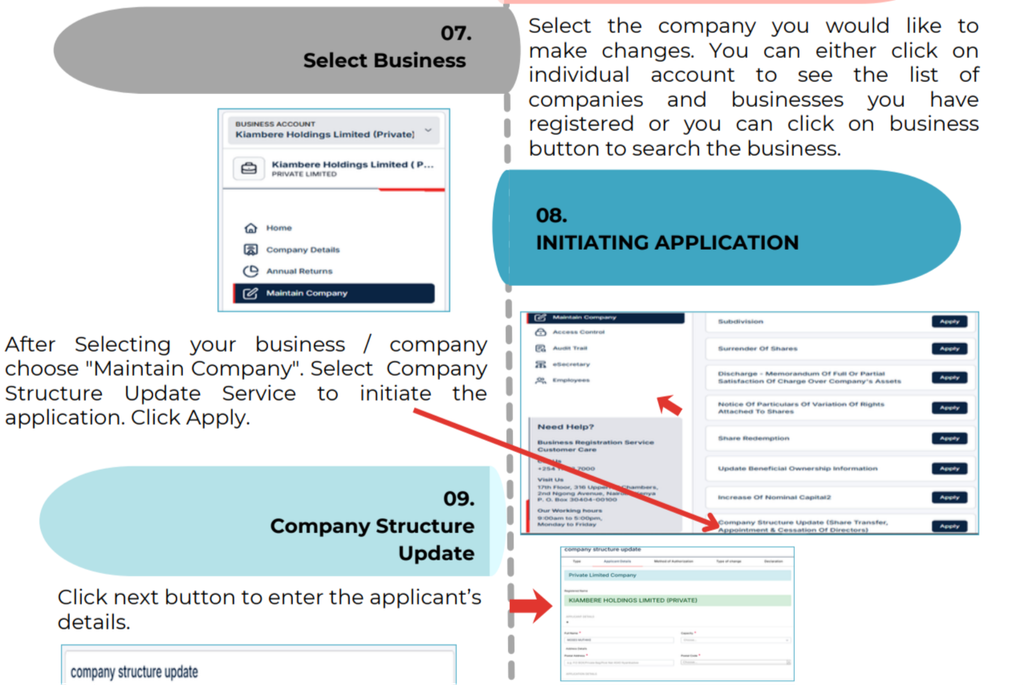
Step 6: Select the Company or Business
Locate the company you want to update. Depending on the available account options, you may select an individual account to view registered businesses or use the business option to search for the relevant entity.
Check the company details carefully before proceeding. Selecting the wrong entity may result in an application being initiated against an unintended company.
Step 7: Choose Maintain Company
After selecting the correct business or company, choose Maintain Company.
This option provides access to supported services for maintaining registered company information.
Step 8: Initiate a Company Structure Update
Select Company Structure Update Service and click Apply to initiate the application.
Follow the on-screen instructions and click Next when required to proceed to the applicant details and authorization stages.
How to Select the Authorization Method
The BRS Version 2 platform provides different authorization routes for company structure changes. Selecting the appropriate route is an important part of the application process.
Option 1: Board Resolution
Choose Board Resolution when the proposed change is supported by the appropriate board resolution under the applicable requirements.
After selecting this option and clicking Next, the system displays the available changes that can be processed through this route.
These may include:
- Director appointments and cessations.
- Appointment of existing shareholders as directors.
- Share transfers involving new or existing directors and shareholders.
- Resignation of a beneficial owner, where supported by the selected application route.
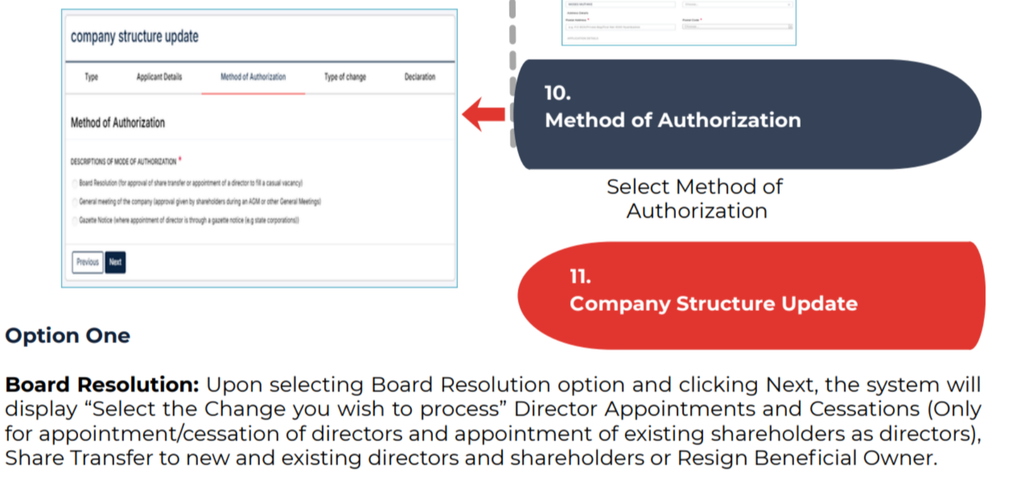
Select the relevant change and follow the instructions displayed by the system.
A board resolution for company changes should be prepared and approved in accordance with the company’s governing documents and applicable legal requirements. Do not assume that every company change can be authorized solely through a board resolution.
Option 2: General Meeting of the Company
Select General Meeting of the Company if the proposed change is being authorized through the relevant company meeting process.
After selecting this option, enter the requested details of the ordinary or special resolution, as applicable. Click Next to continue to the page where you can select the change to be processed.
Ensure that the resolution details match the company’s actual decision and supporting records. The appropriate resolution type and approval requirements depend on the proposed action and applicable law.
Option 3: Gazette Notice
Select Gazette Notice when the applicable procedure requires or permits the relevant change to be processed using this authorization route.
Click Next and follow the instructions to select the proposed change.
Before proceeding, verify that the Gazette Notice option applies to your circumstances and that you have the required supporting information. The availability of an option on the platform does not, by itself, establish that it is legally appropriate for every application.
How to Change Company Directors on BRS Version 2
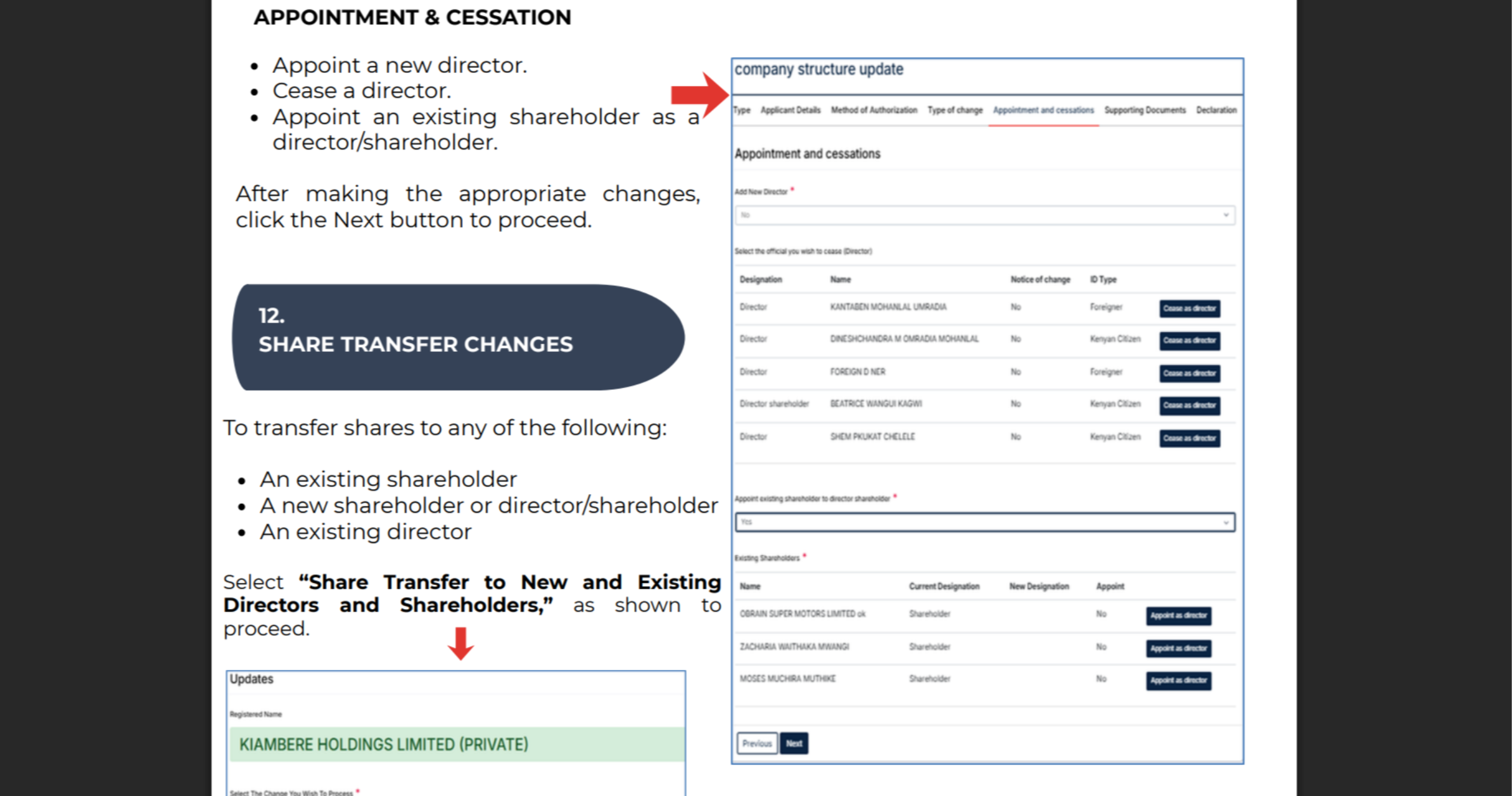
The BRS Version 2 platform supports certain director appointment and cessation applications through the company structure update service.
Appoint a New Director
To appoint a new director:
- Log in to the BRS Version 2 platform.
- Select the company you want to update.
- Open Maintain Company.
- Select Company Structure Update Service and click Apply.
- Choose the applicable authorization method.
- Select the director appointment option.
- Enter the requested details and proceed through the application.
- Review the information and follow the submission instructions.
Ensure that the proposed director’s details are accurate and that the necessary company approvals and supporting documents are available.
Cease an Existing Director
If a director is leaving the company, select the relevant director cessation option when it is available under the chosen authorization route.
Enter the requested information and follow the on-screen instructions to complete the application.
Before submitting, confirm the director’s details and ensure that the cessation is supported by the appropriate company records and complies with applicable legal requirements.
Appoint an Existing Shareholder as a Director
Where an existing shareholder is being appointed as a director, select the corresponding option if it is available for the chosen authorization method.
Follow the instructions to identify the relevant shareholder and provide the required details.
An appointment should be recorded accurately so that the company’s management information reflects the approved change.
How to Transfer Company Shares on BRS Version 2
Share transfers may involve an existing shareholder, a new shareholder, an existing director, or another eligible recipient identified by the platform.
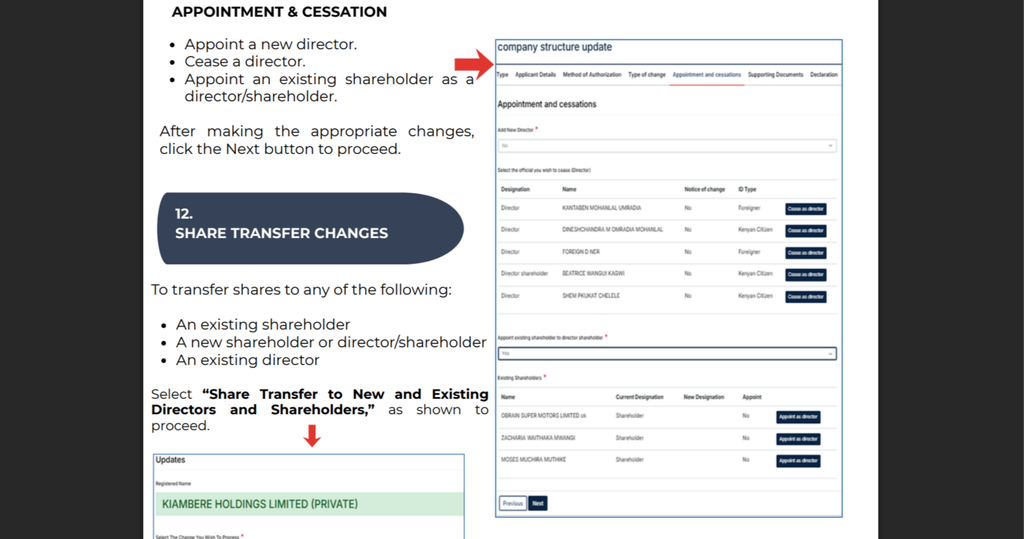
Step 1: Select the Share Transfer Option
On the page displaying the available changes, select Share Transfer to New and Existing Directors and Shareholders.
This option is intended for supported share transfers involving the categories of recipients identified in the BRS guide.
Step 2: Enter the Required Share Transfer Details
Follow the instructions provided by the system and enter the requested information about the transfer.
Depending on the transaction, this may involve details relating to the transferor, recipient, and shares being transferred. Ensure that the information agrees with the relevant company records and transfer documentation.
Step 3: Review the Application
Check all the information before proceeding. Confirm that the intended parties and transaction details are correct.
Share transfers may also involve additional legal, tax, company approval, or documentation requirements. The online application should not be treated as a substitute for satisfying those requirements.
Step 4: Proceed With the Submission
Click Next and follow the remaining instructions displayed by the platform.
Retain any application reference, acknowledgement, or confirmation generated by the system. Check the application status through the available official channels and respond to any requests for additional information.
Selecting Multiple Company Changes
The BRS guide explains that applicants may select one or more changes on the relevant selection page, subject to the options supported by the system.
The platform may allow applicants to select up to three changes at once, depending on the available workflow.
Before proceeding, consider the following:
- Select only the changes that are relevant to your application.
- Confirm that the selected changes are compatible with the authorization method.
- Ensure that the required supporting information is available for each change.
- Review the selections before clicking Next.
If a particular combination is unavailable, follow the options presented by the system rather than attempting to bypass the application’s restrictions.
How to Update Company Information and Maintain Accurate Records
Keeping company information accurate is important for regulatory compliance, corporate governance, and business administration.
The phrase change of company particulars can refer to different types of updates. Not all changes follow the same procedure, and not every company detail is necessarily managed through the Company Structure Update Service.
Company Structure Changes
These include supported changes to directors, shareholders, and share ownership. Applicants should select the specific service that corresponds to the proposed transaction.
For a more detailed walkthrough of the relevant process, see this step-by-step guide to changing company particulars on BRS in Kenya.
Change of Registered Office Address
A change of registered office address is distinct from a director appointment or share transfer. To change a registered business address, identify the relevant address-change service and confirm its current requirements on the official BRS platform.
Change of Company Name
A company name change may require a separate application and the appropriate approvals. Applicants seeking a company name change in Kenya should use the applicable official service rather than assuming that the director and shareholder structure update process will change the registered name.
Change of Nature of Business
A change in the nature of business may also require a separate procedure, depending on the company’s registration details and the nature of the proposed change. Confirm which service is available and whether supporting documentation or additional approvals are necessary.
Company Officials and Other Particulars
Other changes, including updates to company officials or particular business registration details, should be initiated through the appropriate service within the official portal.
To update company information successfully, identify the exact record that needs changing, select the correct service, and follow the requirements applicable to that transaction.
Where a change involves beneficial ownership, consult this guide to updating beneficial ownership information on BRS in Kenya.
Common Mistakes to Avoid When Changing Company Details in Kenya
Applicants can reduce delays by reviewing their applications carefully before submission.
Selecting the Wrong Company
If several companies are associated with your account, verify the company name and registration details before initiating the application.
Choosing the Wrong Authorization Method
Board resolutions, general meeting resolutions, and Gazette Notices are not interchangeable in every situation. Confirm the appropriate method before selecting an option.
Entering Incorrect Director or Shareholder Details
Errors in names, identification information, or transaction details may create inconsistencies with existing records. Review all information before proceeding.
Using an Incorrect Service
The Company Structure Update Service is intended for supported structural changes. A name change, registered office address change, or other amendment may require a different service.
Failing to Keep Application Records
Retain relevant resolutions, supporting documents, application references, and submission confirmations. These records can help when tracking an application or responding to a request for clarification.
If you need official company records or supporting documents after a change, consult this guide to downloading certificates and other records on BRS in Kenya.
Applicants who need an official certified record can also refer to the step-by-step guide to submitting, downloading, and accessing certified copies of records in Kenya.
Where to Get Official Assistance
For current instructions, service requirements, and guidance on the company changes application process, consult the official Business Registration Service website.
You can also use the BRS Version 2 portal:
The BRS guide lists 011 112 7000 as a contact number for further information. Confirm the current contact details on the official website if you need assistance.
For information about applicable company registry charges, review the official BRS fee schedule for the Companies Registry.
If you are registering or managing a limited liability partnership, the requirements may differ from those for a company. Refer to this step-by-step guide to registering a limited liability partnership in Kenya.
Other business procedures may also require separate applications. These include consenting on BRS and cessation or conversion of a business name in Kenya.
Companies dealing with secured transactions may find the MPSR collateral registry user guide for Kenya useful. For broader legal and business administration matters, consult the guides on debtors’ bankruptcy proceedings in Kenya, company liquidation in Kenya, and the company administration process in Kenya.
Because online services and administrative requirements can change, always follow the latest instructions displayed by the official platform and consult a qualified legal professional when a proposed change raises questions about company law or shareholder rights.
Frequently Asked Questions
1. How do I change company particulars on the BRS Version 2 platform?
Log in through the BRS Version 2 eCitizen portal, select Company Registry Services, choose the relevant company, open Maintain Company, and select Company Structure Update Service. Click Apply, choose the appropriate authorization method, and follow the instructions for the proposed change.
2. Which authorization methods are available for company structure updates?
The BRS guide identifies three options: Board Resolution, General Meeting of the Company, and Gazette Notice. The appropriate method depends on the nature of the proposed change and the applicable legal and procedural requirements.
3. Can I change directors and transfer shares through BRS Version 2?
The platform supports specified director appointments, director cessations, appointments of existing shareholders as directors, and share transfers involving eligible new or existing shareholders and directors. Available options depend on the authorization route and the current application workflow.