How to Use the MPSR Collateral Registry in Kenya: A Step-by-Step Guide
Learn how to use the MPSR collateral registry in Kenya, register security interests in movable property, complete online applications, search notices, and understand the Movable Property Security Rights Act.
The Movable Property Security Rights (MPSR) Registry is an electronic government register in Kenya that allows users to register and search notices of security rights in movable property. Administered by the Business Registration Service (BRS), the registry supports secured transactions by making information about registered security interests publicly accessible.
The collateral registry in Kenya provides a way for creditors to record security interests in movable assets, while businesses and individuals can use eligible movable property as collateral when seeking financing. Understanding the registration process, the information required, and how to access the online system can help users complete their applications accurately.
This guide explains how to access the MPSR registry, submit an initial notice, enter the required information, and review application records. For more practical business registration information, users can explore the business registration and compliance guides.
What Is the MPSR Collateral Registry in Kenya?
The MPSR Registry is an online, notice-based public register of security rights in movable property. It operates under Kenya’s Movable Property Security Rights Act, 2017, which provides a legal framework for using movable assets to secure obligations.
Unlike a system that focuses exclusively on land or buildings, the movable property security rights framework enables eligible movable assets to be used in secured transactions, subject to applicable legal requirements.
Role of the Business Registration Service
The Business Registration Service is a Kenyan State Corporation established under the Business Registration Service Act, 2015. Its responsibilities include administering laws and policies relating to the registration of companies, partnerships, business names, and other relevant matters, including security rights.
Through the MPSR system, the BRS provides electronic services that allow users to submit notices and search the registry without relying entirely on paper-based processes.
Businesses that need to verify the types of entities covered by the registration system can consult the official BRS list of registered entities.
Purpose of the Electronic Collateral Registry
The electronic collateral registry supports several important functions:
- Recording notices of security interests in movable property.
- Providing public access to registered notices.
- Supporting lenders and borrowers involved in secured transactions.
- Enabling searches for previously registered notices.
- Maintaining application histories for users.
- Improving transparency in movable asset financing.
It is important to understand that registering a notice does not, by itself, guarantee that a debt will be repaid or establish every aspect of a creditor’s legal rights. The underlying security agreement, applicable law, and relevant registration requirements remain important.
What Is Movable Property Collateral?
Movable property collateral refers to eligible assets that can be used to secure an obligation without being permanently attached to land.
Depending on the applicable law and the terms of the transaction, movable assets may include equipment, machinery, inventory, vehicles, agricultural assets, receivables, and certain other forms of personal property.
Examples of Assets Used as Collateral
Businesses may use different categories of movable property to support financing arrangements.
- Machinery and equipment: Assets used in manufacturing, construction, agriculture, and other commercial activities.
- Inventory: Goods held for sale or used in business operations.
- Vehicles: Eligible vehicles used for commercial or personal purposes.
- Receivables: Money owed to a business by its customers.
- Agricultural assets: Certain livestock, crops, and related assets, where legally eligible.
The precise assets that may be offered as security depend on the transaction and applicable legislation. Borrowers should confirm that the asset can legally be used as collateral and that the security agreement adequately identifies it.
Why Is the MPSR Registry Important?
The collateral registry plays an important role in secured transactions in Kenya by providing a central electronic location for recording and searching notices.
Benefits for Borrowers
Businesses and individuals who own eligible movable assets may have additional options when seeking credit. They may not need to rely exclusively on land or buildings to support a financing arrangement.
For small businesses, this framework can be particularly relevant when machinery, inventory, vehicles, or receivables form a substantial part of their assets.
However, the availability of financing depends on the lender’s assessment, the value and eligibility of the collateral, the borrower’s financial position, and the terms of the loan.
Benefits for Creditors
Creditors can use the registry to record notices associated with security interests and search for existing notices.
These searches can help creditors assess potential competing claims involving particular grantors or collateral. The registry’s public notice function can therefore support better-informed lending decisions.
Transparency in Secured Transactions
The public notice registry improves access to information about registered security interests. Nevertheless, a search result should be interpreted carefully. A registry search is not necessarily a complete determination of ownership, enforceability, priority, or the current balance of a secured obligation.
Requirements for MPSR Online Registration
Before starting an MPSR online registration application, prepare the information required for the relevant transaction.
The official MPSR User Guide identifies several categories of information that applicants must provide when submitting an initial notice. Applicants who need the original procedural instructions can consult the MPSR User Manual and Collateral Registry Guide in Kenya.
Information About the Grantor
The grantor is the person or organisation that grants a security right in movable property.
Depending on the applicant’s circumstances, the system may require the grantor’s category and identifying particulars. The official guide illustrates selecting an appropriate type, such as Kenyan Citizen, before entering the remaining details.
Applicants should ensure that the information accurately identifies the grantor and corresponds with the relevant transaction documents.
Information About the Creditor
The application also requires the particulars of the creditor, who holds or is intended to hold the security interest under the relevant arrangement.
Enter the requested creditor information carefully. Errors in names or identifying particulars may create difficulties when searching for or interpreting a registered notice.
Description of the Collateral
The collateral description identifies the movable property covered by the notice.
Provide a description that corresponds with the security agreement and the assets involved in the transaction. The information should be sufficiently accurate to help identify the collateral, in accordance with the applicable legal and system requirements.
Secured Amount and Effectiveness Period
The application process includes fields for the maximum amount secured and the period of effectiveness.
These details should be completed using the information applicable to the transaction. Applicants should not assume that entering an amount or an effectiveness period independently determines the full scope or duration of their contractual rights.
Review the governing legislation and relevant transaction documents whenever the correct entry is uncertain.
How to Register an Initial Notice in the MPSR Registry
The following steps are based on the official Collateral Registry User Manual published by the Business Registration Service.
Step 1: Access the BRS Online Services
Visit the official Business Registration Service website at brs.go.ke and navigate to the relevant collateral registry services.
The registry is accessed through the online government service environment. Ensure that you are using the official platform before entering personal or business information.
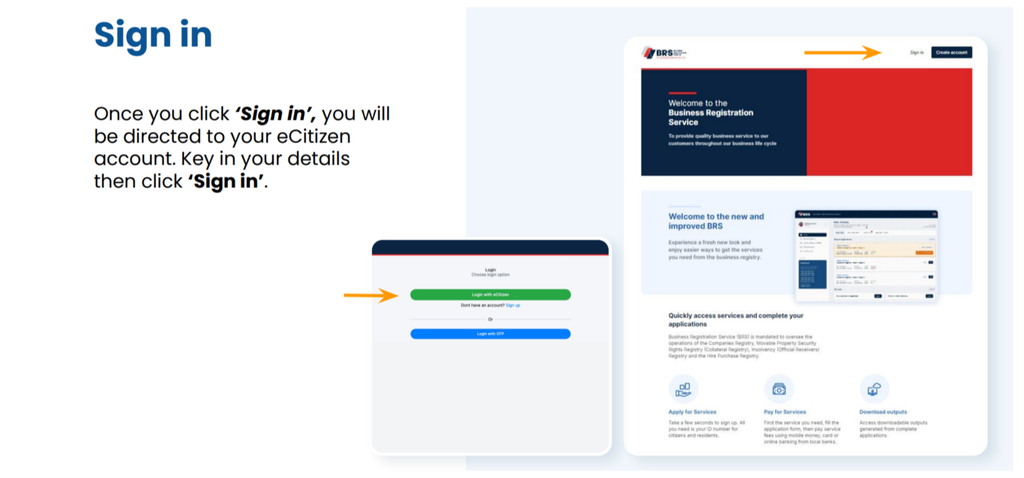
Step 2: Sign In Through eCitizen
Select the Sign in option. You will be directed to your eCitizen account, where you must enter your login credentials.
Follow the instructions displayed on the screen to authenticate your account.
If you cannot access your account, resolve the login issue through the appropriate official support channel before proceeding with the application.
Step 3: Complete the One-Time Password Verification
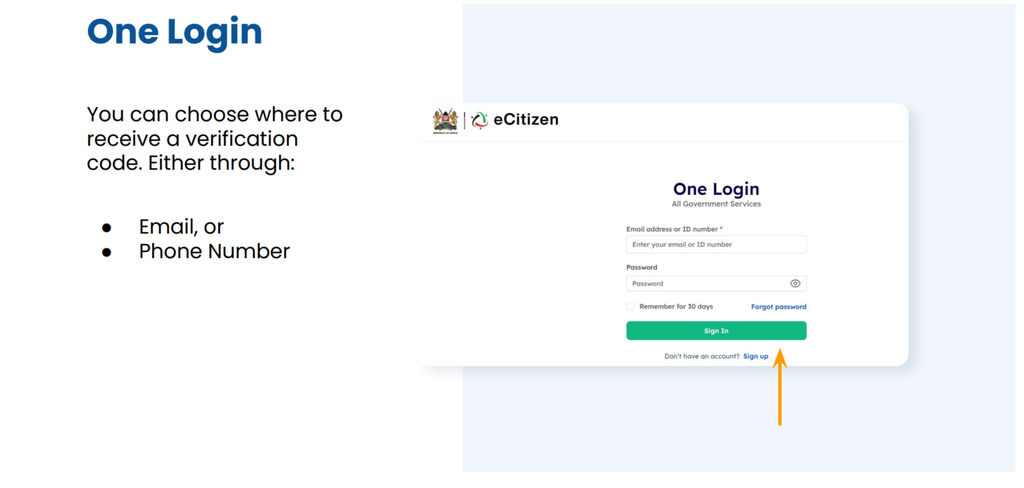
The sign-in process may require a one-time password (OTP).
According to the user guide, you can choose to receive the verification code through either your registered email address or your phone number.
If you choose email verification, enter the OTP sent to your email and select Next. If you choose phone verification, enter the code sent to your phone and select Next.
After successful verification, select Continue to proceed to the dashboard.
Never share your OTP or account password with an unauthorised person.
Step 4: Open the Collateral Registry
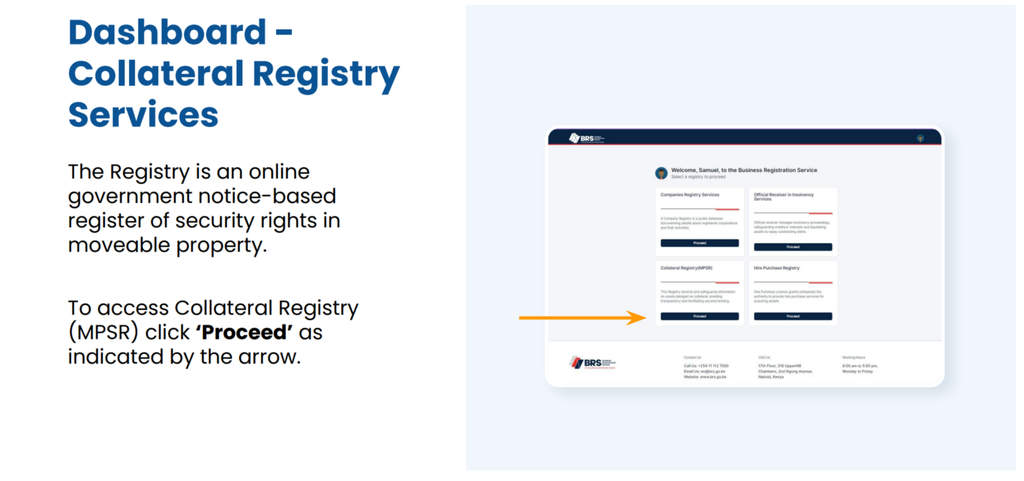
From the dashboard, locate the Collateral Registry Services section.
Select Proceed to access the MPSR registry system.
The registry provides access to services for submitting notices and searching existing records. The precise appearance of the dashboard may change as the government updates its online services.
Step 5: Select the Initial Notice Application
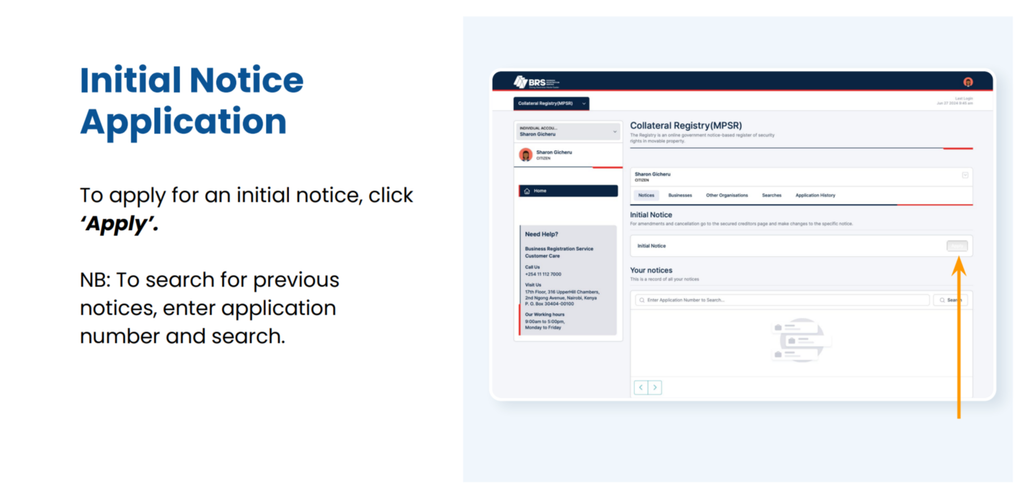
To register a new notice, select Apply under the initial notice application section.
If you need to locate an existing application or notice, the system also provides a search function where you can enter an application number, as applicable.
Before creating a new application, check whether the transaction has already been submitted to avoid unnecessary duplicate filings.
Step 6: Enter the Grantor’s Particulars
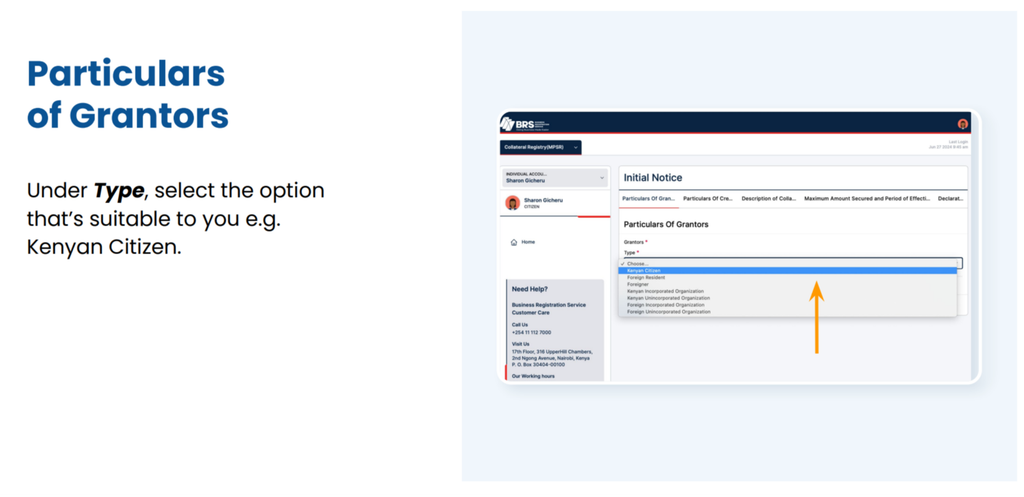
Select the appropriate grantor type from the available options.
For example, the user guide illustrates choosing Kenyan Citizen where that category applies. Other applicants should select the option that accurately reflects their circumstances.
Enter the remaining required details and select Next.
Check that the information matches the relevant identification or business records. Incorrect grantor particulars can make a notice more difficult to identify and may have legal consequences.
Step 7: Enter the Creditor’s Particulars
Provide the creditor’s details in the fields presented by the system.
Confirm that the creditor is correctly identified and that the particulars are consistent with the transaction documentation.
Oncethe required fields are complete, select Next to continue.
Step 8: Describe the Collateral
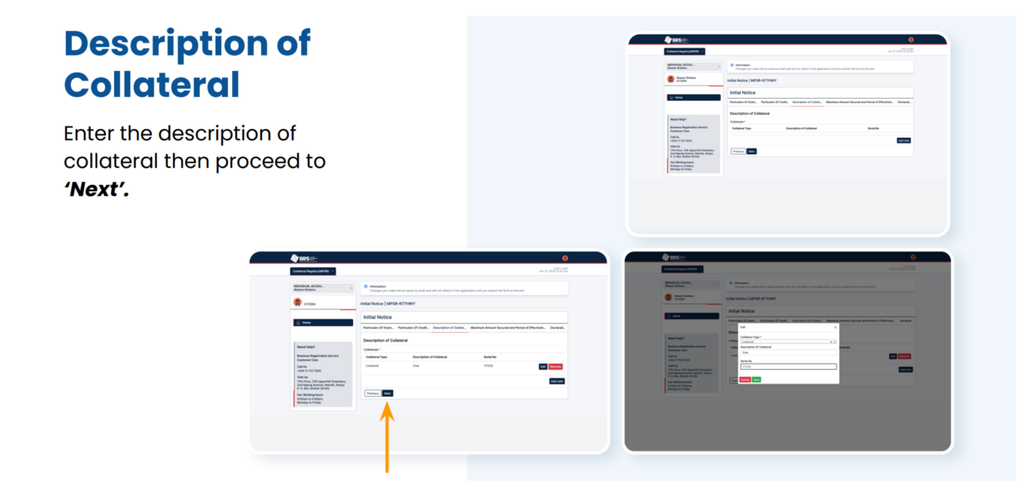
Enter the description of the movable property covered by the security arrangement.
The description should correspond with the underlying agreement and identify the relevant assets as accurately as the applicable requirements demand.
If several assets are involved, follow the system’s instructions for describing them. Avoid using vague descriptions that could create uncertainty about the property covered by the notice.
Proceed to the next section after reviewing the collateral information.
Step 9: Enter the Maximum Secured Amount and Effectiveness Period
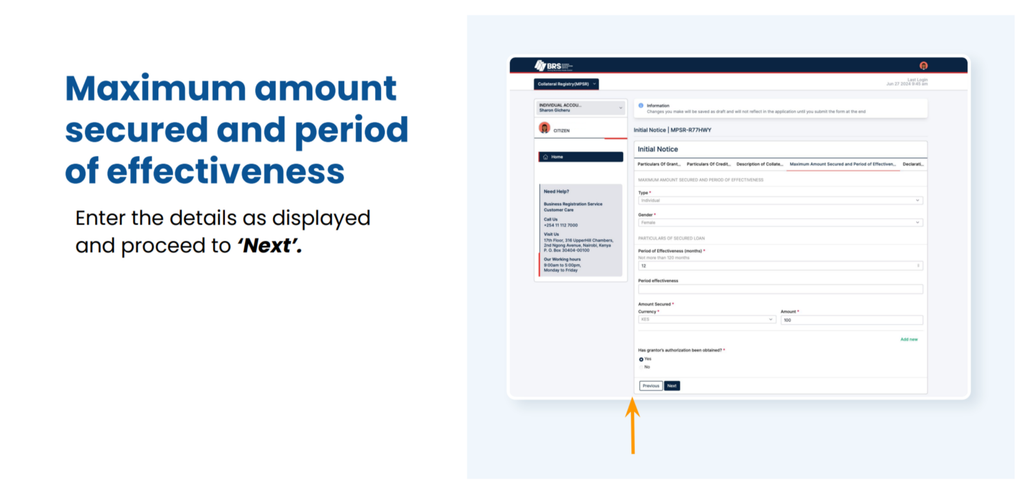
Complete the fields for the maximum amount secured and the period of effectiveness.
Use the correct figures and dates or duration information required by the system and supported by the transaction documents.
Where the security arrangement contains complicated financial terms, multiple obligations, or changing collateral, obtain appropriate legal advice before submitting the notice.
Step 10: Review the Declaration
Before completing the application, carefully review the information entered in each section.
The system provides an opportunity to confirm that the particulars are accurate. Tick the declaration box as instructed and select Complete when you are satisfied with the details.
If you identify an error, select Edit and correct it before finalising the application.
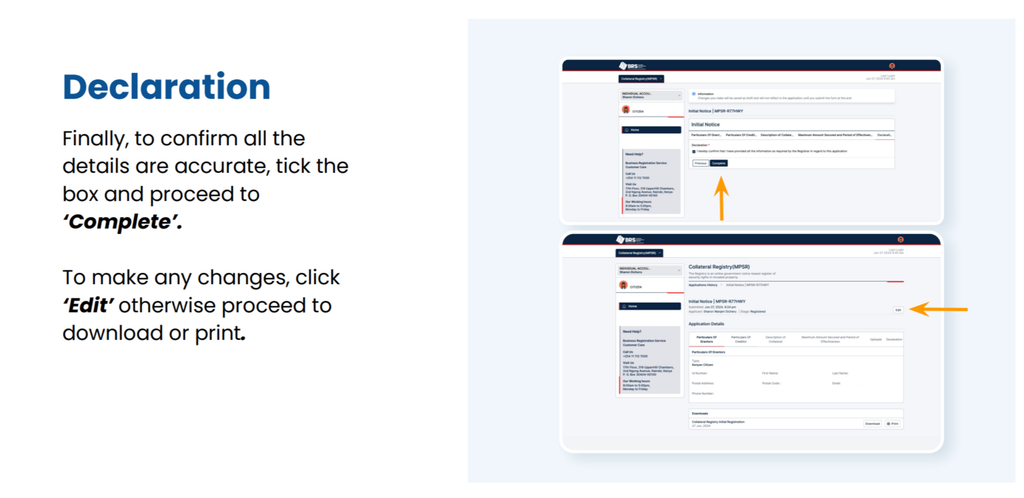
Step 11: Download or Print the Application Record
After completing the application, use the available options to download or print the relevant record.
Keep copies of the confirmation and associated transaction documents for your records. Where the system provides a reference or application number, retain it for future searches and correspondence.
A completed electronic submission should not automatically be interpreted as a guarantee that every legal requirement has been satisfied. Check the system’s confirmation and any further instructions provided.
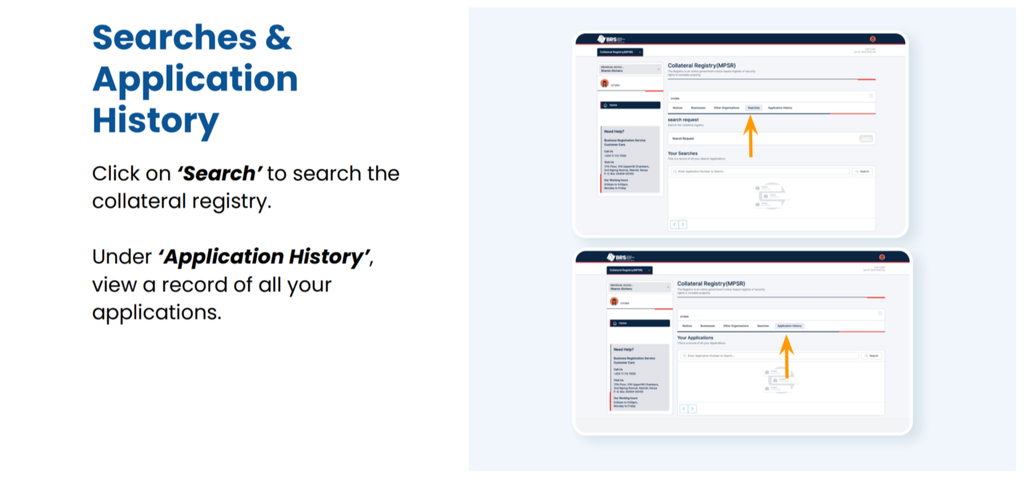
How to Search the Kenya Collateral Registry
The MPSR Registry also supports searches for previously registered notices.
A registry search can help a lender, borrower, adviser, or other authorised user investigate notices associated with a particular transaction.
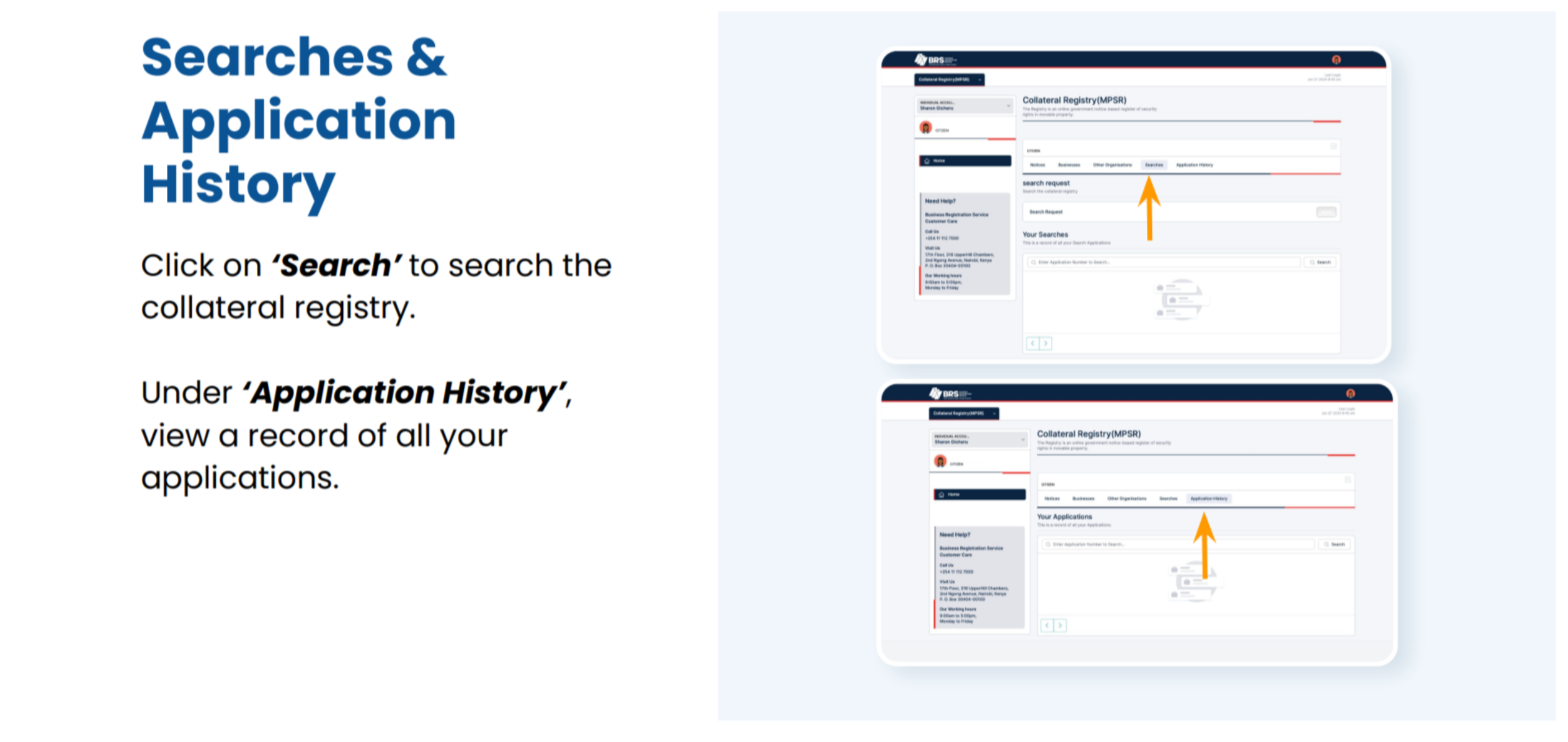
Search Using an Application Number
Where you already have an application number, enter it in the relevant search field and submit the search.
This can help you locate a particular application or notice without having to start a new registration process.
Review the Application History
The user guide identifies an Application History section where users can view a record of their applications.
This function can be useful for tracking previously submitted applications and retrieving relevant information when following up on a transaction.
Search Before Extending Credit
Creditors may wish to search the registry as part of their due diligence before accepting movable property as security.
A search may reveal existing notices that warrant further investigation. However, users should not assume that a search alone conclusively establishes whether an asset is unencumbered or determines the legal priority of competing claims.
Where necessary, seek legal advice and review the underlying agreements and relevant statutory provisions.
Businesses and Other Organisations in the MPSR System
The official user guide also describes sections for Businesses and Other Organisations.
The Businesses section allows users to view details of listed businesses registered in their name, as available through the platform.
The Other Organisations section provides an option to add other organisations for MPSR-specific purposes.
Users should follow the instructions displayed within their accounts and ensure that the correct organisation is associated with the intended transaction. These functions should not be confused with the separate procedures for incorporating a company or registering a business name.
For related procedures, applicants can consult the guides on downloading certificates and other records from BRS and accessing certified copies of company records.
Understanding Security Interest Registration in Kenya
Security interest registration is an important part of the framework governing secured transactions, but the registration process should be understood in its proper legal context.
The Movable Property Security Rights Act, 2017, provides the principal statutory framework for security rights in movable property. The applicable legal rules determine how security rights are created, made effective against third parties, prioritised, and enforced.
Registration Is Not the Same as Creating a Security Agreement
The underlying security agreement and the registry notice serve different functions.
A security agreement documents the arrangement between the relevant parties. A registry notice provides public notice of a claimed security interest.
The requirements for creating an enforceable security right and making it effective against third parties must be assessed under the applicable legislation. Filing a notice should not be treated as a substitute for preparing the necessary agreement.
Priority and Competing Security Interests
When more than one creditor claims rights over the same collateral, questions of priority may arise.
The outcome can depend on statutory priority rules, the circumstances of each transaction, the type of collateral, and other legally relevant factors. Registration timing may be important, but it should not be treated as the only factor in every case.
Creditors should conduct appropriate due diligence and obtain legal advice where competing claims or complex security arrangements exist.
Keep Registry Information Accurate
Applicants should take care when entering grantor details, creditor particulars, collateral descriptions, secured amounts, and effectiveness periods.
If information needs to be changed, users should consult the available registry procedures and applicable law to determine the correct method. Do not assume that editing an already submitted notice is always possible or that every correction has the same legal effect.
Where a change involves business particulars, the separate BRS guide to changing registered particulars may help explain the relevant business-record process. For statutory forms and official documents, consult the BRS forms directory.
MPSR Registry Contact and Official Resources
For the most reliable instructions, consult the Business Registration Service’s official resources.
The detailed user manual is available at:
https://brs.go.ke/wp-content/uploads/2024/07/MPSR-User-Guide.pdf
The BRS website lists the contact number +254 011 112 7000 in the referenced user guide. Confirm the current contact details through the official website before relying on them.
The manual provides procedural guidance for signing in, accessing the collateral registry, submitting an initial notice, entering the relevant particulars, completing the declaration, and reviewing application history.
Because online systems and administrative procedures can change, follow the instructions currently displayed on the official platform if they differ from older screenshots or documentation.
For questions about fees for other company registration services, the official BRS companies registry fee schedule provides a relevant reference. Do not assume that company registration fees also apply to MPSR notices.
Frequently Asked Questions About the MPSR Registry
1. What is the MPSR Registry in Kenya?
The MPSR Registry is an electronic, notice-based government register of security rights in movable property. It is administered by the Business Registration Service and supports the registration and searching of notices relating to secured transactions.
2. How do I register a security interest in the MPSR Registry?
Access the official BRS online services, sign in through eCitizen, complete any required OTP verification, and open Collateral Registry Services. Select Apply for an initial notice, enter the grantor and creditor particulars, describe the collateral, provide the secured amount and effectiveness period, review the declaration, and complete the application.
3. Can I search the collateral registry before accepting an asset as security?
Yes. The MPSR Registry provides search functionality for existing notices. A search can support due diligence before accepting movable property as collateral. However, search results should be assessed alongside the underlying agreements and applicable legal requirements, particularly where ownership, competing claims, or priority is uncertain.