CIPC External Company Registration in South Africa: A Step-by-Step Guide to the Automated Process
Registering an external company in South Africa is an important step for a foreign business that wants to establish a formal presence in the country. The Companies and Intellectual Property Commission (CIPC) has introduced an automated online process that allows applicants and authorised filers to capture and submit external company registration information electronically.
CIPC’s Step by Step Guide External Company Automation provides a practical view of how the process works, from accepting the POPIA consent and Companies Act declarations through to capturing company information, appointing representatives and directors, adding auditors, uploading supporting documents, completing OTP verification and submitting the application for CIPC back-office approval.
For foreign businesses, understanding this process is particularly important because an external company registration is not simply a matter of entering the foreign company’s name into an online form. The application requires information about the original jurisdiction, South African address, foreign address, representative, directors, company secretary where applicable, auditor where applicable, and supporting corporate documents.
This guide explains the process in detail and highlights some of the practical issues applicants should consider before starting an application.
What Is an External Company?
An external company is essentially a foreign company that conducts or intends to conduct business activities in South Africa and therefore needs to be registered with the South African corporate regulator.
This is different from incorporating a completely new South African company.
For example, suppose a company was originally incorporated in Namibia, the United Kingdom, the United States, Mauritius or another jurisdiction. Instead of creating an entirely separate South African company, the foreign business may establish its South African presence through the external-company framework where appropriate.
The CIPC automated application specifically provides fields for information such as:
- Enterprise name
- Enterprise type
- Enterprise email
- Enterprise telephone number
- Date of incorporation in the original jurisdiction
- Financial year-end
- Industry
- Jurisdiction of original incorporation
- Jurisdiction of current incorporation
- South African physical and postal addresses
- Foreign physical address
The guide therefore demonstrates that CIPC’s process is designed around the existing foreign legal entity, rather than treating the application as a normal South African incorporation.
Why the Automated CIPC Process Matters
The automation of the external-company registration process is significant because international businesses often have more complicated registration requirements than locally incorporated companies.
A foreign business may have:
- A foreign incorporation certificate.
- A foreign constitution or governance document.
- Directors residing in different countries.
- A foreign parent company or corporate director.
- A South African representative.
- A South African business address.
- Foreign-language corporate documents.
- A company secretary or auditor where applicable.
The CIPC workflow brings many of these components into one electronic application.
Rather than treating the application as a simple registration form, applicants should think of it as a corporate information and verification process.
That distinction can save considerable time.
Step-by-Step CIPC External Company Registration Process
Step 1: Accept POPIA Consent
The process begins with a POPIA consent screen.
The CIPC service explains that by using its website, e-services, BizPortal and other processes, users agree to the processing of personal information where required by law. The applicant must accept the relevant consent before proceeding.

This is an important first step because the registration process requires personal information relating to company officials and other individuals.
Information that may be processed includes:
- Identification information
- Names
- Dates of birth
- Contact information
- Addresses
- Citizenship
- Director information
- Representative information
- Company secretary information
- Other information required for verification
Applicants should therefore ensure that the people whose information is being submitted understand that their information is being used as part of the corporate registration process.
Step 2: Agree to the Companies Act Terms

After the initial consent screen, the applicant is required to acknowledge the relevant Companies Act terms before continuing.
The system presents an agreement which must be accepted before the applicant can proceed with the registration service.
This may appear to be a minor administrative step, but it establishes an important principle:
The person submitting the application is expected to understand and comply with the legal requirements associated with the registration.
For this reason, the filer should not simply enter information supplied by a client without checking whether the information is consistent with the foreign company’s official records.
Step 3: Select “New External Company”
The CIPC workflow then provides an option to create a New External Company.
Selecting this option starts the external-company registration application.
At this point, it is useful to have the foreign company’s corporate documents available because many of the subsequent fields should correspond directly with those documents.

Step 4: Enter the External Company Details
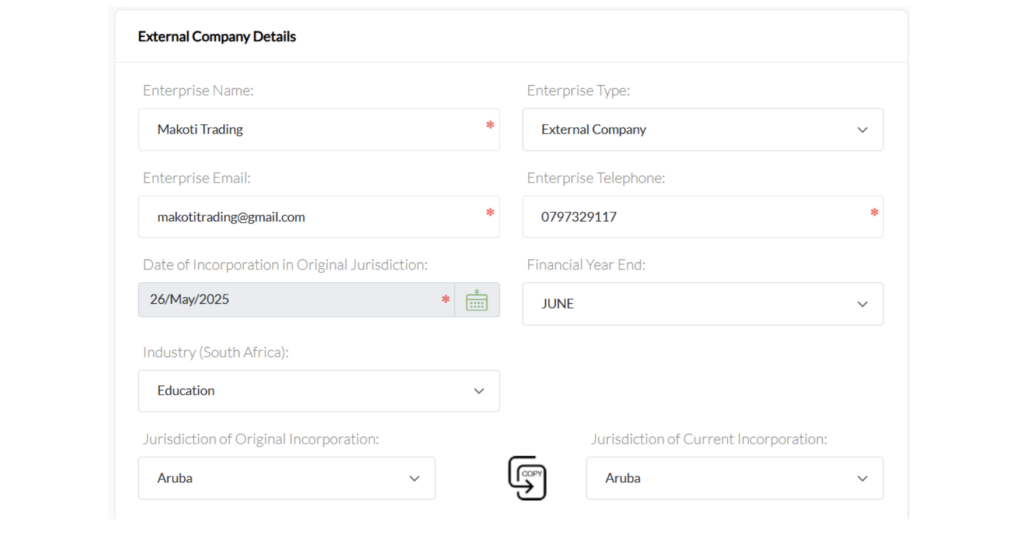
The first major section is External Company Details.
The CIPC example shows fields for:
- Enterprise name
- Enterprise type
- Enterprise email
- Enterprise telephone
- Date of incorporation in the original jurisdiction
- Financial year-end
- Industry
- Jurisdiction of original incorporation
- Jurisdiction of current incorporation
The enterprise type is identified as External Company in the example.
Why the original incorporation date matters
The date of incorporation should correspond to the company’s official foreign registration records.
For example, if a Namibian company was incorporated on 15 March 2020, the applicant should not enter the date on which the company decided to enter South Africa. The relevant information concerns the company’s incorporation in its original jurisdiction.
Choosing the correct jurisdiction
The application distinguishes between:
- Jurisdiction of Original Incorporation
- Jurisdiction of Current Incorporation
These fields are particularly relevant where a company has undergone a migration, continuation, redomiciliation or similar corporate restructuring.
The applicant should therefore avoid assuming that these two fields are always identical.
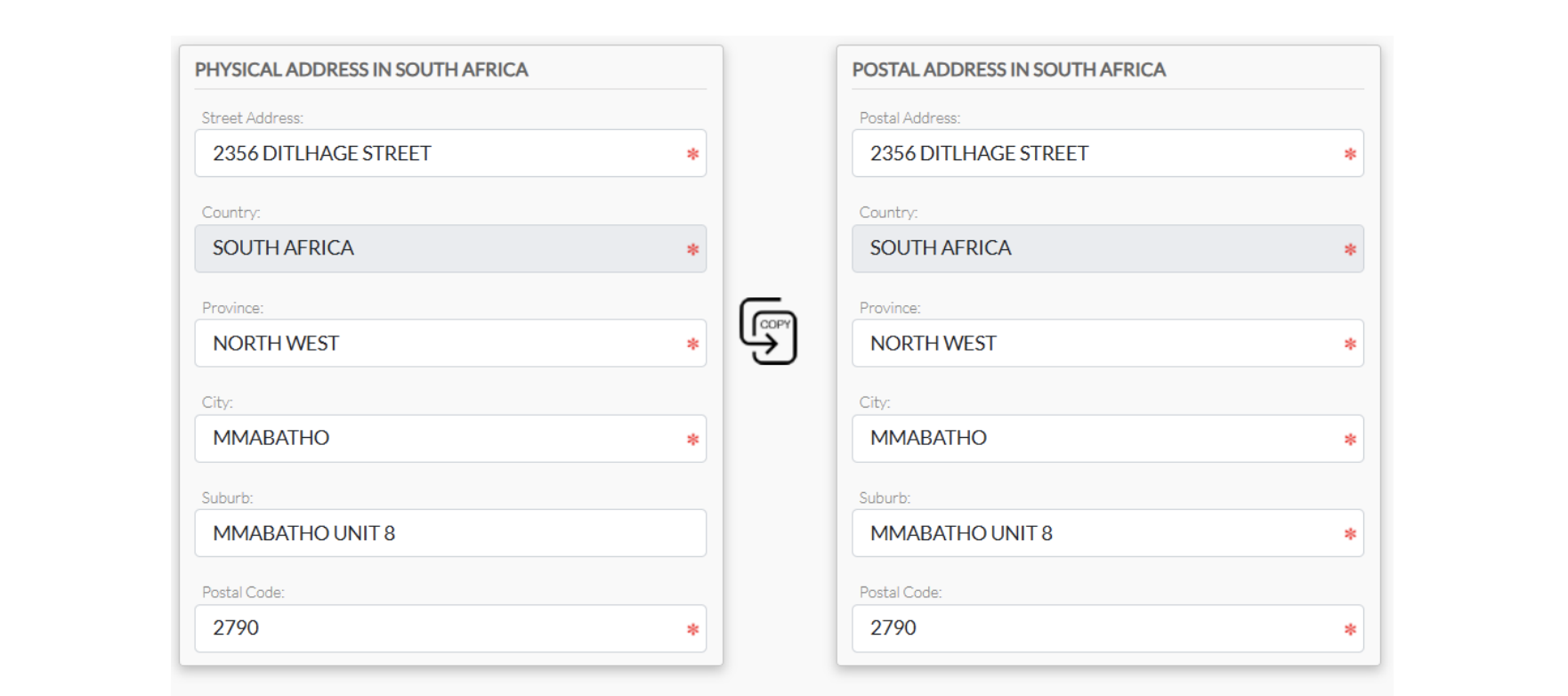
Step 5: Provide the South African Physical and Postal Address
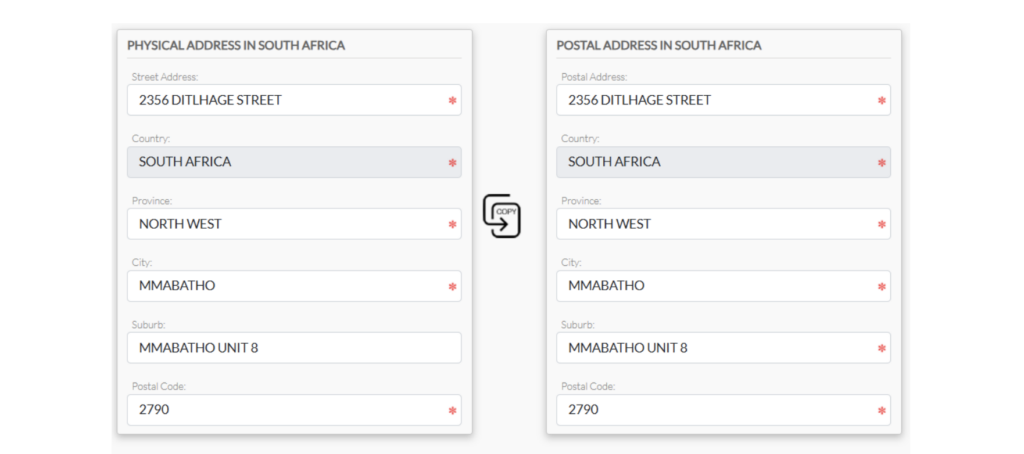
The application requires a physical address in South Africa and a postal address in South Africa.
The CIPC guide illustrates fields including:
- Street address
- Country
- Province
- City
- Suburb
- Postal code
The system also includes a copy function that can make it easier to duplicate address information when the physical and postal addresses are the same.
Why the South African address deserves attention
A foreign company entering South Africa should not treat the local address as a purely cosmetic field.
Businesses should ensure that the address is legitimate and appropriate for the company’s South African activities.
An applicant should carefully consider:
- Whether the address is physically valid.
- Whether correspondence can be received there.
- Whether the address belongs to the company, its representative or an authorised service provider.
- Whether supporting proof of the address can be supplied if required.
- Whether the address is consistent with other regulatory registrations.
A virtual office can sometimes be useful for international businesses, but applicants should understand the distinction between having a legitimate registered address and merely purchasing an address for correspondence.
Step 6: Enter the Business Coordinates

The automated form also includes a Business Coordinates section.
The example provides fields for:
- Latitude
- Longitude
The CIPC guide shows these coordinates being entered as part of the company information.
This demonstrates that the automated system is designed to collect increasingly structured information about the business rather than relying solely on free-text addresses.
Practical advice
Before submitting an application, make sure the coordinates correspond with the South African business address being provided.
Incorrect coordinates can create inconsistencies between the address and the geographic information recorded in the application.
Step 7: Provide the Foreign Company’s Address
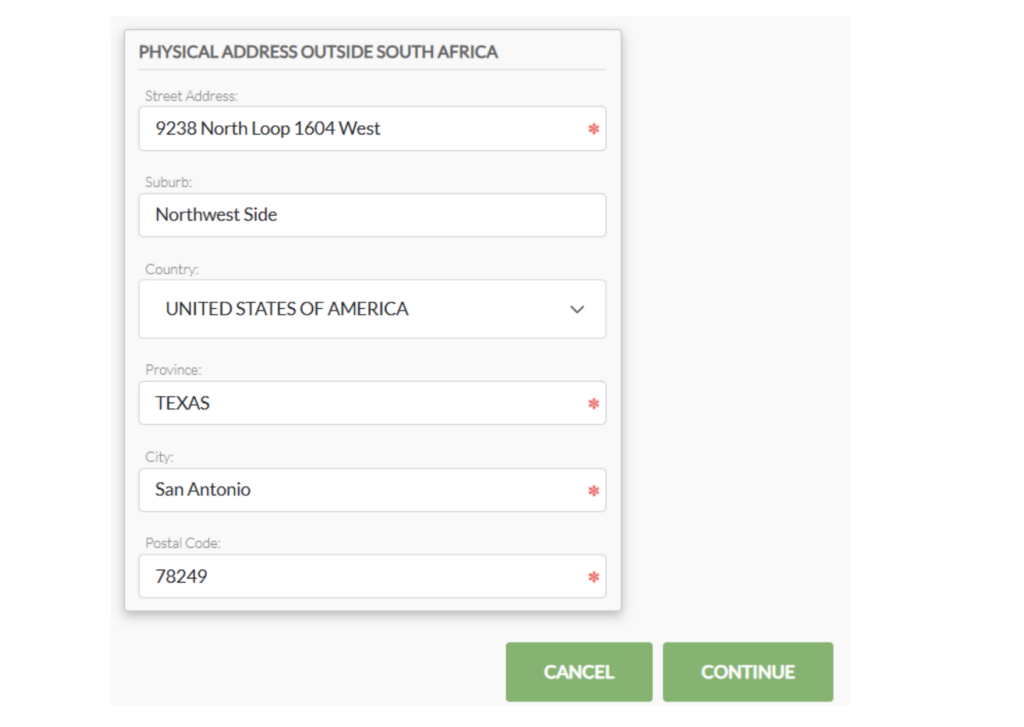
The application also asks for the company’s physical address outside South Africa.
The guide illustrates fields for:
- Street address
- Suburb
- Country
- Province or equivalent
- City
- Postal code
The example uses a foreign address in the United States.
This is another important difference between an external company and an ordinary South African company.
The regulator needs information about the foreign legal entity behind the South African registration.
Therefore, applicants should have the foreign company’s official address readily available.
Step 8: Appoint and Verify the Representative
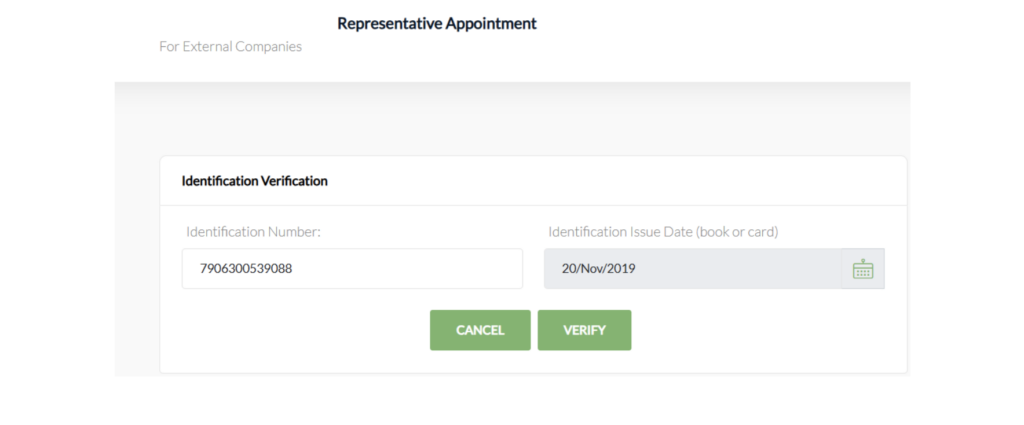
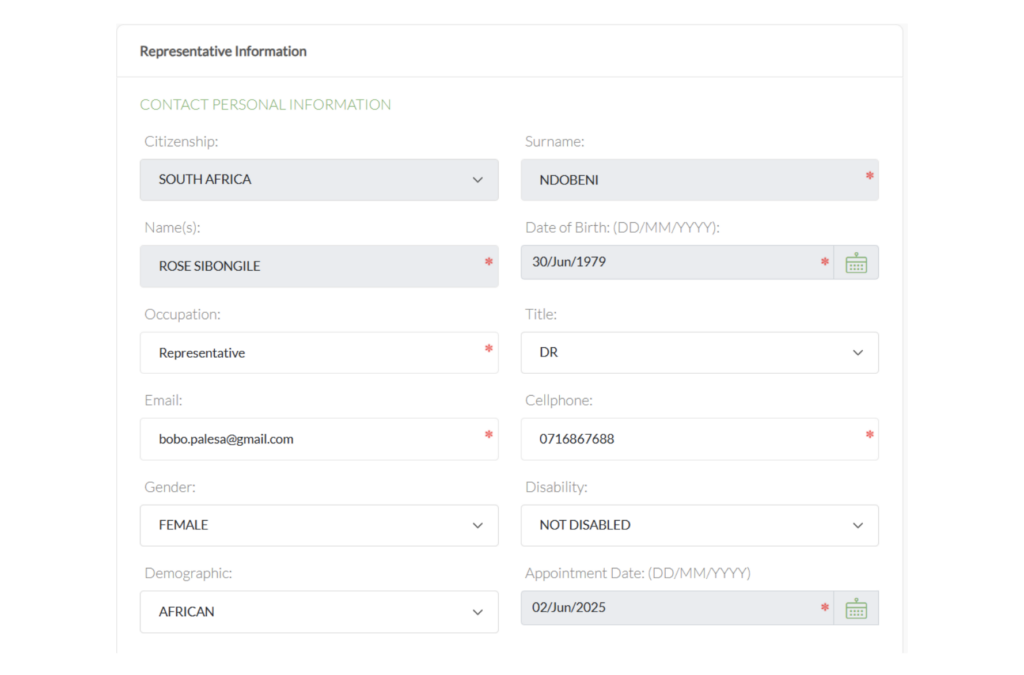
The CIPC workflow includes a Representative Appointment section.
The representative’s personal information must be captured, including information such as:
- Citizenship
- Surname
- Name
- Date of birth
- Occupation
- Title
- Cellphone number
- Gender
- Disability status
- Demographic information
- Appointment date
The application also provides for the representative’s physical and postal address.
Identification verification
The guide shows an identification verification step requiring an identification number and identification issue date before verification can be completed.
This is an important part of the automated system.
It means that a filer should not wait until the final submission stage to discover that the representative’s identification details cannot be verified.
Best practice
Before beginning the application, obtain:
- The representative’s correct identification information.
- The relevant identification issue date.
- Current contact details.
- The correct appointment date.
- A reliable email address and cellphone number.
Small discrepancies can create unnecessary delays.
Step 9: Decide Whether to Appoint a Company Secretary
The workflow asks whether the external company will be appointing a company secretary.
If the answer is yes, the system proceeds to company-secretary information.
The CIPC example shows personal information fields similar to those used for other company officials, including:
- Citizenship
- Surname
- Names
- Date of birth
- Occupation
- Title
- Cellphone
- Gender
- Disability information
- Demographic information
- Appointment date
The secretary’s address information must also be captured.
Do not confuse the company secretary with the representative
These are separate roles in the application.
A company secretary is not automatically the same person as the external company’s representative.
Businesses should therefore determine the appropriate appointments before starting the application.
Step 10: Add Directors
The application then moves into the Director Appointment section.
The guide provides an option to:
- Add a director
- Go back
- Continue
This allows multiple directors to be captured.
The system distinguishes different types of director arrangements.
For example, the guide demonstrates a director information screen containing fields for:
- Enterprise number
- Enterprise name
- Country of residence
- Director type
- Appointment date
- Cellphone
- Address information
The director type can include options such as a trust, external/overseas entity or director associated with companies and close corporations, depending on the circumstances.
Step 11: Understand Natural-Person and Juristic Directors
One of the more interesting features demonstrated in the guide is that the application separates natural person directors and juristic directors.
A natural person is an individual.
A juristic person is a legal entity that can hold rights and obligations under law.
The example shows a company-related entity appearing as a juristic director, alongside a natural person director.
This is particularly relevant for international corporate structures.
For example, a foreign group may have:
Foreign parent company → South African external company → local operations
If a corporate entity forms part of the director structure, the applicant needs to understand exactly how that entity should be captured.
Incorrectly treating a juristic director as an ordinary individual can create problems later.
Step 12: Deal With Foreign Directors
The guide specifically includes a Director Foreigner Appointment section.
The system asks whether a passport will be used to appoint a director.
If a passport is being used, the guide notes that the passport must have been approved through the Foreigner Assurance process.
The verification process includes:
- Passport number
- Passport expiry date
- Verification
This is particularly important for international businesses because a foreign director may not have a South African identity document.
Practical lesson for international applicants
Do not assume that simply having a valid passport means the director can immediately be added to the CIPC application.
The foreigner-assurance component needs to be considered beforehand.
Where multiple foreign directors are involved, it is sensible to prepare their documentation and verification requirements before starting the application.
Step 13: Capture Director Personal Information
For natural-person directors, the system captures personal information such as:
- Citizenship
- Surname
- Name
- Date of birth
- Occupation
- Director type
- Cellphone
- Gender
- Disability information
- Demographic information
- Title
- Appointment date
The guide also demonstrates different director classifications, including director, non-executive director and alternate director.
The director’s physical and postal addresses are then captured separately.
Once directors have been added, the application displays them in a table showing information such as:
- Residency
- Identification
- Name
- Type
- Edit/remove controls
This gives the filer an opportunity to review the information before moving forward.
Step 14: Decide Whether an Auditor Will Be Appointed
The application then includes a Company Auditor Appointment section.
The filer is asked whether a company auditor will be appointed.
If the answer is yes, the system requires auditor information. The example shows a profession number and appointment date, followed by a search function.
The system then displays confirmation of the auditor associated with the enterprise.
Why the search function is useful
Rather than relying entirely on manually typed auditor details, the workflow demonstrates a search-and-confirm mechanism.
This can reduce the risk of entering an incorrect professional registration number or auditor name.
Applicants should nevertheless verify the information before saving the appointment.
Step 15: Prepare the Supporting Documentation
One of the most important parts of the process is the Supporting Documentation section.
The CIPC guide states that supporting documents are compulsory and provides a list that includes:
- Mandate for the authorised filer
- Resolution from the directors
- Certified Certificate of Incorporation
- Certified Governance / Constitutional Document
- Certified proof of business address within South Africa
- Certified Translation Certificate, where documents are in a foreign language
- Security Register, where applicable to profit external companies
This is arguably one of the most important sections of the entire process.
An applicant can complete the online form perfectly and still encounter problems if the supporting documents are incomplete, incorrectly certified or inconsistent with the information entered into the application.
What Documents Should a Foreign Business Prepare?
Before starting an external company application, I recommend creating a document checklist.
1. Certificate of Incorporation
A certified copy of the foreign company’s certificate of incorporation should be prepared.
The company’s name, registration number and incorporation date should correspond with the information entered into the CIPC application.
2. Constitutional or Governance Document
The guide refers to a certified governance or constitutional document.
Depending on the foreign jurisdiction, this could relate to the company’s:
- Constitution
- Articles
- Memorandum
- Charter
- Governance instrument
- Other founding corporate document
The terminology varies between jurisdictions.
3. Directors’ Resolution
A resolution from the directors is listed among the compulsory supporting documents.
The resolution should properly authorise the relevant corporate action and should be consistent with the application.
4. Authorised Filer’s Mandate
The authorised filer needs a mandate.
This is particularly relevant where a professional service provider, consultant, attorney, accountant or corporate services provider is submitting the application on behalf of the foreign company.
5. South African Proof of Business Address
The application requires certified proof of the business address in South Africa.
This should be arranged before submission rather than treated as an afterthought.
6. Certified Translation
If corporate documents are written in a foreign language, the CIPC guide specifically identifies a certified translation certificate as mandatory in that situation.
This is particularly relevant to companies originating from non-English-speaking jurisdictions.
7. Security Register
The guide identifies a security register as mandatory only for Profit External Companies in the circumstances described in the process.
Applicants should therefore determine whether this requirement applies to their specific registration before submitting the application.
Step 16: Upload the Documents
After preparing the required documentation, the applicant uploads the files to the system.
The guide demonstrates a document table showing:
| Document | Example Type |
|---|---|
| Certificate of incorporation | Certified Certificate of Incorporation |
| Governance document | Certified Constitution |
| Foreign-language documentation | Certified Translation Certificate |
| Security documentation | Security Register |
| Authorisation | Mandate |
The system provides options to add a new document, go back or continue.
A useful document-management strategy
Instead of uploading files with vague names such as:
document1.pdfscan.pdfnewfile.pdf
use descriptive names such as:
Certified_Certificate_of_Incorporation.pdfDirectors_Resolution.pdfCertified_Constitution.pdfSouth_African_Address_Proof.pdfFiler_Mandate.pdfCertified_Translation.pdf
This makes it easier for everyone involved to identify the documents and reduces administrative confusion.
Step 17: Review the Application
Before submission, CIPC displays a summary of the company information, company officials, auditor and supporting documentation.
The example shows a company information section containing:
- Application ID
- Enterprise name
- Enterprise type
The company-officials section then lists the relevant officials and their roles.
The review stage is extremely important.
Check the following before confirming:
- Foreign company’s legal name
- Original jurisdiction
- Incorporation date
- Financial year-end
- South African address
- Foreign address
- Representative
- Directors
- Juristic directors
- Company secretary
- Auditor
- Appointment dates
- Identification information
- Passport information
- Supporting documents
A good rule is:
Never submit an external-company application simply because every mandatory field has been completed. Submit it only after every field has been reconciled against the company’s official records.
Step 18: Confirm the Application
The final review screen provides a Confirm option.
Once the filer confirms the information, the application proceeds to submission.
This is effectively the point at which the filer is saying that the captured information and documentation are ready for CIPC processing.
Step 19: Submit the Application
After submission, the system provides an application status and reference number.
The CIPC example states that the application has been submitted successfully and provides a reference number.
The application then moves into the next stage of processing.
However, submission does not necessarily mean immediate registration.
This is an important distinction for applicants.
Step 20: Complete OTP Verification
One of the most important features of the automated process is OTP verification.
The guide demonstrates that OTPs are required for the filer and appointed officials. Each official receives an email or SMS containing a verification mechanism.
The system then records which officials have consented.
The guide shows OTP approval information for company officials, with successful approvals represented in the system.
Why OTP verification matters
This creates an additional authentication and consent mechanism.
It means that the filer should make sure all relevant officials:
- Have access to their email or cellphone.
- Know that an OTP will be sent.
- Are available to complete the verification.
- Understand the application being submitted.
- Complete the verification within the applicable validity period.
OTPs Can Expire
The CIPC example indicates that OTPs have a limited validity period and that applications can become void after OTPs expire, requiring resubmission. It also indicates that payment instructions are issued after OTP consent.
This has a practical implication for professional filers.
If you are submitting an application on behalf of an overseas client, do not assume that you can collect all the information today and complete the OTP process weeks later.
Coordinate the process.
A sensible workflow is:
- Prepare the documents.
- Complete the application.
- Inform all officials.
- Submit the application.
- Coordinate OTP verification immediately.
- Monitor the application.
- Respond to CIPC queries promptly.
- Make payment when instructed after successful approval.
Step 21: CIPC Back-Office Approval
Once the OTPs have been successfully verified, the application is sent to the Back Office for approval.
The guide’s example states that the Back Office may respond with queries if necessary. After successful approval, the applicant receives an email to make payment.
This means there is an important distinction between:
Application submitted → OTP verified → Back Office review → Approval → Payment
Applicants should not automatically interpret successful online submission as final approval.
Step 22: Respond to CIPC Queries
The guide specifically indicates that the Back Office may issue queries.
This is where document preparation becomes especially important.
A query may arise because:
- A document is unclear.
- Information does not match.
- A corporate document is incomplete.
- A director’s information needs clarification.
- A foreign document requires additional evidence.
- The South African address needs attention.
- An official’s information does not verify correctly.
- A required supporting document is missing.
How to handle a query
Do not respond casually.
Instead:
- Read the query carefully.
- Identify exactly what CIPC is requesting.
- Compare the request against the original corporate documents.
- Obtain the necessary correction or supporting evidence.
- Ensure the replacement document is properly certified where required.
- Submit the response through the prescribed process.
- Keep a copy of the response for your corporate records.
Step 23: Payment After Approval
The guide demonstrates that payment instructions are issued after successful approval.
This is an important feature to understand when budgeting for the registration.
Applicants should distinguish between:
- Preparing the application
- Submitting the application
- OTP verification
- Back-office approval
- Payment
- Finalisation of the registration
The exact fee applicable to an external-company registration should always be checked against the current CIPC fee schedule rather than relying on an old guide, quotation or third-party website.
The Complete External Company Registration Workflow
The process can be summarised as follows:
1. POPIA consent
↓
2. Accept Companies Act terms
↓
3. Select New External Company
↓
4. Capture foreign company details
↓
5. Capture South African address
↓
6. Capture foreign address
↓
7. Capture business coordinates
↓
8. Appoint representative
↓
9. Verify representative
↓
10. Add company secretary where applicable
↓
11. Add directors
↓
12. Deal with juristic directors where applicable
↓
13. Verify foreign directors where applicable
↓
14. Add auditor where applicable
↓
15. Upload supporting documents
↓
16. Review application
↓
17. Confirm and submit
↓
18. Complete OTP verification
↓
19. Back-office review
↓
20. Respond to queries if required
↓
21. Receive approval
↓
22. Make payment as instructed
This sequence is based on the workflow illustrated in the CIPC automation guide.
Common Mistakes to Avoid
1. Starting Without the Foreign Corporate Documents
One of the biggest mistakes is starting the online application before obtaining the foreign company’s documents.
The application requires information that should normally be verified against official records.
Better approach
Prepare the corporate document pack first.
2. Entering Information That Does Not Match the Certificate
For example, the company name entered into CIPC should not casually differ from the legal name appearing on the foreign certificate.
The same principle applies to:
- Incorporation date
- Registration number
- Jurisdiction
- Directors
- Company address
- Corporate structure
Consistency is essential.
3. Ignoring Foreign Directors’ Verification Requirements
Foreign directors may require passport and foreigner-assurance verification.
The CIPC guide specifically warns that a passport used for a foreign director appointment must have been approved through the Foreigner Assurance process.
Do not leave this until the final submission.
4. Forgetting the Translation Requirement
If a foreign company’s documentation is not in an accepted language, the applicant may need a certified translation.
The CIPC guide specifically identifies a certified translation certificate as mandatory when documents are in a foreign language.
5. Using an Incorrect South African Address
A South African external company registration requires a local business address.
Do not simply insert an address without confirming that it can support the company’s registration and related regulatory obligations.
6. Using the Wrong Director Classification
The application provides different director types.
This is particularly important where the company has:
- Natural-person directors
- Corporate directors
- Non-executive directors
- Alternate directors
- Foreign directors
- Other specialised arrangements
Review the corporate structure carefully before selecting an option.
7. Delaying OTP Verification
OTP verification is not something to postpone unnecessarily.
The guide shows that OTPs have a validity period and that expired OTPs can result in the application becoming void and requiring resubmission.
A Practical Pre-Application Checklist
Before beginning the CIPC external-company application, I recommend preparing the following checklist.
Foreign company information
- Legal company name
- Foreign registration number
- Original jurisdiction
- Date of incorporation
- Current jurisdiction, where different
- Financial year-end
- Industry information
- Foreign physical address
- Company email
- Company telephone number
South African information
- South African physical address
- South African postal address
- Proof of business address
- Latitude
- Longitude
Representative
- Full name
- Identification information
- Identification issue date
- Citizenship
- Contact information
- Appointment date
- Physical address
- Postal address
Directors
- Full names
- Citizenship
- Date of birth
- Country of residence
- Director type
- Cellphone
- Appointment date
- Identification documents
- Passport information for foreign directors
- Foreigner Assurance where applicable
Company secretary
- Appointment decision
- Full details
- Identification information
- Contact information
- Address
- Appointment date
Auditor
- Decision on appointment
- Professional number where applicable
- Appointment date
Supporting documents
- Authorised filer mandate
- Directors’ resolution
- Certified certificate of incorporation
- Certified constitutional/governance document
- Certified South African address proof
- Certified translation where applicable
- Security register where applicable
This checklist is closely aligned with the fields and supporting-document requirements demonstrated in the CIPC automation guide.
Why External Company Registration Requires More Planning Than a Normal Company Registration
A major misconception is that registering a foreign company in South Africa is simply another online company-registration exercise.
It is more complicated because two legal and administrative environments are involved.
The foreign company already exists under the laws of its original jurisdiction, while CIPC needs enough information to recognise and record its presence in South Africa.
This creates a bridge between:
Foreign corporate law
and
South African corporate regulation.
That is why the application asks for both foreign and South African information.
The process also involves multiple people who may be located in different countries.
A foreign director could be in Europe, the company secretary could be in South Africa, the parent company could be registered in another African country, and the authorised filer could be a professional in Johannesburg.
The automated process has to bring all these participants into one registration workflow.
Advice for Foreign Investors Entering South Africa
For foreign businesses considering South Africa as an expansion market, external-company registration should be treated as part of a broader market-entry strategy.
Registration is only one component.
A foreign business should also consider:
Tax
Determine the company’s South African tax obligations and whether it needs registrations with the South African Revenue Service.
Banking
Consider whether the company needs a South African bank account and what documentation the bank will require.
Employment
If employees will be hired locally, employment-related compliance becomes relevant.
Licensing
Certain industries require additional licences or approvals.
Examples can include:
- Financial services
- Healthcare
- Telecommunications
- Transport
- Mining
- Security
- Construction
- Education
- Food-related activities
Immigration
Foreign directors, employees and investors should separately consider immigration and work-authorisation requirements where relevant.
Beneficial ownership
Corporate ownership and beneficial ownership obligations should also be considered as part of the company’s wider compliance framework.
In other words, CIPC registration should be viewed as the beginning of the South African compliance journey, not necessarily the end of it.
The Role of Professional Assistance
The automated system makes the application more structured, but automation does not eliminate the need for professional judgement.
A corporate services provider, attorney, accountant or other qualified professional can help with:
- Reviewing foreign corporate documents
- Preparing the application
- Coordinating directors
- Preparing resolutions
- Preparing mandates
- Checking certification requirements
- Coordinating translations
- Assisting with foreign director verification
- Reviewing South African address documentation
-Monitoring OTPs - Responding to CIPC queries
- Coordinating payment
- Maintaining corporate records
This can be especially useful where the foreign company’s ownership structure is complicated.
Final Thoughts
The CIPC External Company Automation process represents a more structured way for foreign companies to submit external-company registration applications electronically.
The process is not merely about filling in an online form. It involves the verification of corporate information, South African and foreign addresses, representatives, directors, company secretaries where applicable, auditors where applicable, supporting documents and OTP-based consent.
The most important lesson for applicants is therefore preparation.
If the foreign company’s corporate documents are complete, the South African address is ready, the officials have been identified, foreign directors have been considered, supporting documents have been properly prepared and everyone is available for OTP verification, the online application becomes considerably easier to manage.
The CIPC guide shows a workflow that moves from initial consent and company information through appointments, documentation, review, submission, OTP verification and back-office approval.
For a foreign business planning to establish operations in South Africa, the best strategy is to treat the application as a corporate compliance project rather than a simple registration form. That approach reduces errors, improves document consistency and makes it easier to respond if CIPC raises a query.
Because regulatory procedures, fees, forms and system functionality can change, applicants should also verify the current requirements directly with CIPC before submitting an application.
Learn how to register an external company with CIPC in South Africa using the automated process, including company details, directors, foreign directors, representatives, documents, OTP verification and approval.