Tag: Company Registration

  • Step-by-Step Guide to Voluntary Deregistration of a Company or Close Corporation in South Africa

    Step-by-Step Guide to Voluntary Deregistration of a Company or Close Corporation in South Africa

    Learn how to voluntarily deregister a South African company or close corporation through CIPC e-Services, including eligibility, OTP consent, objections, the two-month notification period, and document downloads.

    Voluntary deregistration is an important process for companies and close corporations (CCs) in South Africa that have stopped operating and no longer need to remain registered with the Companies and Intellectual Property Commission (CIPC). Rather than leaving an inactive entity on the register indefinitely, qualifying businesses can apply for voluntary deregistration through the CIPC e-Services platform.

    The CIPC Step by Step Guide: Automation of Company and Close Corporation Voluntary Deregistration eServices explains the requirements, application process, consent and OTP verification, notification period, objections, and downloading of application documents.

    However, voluntary deregistration should not be treated simply as a way to make an inactive company disappear. Directors and members need to make sure that the company’s affairs have been properly finalised before submitting the application. Outstanding assets, liabilities, disputes, or other unresolved matters can create problems even after the deregistration process has been completed.

    This guide explains the process in practical terms and highlights the issues directors, members, creditors, and other stakeholders should understand before starting a voluntary deregistration application.

    What Is Voluntary Deregistration?

    Voluntary deregistration is the process through which a company or close corporation requests that CIPC remove the entity from the active register.

    The process is intended for entities that meet specific conditions. According to the CIPC guide, a company or close corporation may apply for voluntary deregistration where:

    • The company or close corporation has ceased all business operations and has no assets; or
    • Due to inadequate assets, there is no reasonable probability of liquidation.
    • The entity may also qualify where it never traded and has no outstanding liabilities.

    The purpose of the process is therefore not merely to close an entity that is inconvenient to maintain. The entity must satisfy the conditions for voluntary deregistration and its affairs should be properly finalised.

    Voluntary Deregistration Is Not the Same as Simply Stopping Trading

    A common misconception is that a company is effectively closed when its owners stop doing business.

    That is not necessarily the case.

    A registered company or close corporation can remain on the CIPC register even when it has stopped trading. If the entity remains registered, it may continue to have regulatory, administrative, tax, or compliance obligations.

    Voluntary deregistration is a formal process. The owners must apply through the appropriate CIPC system and satisfy the applicable requirements.

    Who Can Apply for Voluntary Deregistration?

    The CIPC guide specifically deals with company and close corporation voluntary deregistration.

    Importantly, the process requires a mandate from the company or close corporation.

    A creditor, service provider, or other third party cannot simply apply for voluntary deregistration on behalf of a company or close corporation without the required mandate from the entity itself.

    This distinction matters because deregistration can affect the legal and practical position of the entity and its stakeholders.

    The Mandate Requirement

    When an applicant accepts the mandate and terms during the online application, the applicant confirms that they have the necessary authority to submit the voluntary deregistration application on behalf of the company or close corporation.

    The applicant also confirms that the information provided to CIPC is true and correct.

    This is not merely an administrative checkbox.

    Submitting false information to CIPC is a criminal offence under section 214 of the Companies Act. The CIPC guide states that false information may result in the withdrawal of filings and possible criminal prosecution.

    Applicants should therefore verify the information carefully before submitting the application.

    Conditions That Should Be Checked Before Applying

    Before starting the online application, directors and members should conduct a basic review of the entity’s affairs.

    1. Has the Business Actually Ceased Operations?

    The company or close corporation should no longer be conducting business if it is relying on cessation of operations as the basis for voluntary deregistration.

    If the business is still actively trading, voluntary deregistration may not be appropriate.

    2. Does the Entity Have Any Assets?

    The CIPC guide identifies the absence of assets as one of the circumstances in which voluntary deregistration may be available.

    Assets should therefore be reviewed before the application is submitted.

    This could include:

    • Cash in bank accounts
    • Vehicles
    • Equipment
    • Property
    • Stock
    • Investments
    • Money owed to the business
    • Intellectual property or other valuable business assets

    The exact treatment of particular assets can depend on the circumstances, so directors should not simply assume that an asset can be ignored because the business is inactive.

    3. Are There Outstanding Liabilities?

    Outstanding debts are another critical consideration.

    Potential liabilities can include:

    • Supplier debts
    • Loans
    • Employee-related amounts
    • Tax obligations
    • Rental obligations
    • Professional fees
    • Customer claims
    • Contractual obligations
    • Government-related liabilities
    • Legal claims

    The CIPC guide places significant emphasis on finalising the affairs of the entity before applying.

    4. Was the Entity Ever Active?

    An entity that never traded may potentially qualify where it has no outstanding liabilities.

    This can be particularly relevant for companies that were registered for a planned business venture but never actually commenced operations.

    However, “never traded” should not be confused with “has not traded recently.” The applicant should ensure that the facts accurately reflect the entity’s history.

    Directors and Members Can Remain Exposed to Unresolved Matters

    One of the most important warnings in the CIPC guide concerns the responsibility of directors and members.

    Directors and members should understand that they may be personally liable for unresolved matters after deregistration.

    This means that deregistration should not be viewed as a mechanism for simply escaping outstanding obligations.

    Why Finalising Affairs Matters

    Imagine that a company has stopped trading but still owes money to a supplier.

    If the company is deregistered while that matter remains unresolved, the supplier may have grounds to object to the deregistration or pursue other remedies available under the law.

    Similarly, unresolved tax, employee, contractual, or legal matters can create complications.

    For this reason, directors and members should use the pre-application stage to identify and resolve outstanding matters wherever possible.

    The CIPC Voluntary Deregistration Process

    The CIPC online process can be divided into several major stages:

    1. Log in to CIPC e-Services.
    2. Select the voluntary deregistration service.
    3. Accept the terms and mandate.
    4. Start a new application.
    5. Search for the company or close corporation.
    6. Confirm the entity’s details.
    7. Complete the application information.
    8. Complete the assets and liabilities checklist.
    9. Obtain the required consent from directors or members.
    10. Complete OTP verification.
    11. Submit the application.
    12. Allow the notification and objection period to run.
    13. Download the processed documents.
    14. Deal with any valid objections where applicable.

    Let’s look at each stage in detail.

    Step 1: Log in to CIPC e-Services

    The first step is to access the CIPC website and enter the e-Services platform.

    The process described in the CIPC guide is:

    1. Visit the CIPC website.
    2. Select Login / Register.
    3. Select the e-Services portal.
    4. Select Customer Login.
    5. Enter the customer code.
    6. Enter the password.
    7. Enter the security code.
    8. Read and accept the terms and conditions.
    9. Click Login.

    The applicant needs access to the appropriate CIPC customer account before beginning the transaction.

    What If You Forgot Your CIPC Password?

    The CIPC guide provides a Forgot Password option.

    If the registered cellphone number or email address is outdated, the applicant may need to use the relevant CIPC process for updating customer contact details.

    The guide indicates that the customer contact detail update form can be submitted together with a certified ID copy of the owner of the customer code to the CIPC password-reset email address.

    It is therefore worth resolving account-access problems before starting the deregistration application.

    Step 2: Select the Voluntary Deregistration Service

    Once logged in:

    1. Click Home.
    2. Select Transact from the main menu.
    3. On the main service dashboard, select More Services.
    4. Under Business Registration, select Company / CC Voluntary Deregistration.

    This takes the applicant into the voluntary deregistration workflow.

    Step 3: Read the Terms and Conditions and Mandate

    Before proceeding, CIPC requires the applicant to review the terms and conditions and mandate.

    Read these carefully.

    If the applicant agrees and has the appropriate authority, select I Agree and then Continue.

    Why the Mandate Matters

    By clicking the agreement, the applicant confirms that they have the necessary mandate under the applicable Companies Regulations to submit the application on behalf of the company or close corporation.

    They are also confirming that the information submitted is true and correct.

    Therefore, the person completing the application should not submit it casually or simply because they have access to the company’s information.

    Step 4: Start a New Application

    Select:

    New Voluntary Deregistration → New Application

    The system provides a search function.

    Enter the company’s or close corporation’s registration number in the required format, such as:

    2025/000123/07

    The system will then identify the relevant registered entity.

    What If There Is Already a Pending Application?

    The CIPC guide explains that a validation error can appear if there is already an existing voluntary deregistration application that has not been finalised.

    In such circumstances, the applicant should select the relevant pending application and complete the existing process instead of creating another application unnecessarily.

    This is an important point because submitting multiple applications may create confusion rather than speeding up the process.

    Step 5: Confirm the Company or Close Corporation Details

    The next stage requires the applicant to confirm the details of the company or close corporation.

    Pay particular attention to the contact details of the active directors or members.

    Why Contact Details Are So Important

    The CIPC process uses OTP verification to confirm consent.

    If the relevant director or member’s cellphone number or email address is outdated, that person may not receive the OTP required to confirm their consent.

    CIPC therefore instructs applicants to make sure the contact details are correct before continuing.

    If the details are incorrect, the application should not simply proceed with outdated information.

    The CIPC guide indicates that the details may need to be updated through:

    • A director amendment using CoR39, or
    • A member change using CK2.

    Once the records are correct, the applicant can continue with the deregistration application.

    Step 6: Complete the Voluntary Deregistration Application

    The applicant must provide additional information about the company or close corporation.

    Select the Relevant Industry

    The application asks the applicant to select the industry in which the company or close corporation conducted business at the time of final deregistration.

    Choose the option that best reflects the entity’s activities.

    This information contributes to CIPC’s administrative and statistical records.

    Enter the Physical Address

    The applicant must provide the South African physical address associated with the company or close corporation at the time of deregistration.

    The CIPC guide explains that the relevant address is the physical location where the majority of the administrative activities were undertaken.

    Importantly, the address supplied for this purpose is for statistical purposes and does not necessarily require a separate CoR21 or CK2A amendment.

    The system may prepopulate parts of the address after the first line is entered. Any missing information should be completed before continuing.

    Geographic Location and Google Maps Verification

    One unusual but important aspect of the process is the system’s use of Google Maps for location verification.

    The CIPC guide warns that entities in rural areas may experience errors during the location-verification process.

    This can be relevant to companies located in places where addresses are less standardised or where mapping data is incomplete.

    How to Enter the Location

    The guide recommends the following process:

    1. Select the relevant province.
    2. Select the city associated with the company.
    3. Search the company’s address using Google Maps.
    4. Obtain the correct geographic coordinates.
    5. Copy the latitude and longitude into the relevant CIPC fields.
    6. Enter the street address.
    7. Enter the suburb.
    8. Enter the postal code.

    Applicants should verify that the coordinates actually correspond to the business location rather than copying coordinates from an unrelated location.

    This is particularly important where the system produces a location-validation error.

    Complete the Assets and Liabilities Checklist

    The assets and liabilities checklist is one of the most important parts of the application.

    It is intended to help directors and members confirm that the affairs of the company or close corporation have been properly finalised before voluntary deregistration is requested.

    The checklist should therefore be treated as a genuine review of the entity’s financial position rather than just another form field.

    Questions to Consider Before Completing the Checklist

    Before confirming the information, directors or members should consider whether the entity has:

    • Any bank balances
    • Outstanding invoices
    • Unpaid suppliers
    • Loans
    • Assets
    • Stock
    • Vehicles or equipment
    • Employees or employee claims
    • Tax matters
    • Legal disputes
    • Contractual obligations
    • Other outstanding debts or claims

    If something remains unresolved, it is sensible to investigate the matter before proceeding.

    Personal Liability Warning

    The CIPC guide specifically warns that directors and members may be personally liable for outstanding matters at the time of deregistration.

    This is arguably one of the most important practical lessons from the entire process:

    Deregistration should be the final administrative step after the company’s affairs have been dealt with, not a substitute for dealing with those affairs.

    Select the Directors or Members Who Have Consented

    After completing the application information and disclaimer, the applicant must identify the directors or members who have consented to voluntary deregistration.

    The selected individuals will then be required to confirm their consent through OTP verification.

    Minimum Consent Requirement

    The CIPC guide states that a minimum of 50% of the active directors or members must consent to the voluntary deregistration application.

    This means that applicants should ensure that the relevant directors or members are available and that their CIPC contact information iscurrent.

    Click Continue after selecting the appropriate consenting directors or members and proceed through the confirmation prompts.

    Step 7: Complete OTP Verification

    OTP verification is an important part of the application because it provides an electronic confirmation of the relevant consent.

    Once the OTP notification email is received, the applicant can select Go To OTP Page.

    The CIPC guide requires the applicant to capture:

    • The identity document details of the customer-code owner; and
    • The relevant email or SMS OTP.

    The applicant then selects Submit.

    Completing the OTP Holder Details

    The OTP page contains tabs that can be accessed through the relevant interface.

    The applicant must complete the OTP holder information.

    Once the OTP has been successfully verified, the red indicator changes to green, showing that the OTP has been approved.

    The application can then be submitted.

    How Long Is the OTP Valid?

    According to the CIPC guide, the OTP is valid for 96 hours.

    Applicants should therefore make sure that the required directors or members are available to complete the verification process within the validity period.

    Step 8: CIPC Notification and Objection Period

    Successfully submitting the application does not mean that the company or close corporation is immediately finally deregistered.

    The entity first enters the deregistration process.

    CIPC issues notifications to active directors, members, and other relevant stakeholders, allowing objections to be raised.

    The CIPC guide states that final deregistration will occur automatically after a two-month notification period, provided that no successful objection is received.

    Why the Two-Month Period Matters

    The notification period provides an opportunity for parties who may have an interest in the entity to raise legitimate concerns.

    This could be particularly important where:

    • A creditor believes money is still owed;
    • A service provider has an unresolved claim;
    • A contractual dispute remains outstanding;
    • An asset has not been properly dealt with;
    • A stakeholder believes the company should not be deregistered.

    For directors and members, the practical lesson is straightforward: resolve known issues before submitting the application.

    Doing so can reduce the likelihood of a successful objection.

    What Happens If Someone Objects?

    CIPC provides a separate process for objecting to a voluntary deregistration application.

    An objector should follow the initial steps of the CIPC e-Services process and select:

    Voluntary Deregistration Objection → New Application

    The objector must search for the entity using its full registration number.

    Information Required for an Objection

    The objection requires:

    1. The reason for the objection;
    2. A certified copy of the objector’s ID or passport; and
    3. Evidence supporting the reason for the objection.

    The objection is then submitted to CIPC.

    According to the guide, the objection is referred to the back office for confirmation.

    Why Evidence Matters

    An objection should not simply state that someone disagrees with the deregistration.

    The objector should provide a clear reason and supporting evidence.

    For example, if the objection concerns an outstanding debt, supporting documentation could potentially help demonstrate the existence of the underlying claim.

    The exact legal circumstances and remedies available will depend on the nature of the dispute.

    Step 9: Download the Deregistration Documents

    After the application has been successfully processed, the relevant documents can be downloaded from CIPC.

    The guide instructs users to:

    1. Go to Historical Applications.
    2. Select the relevant transaction.
    3. Click Download Documents.
    4. Select Process.

    The resulting documentation should be retained as part of the entity’s records.

    Why You Should Keep the Documents

    Even after deregistration, it is sensible to maintain copies of:

    • The deregistration application;
    • Confirmation of submission;
    • Relevant CIPC correspondence;
    • Consent and verification records;
    • The final deregistration documentation;
    • Evidence showing that outstanding affairs were finalised.

    Maintaining an organised record can be valuable if a question arises later about the entity’s status or historical affairs.

    Voluntary Deregistration vs. Liquidation

    Voluntary deregistration should not be confused with liquidation.

    The CIPC conditions refer to circumstances where the entity has no assets or, because of inadequate assets, there is no reasonable probability of liquidation.

    This distinction is important.

    Liquidation

    Liquidation is generally associated with the formal winding-up of an entity’s affairs, particularly where assets and liabilities need to be dealt with through a formal process.

    Voluntary Deregistration

    Voluntary deregistration is aimed at qualifying entities whose affairs are sufficiently finalised for deregistration to be appropriate.

    Therefore, a company with substantial assets, significant debts, or complicated unresolved affairs should not assume that voluntary deregistration is the correct solution.

    Where there are substantial unresolved liabilities or disputes, professional legal or accounting advice may be appropriate.

    Common Mistakes to Avoid

    The CIPC procedure appears straightforward, but several practical problems can delay the process.

    1. Applying Without Checking for Assets

    Do not automatically assume that an inactive business has no assets.

    Check bank accounts, equipment, vehicles, receivables, stock, investments, and other property.

    2. Ignoring Outstanding Liabilities

    An entity may have stopped trading but still owe money.

    Outstanding obligations should be investigated and dealt with before applying.

    3. Using Outdated Director or Member Contact Details

    This can prevent OTPs from reaching the relevant people.

    Check the CIPC record before starting the application.

    4. Assuming Submission Means Immediate Deregistration

    Submission starts the process. It does not mean final deregistration occurs immediately.

    The CIPC guide provides for a two-month notification period during which objections can be raised.

    5. Providing Incorrect Information

    Applicants should never guess information merely to get through the online system.

    False information submitted to CIPC can have serious consequences, including potential criminal prosecution.

    6. Ignoring the Geographic Location Requirement

    Incorrect coordinates can cause problems with CIPC’s Google Maps location verification.

    This can be particularly relevant for businesses in rural areas.

    7. Failing to Keep Proof of the Process

    After completion, download and retain the relevant documents.

    Business records should not simply be discarded because the entity has been deregistered.

    A Practical Pre-Deregistration Checklist

    Before starting the CIPC application, directors or members can use the following checklist.

    Corporate Affairs

    • The company or close corporation has ceased operations.
    • The entity qualifies for voluntary deregistration.
    • The appropriate person has the necessary mandate.
    • The CIPC registration information has been reviewed.
    • There is no conflicting pending application.

    Financial Affairs

    • Assets have been identified.
    • Bank balances have been checked.
    • Outstanding receivables have been reviewed.
    • Supplier debts have been reviewed.
    • Loans and other liabilities have been checked.
    • Employee-related matters have been considered.
    • Tax and other regulatory matters have been reviewed.

    CIPC Information

    • Active directors or members are correctly reflected.
    • Their cellphone numbers are current.
    • Their email addresses are current.
    • Required consent can be obtained.
    • At least 50% of active directors or members can provide consent.
    • The physical address is available.
    • Correct geographic coordinates can be obtained.

    Application

    • Terms and conditions have been read.
    • Mandate has been confirmed.
    • Industry information has been completed.
    • Assets and liabilities checklist has been completed accurately.
    • OTP verification has been completed.
    • Application submission has been confirmed.
    • The two-month notification period has been noted.

    After Processing

    • Historical Applications have been checked.
    • Deregistration documents have been downloaded.
    • Copies have been securely stored.

    How Long Does Voluntary Deregistration Take?

    The CIPC guide provides a specific two-month notification period before automatic final deregistration, provided that no successful objection is received.

    This means applicants should not plan around an assumption that the entity will disappear from the register immediately after submitting the application.

    The overall practical timeframe can also depend on factors such as:

    • Whether the application information is correct;
    • Whether director or member details are up to date;
    • Whether OTP verification is completed successfully;
    • Whether an existing application is pending;
    • Whether CIPC requires additional processing;
    • Whether an objection is submitted.

    For this reason, businesses planning a corporate closure should allow sufficient time.

    Why Businesses Should Not Wait Until the Last Minute

    A company that is no longer trading may be tempted to postpone deregistration indefinitely.

    That can create unnecessary administrative complications.

    A better approach is to make corporate housekeeping part of the business’s closure process:

    1. Decide to stop operations.
    2. Review the company’s assets and liabilities.
    3. Finalise outstanding affairs.
    4. Review CIPC information.
    5. Update director or member details if necessary.
    6. Prepare the voluntary deregistration application.
    7. Obtain the required consent.
    8. Submit the application.
    9. Monitor the notification period.
    10. Download and retain the final documents.

    This creates a much cleaner exit from the business.

    What Directors and Members Should Understand

    The voluntary deregistration process places significant responsibility on the people managing or owning the entity.

    Directors and members should not interpret deregistration as a declaration that every historical issue has disappeared.

    The CIPC guide explicitly warns that directors and members may remain personally liable for unresolved matters.

    Therefore, before applying, they should ask a simple question:

    “If someone asked me today whether this company has any outstanding assets, liabilities, claims, or obligations, could I demonstrate that everything has been properly dealt with?”

    If the answer is no, the entity’s affairs may need further attention before deregistration.

    Final Thoughts

    Voluntary deregistration can be a practical way of closing a company or close corporation that has genuinely ceased operations and meets the applicable CIPC requirements. The online process is structured around a series of steps, beginning with CIPC e-Services login and ending with final deregistration after the prescribed notification period.

    The most important part of the process, however, happens before the online application is submitted.

    Directors and members should make sure that the entity has no unresolved assets, liabilities, claims, or other outstanding matters. They should also ensure that CIPC’s director or member contact information is accurate so that OTP verification can be completed successfully.

    The process can be summarised as follows:

    Check eligibility → finalise the company’s affairs → verify CIPC details → submit the application → obtain the required OTP consent → allow the two-month notification period → address any valid objections → download the final documents.

    For straightforward dormant entities with no assets or liabilities, voluntary deregistration can provide a clear route toward formally closing the business. For entities with significant assets, debts, disputes, or complicated affairs, however, directors and members should consider obtaining professional legal or accounting advice before proceeding.

    Ultimately, the goal should not simply be to get a company deregistered. The goal should be to close the company’s affairs responsibly and then complete the deregistration process correctly.

  • CIPC External Company Registration in South Africa: A Step-by-Step Guide to the Automated Process

    CIPC External Company Registration in South Africa: A Step-by-Step Guide to the Automated Process

    CIPC External Company Registration in South Africa: A Step-by-Step Guide to the Automated Process

    Registering an external company in South Africa is an important step for a foreign business that wants to establish a formal presence in the country. The Companies and Intellectual Property Commission (CIPC) has introduced an automated online process that allows applicants and authorised filers to capture and submit external company registration information electronically.

    CIPC’s Step by Step Guide External Company Automation provides a practical view of how the process works, from accepting the POPIA consent and Companies Act declarations through to capturing company information, appointing representatives and directors, adding auditors, uploading supporting documents, completing OTP verification and submitting the application for CIPC back-office approval.

    For foreign businesses, understanding this process is particularly important because an external company registration is not simply a matter of entering the foreign company’s name into an online form. The application requires information about the original jurisdiction, South African address, foreign address, representative, directors, company secretary where applicable, auditor where applicable, and supporting corporate documents.

    This guide explains the process in detail and highlights some of the practical issues applicants should consider before starting an application.


    What Is an External Company?

    An external company is essentially a foreign company that conducts or intends to conduct business activities in South Africa and therefore needs to be registered with the South African corporate regulator.

    This is different from incorporating a completely new South African company.

    For example, suppose a company was originally incorporated in Namibia, the United Kingdom, the United States, Mauritius or another jurisdiction. Instead of creating an entirely separate South African company, the foreign business may establish its South African presence through the external-company framework where appropriate.

    The CIPC automated application specifically provides fields for information such as:

    • Enterprise name
    • Enterprise type
    • Enterprise email
    • Enterprise telephone number
    • Date of incorporation in the original jurisdiction
    • Financial year-end
    • Industry
    • Jurisdiction of original incorporation
    • Jurisdiction of current incorporation
    • South African physical and postal addresses
    • Foreign physical address

    The guide therefore demonstrates that CIPC’s process is designed around the existing foreign legal entity, rather than treating the application as a normal South African incorporation.


    Why the Automated CIPC Process Matters

    The automation of the external-company registration process is significant because international businesses often have more complicated registration requirements than locally incorporated companies.

    A foreign business may have:

    1. A foreign incorporation certificate.
    2. A foreign constitution or governance document.
    3. Directors residing in different countries.
    4. A foreign parent company or corporate director.
    5. A South African representative.
    6. A South African business address.
    7. Foreign-language corporate documents.
    8. A company secretary or auditor where applicable.

    The CIPC workflow brings many of these components into one electronic application.

    Rather than treating the application as a simple registration form, applicants should think of it as a corporate information and verification process.

    That distinction can save considerable time.


    Step-by-Step CIPC External Company Registration Process

    Step 1: Accept POPIA Consent

    The process begins with a POPIA consent screen.

    The CIPC service explains that by using its website, e-services, BizPortal and other processes, users agree to the processing of personal information where required by law. The applicant must accept the relevant consent before proceeding.

    Accept POPIA Consent
    Accept POPIA Consent

    This is an important first step because the registration process requires personal information relating to company officials and other individuals.

    Information that may be processed includes:

    • Identification information
    • Names
    • Dates of birth
    • Contact information
    • Addresses
    • Citizenship
    • Director information
    • Representative information
    • Company secretary information
    • Other information required for verification

    Applicants should therefore ensure that the people whose information is being submitted understand that their information is being used as part of the corporate registration process.


    Step 2: Agree to the Companies Act Terms

    Step 2: Agree to the Companies Act Terms
    Step 2: Agree to the Companies Act Terms

    After the initial consent screen, the applicant is required to acknowledge the relevant Companies Act terms before continuing.

    The system presents an agreement which must be accepted before the applicant can proceed with the registration service.

    This may appear to be a minor administrative step, but it establishes an important principle:

    The person submitting the application is expected to understand and comply with the legal requirements associated with the registration.

    For this reason, the filer should not simply enter information supplied by a client without checking whether the information is consistent with the foreign company’s official records.


    Step 3: Select “New External Company”

    The CIPC workflow then provides an option to create a New External Company.

    Selecting this option starts the external-company registration application.

    At this point, it is useful to have the foreign company’s corporate documents available because many of the subsequent fields should correspond directly with those documents.

    Select "New External Company"
    Select “New External Company”

    Step 4: Enter the External Company Details

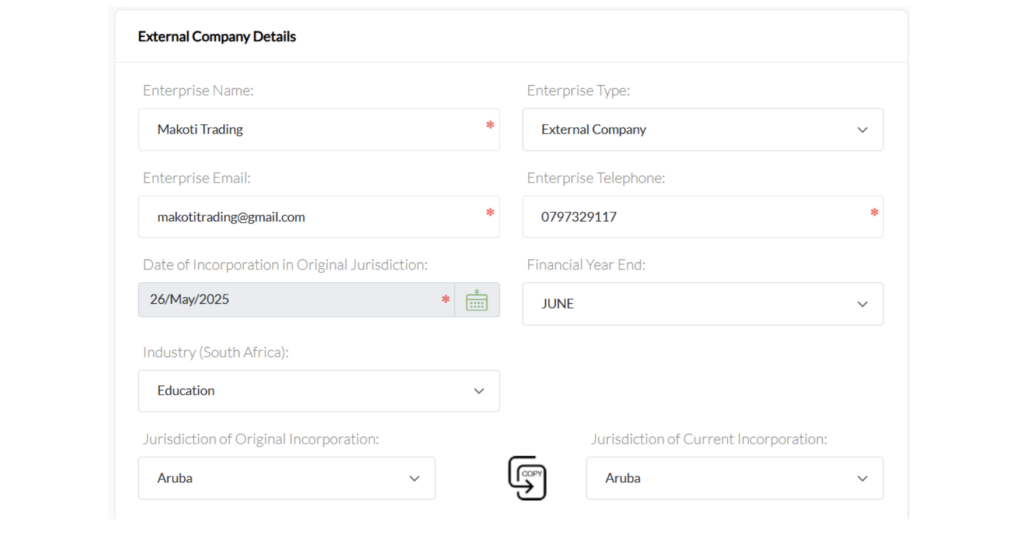
    The first major section is External Company Details.

    The CIPC example shows fields for:

    • Enterprise name
    • Enterprise type
    • Enterprise email
    • Enterprise telephone
    • Date of incorporation in the original jurisdiction
    • Financial year-end
    • Industry
    • Jurisdiction of original incorporation
    • Jurisdiction of current incorporation

    The enterprise type is identified as External Company in the example.

    Enter the External Company Details
    Enter the External Company Details

    Why the original incorporation date matters

    The date of incorporation should correspond to the company’s official foreign registration records.

    For example, if a Namibian company was incorporated on 15 March 2020, the applicant should not enter the date on which the company decided to enter South Africa. The relevant information concerns the company’s incorporation in its original jurisdiction.

    Choosing the correct jurisdiction

    The application distinguishes between:

    • Jurisdiction of Original Incorporation
    • Jurisdiction of Current Incorporation

    These fields are particularly relevant where a company has undergone a migration, continuation, redomiciliation or similar corporate restructuring.

    The applicant should therefore avoid assuming that these two fields are always identical.


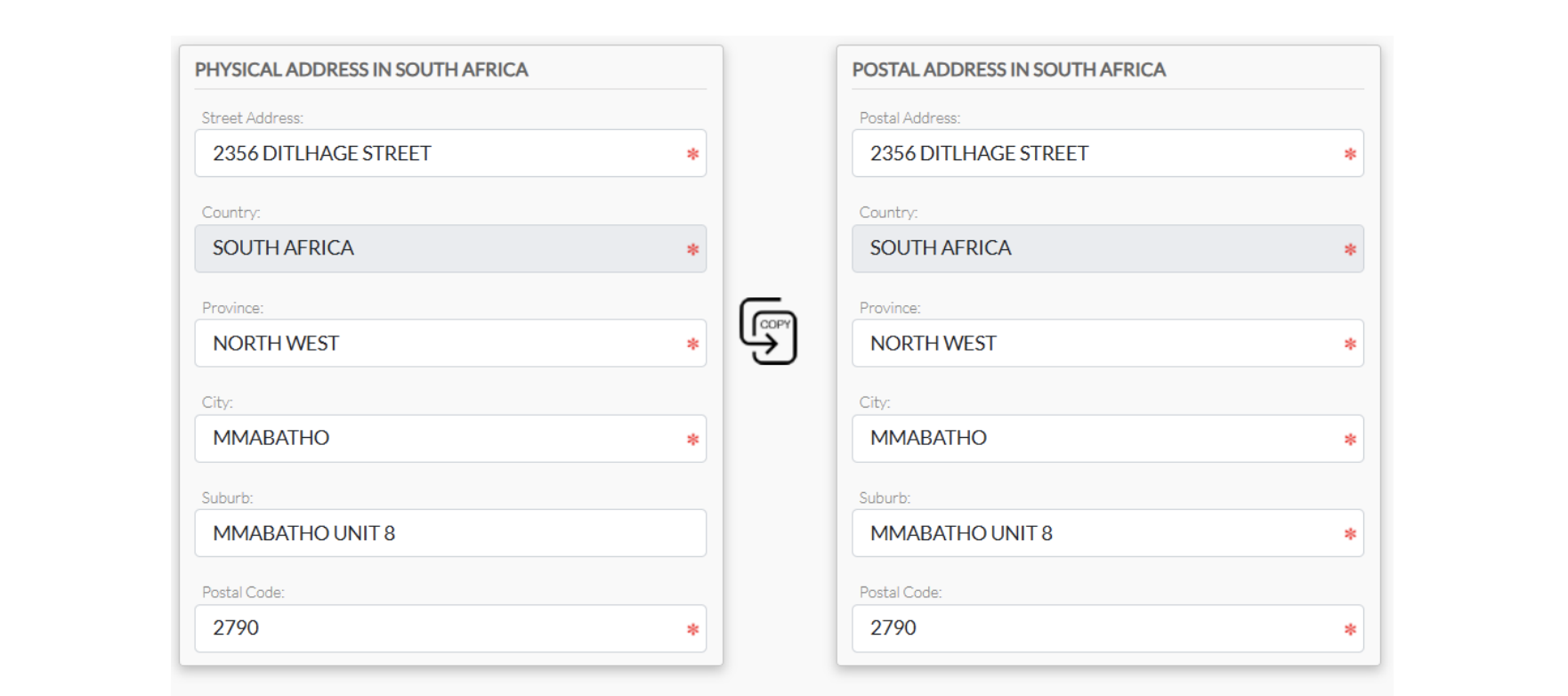
    Step 5: Provide the South African Physical and Postal Address

    Provide the South African Physical and Postal Address
    Provide the South African Physical and Postal Address

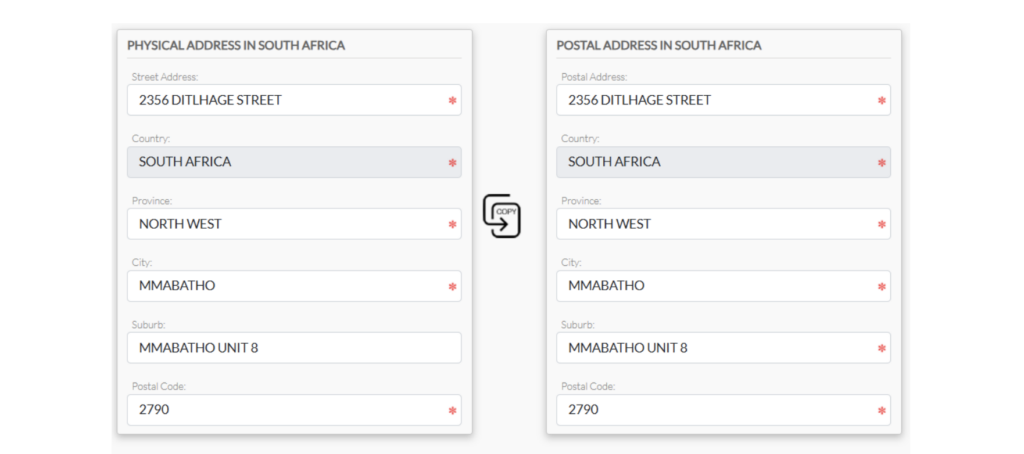
    The application requires a physical address in South Africa and a postal address in South Africa.

    The CIPC guide illustrates fields including:

    • Street address
    • Country
    • Province
    • City
    • Suburb
    • Postal code

    The system also includes a copy function that can make it easier to duplicate address information when the physical and postal addresses are the same.

    Why the South African address deserves attention

    A foreign company entering South Africa should not treat the local address as a purely cosmetic field.

    Businesses should ensure that the address is legitimate and appropriate for the company’s South African activities.

    An applicant should carefully consider:

    • Whether the address is physically valid.
    • Whether correspondence can be received there.
    • Whether the address belongs to the company, its representative or an authorised service provider.
    • Whether supporting proof of the address can be supplied if required.
    • Whether the address is consistent with other regulatory registrations.

    A virtual office can sometimes be useful for international businesses, but applicants should understand the distinction between having a legitimate registered address and merely purchasing an address for correspondence.


    Step 6: Enter the Business Coordinates

    Enter the Business Coordinates
    Enter the Business Coordinates

    The automated form also includes a Business Coordinates section.

    The example provides fields for:

    • Latitude
    • Longitude

    The CIPC guide shows these coordinates being entered as part of the company information.

    This demonstrates that the automated system is designed to collect increasingly structured information about the business rather than relying solely on free-text addresses.

    Practical advice

    Before submitting an application, make sure the coordinates correspond with the South African business address being provided.

    Incorrect coordinates can create inconsistencies between the address and the geographic information recorded in the application.


    Step 7: Provide the Foreign Company’s Address

    Provide the Foreign Company's Address
    Provide the Foreign Company’s Address

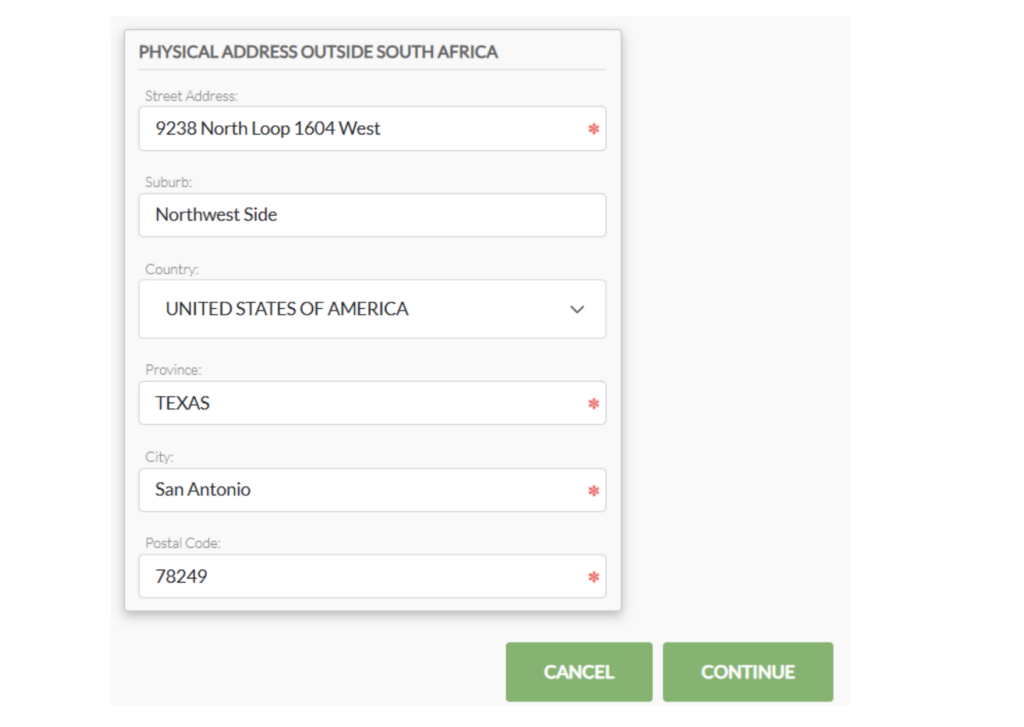
    The application also asks for the company’s physical address outside South Africa.

    The guide illustrates fields for:

    • Street address
    • Suburb
    • Country
    • Province or equivalent
    • City
    • Postal code

    The example uses a foreign address in the United States.

    This is another important difference between an external company and an ordinary South African company.

    The regulator needs information about the foreign legal entity behind the South African registration.

    Therefore, applicants should have the foreign company’s official address readily available.


    Step 8: Appoint and Verify the Representative

    Appoint and Verify the Representative
    Appoint and Verify the Representative

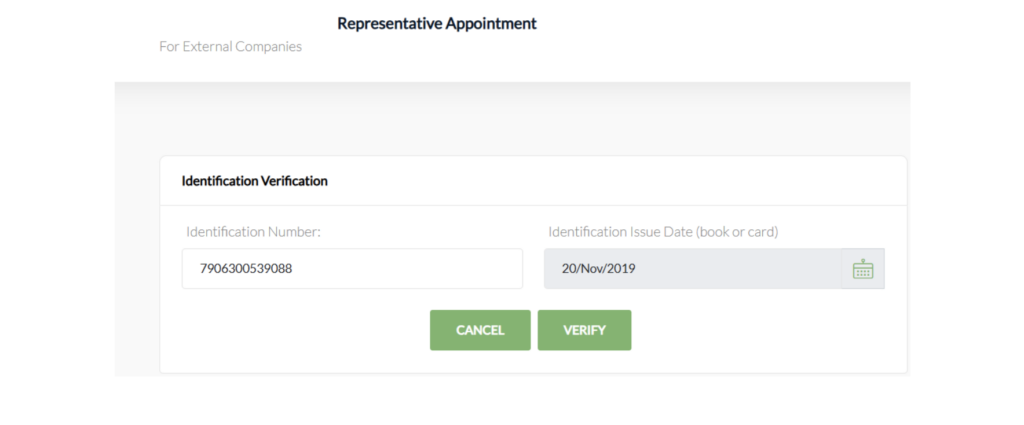
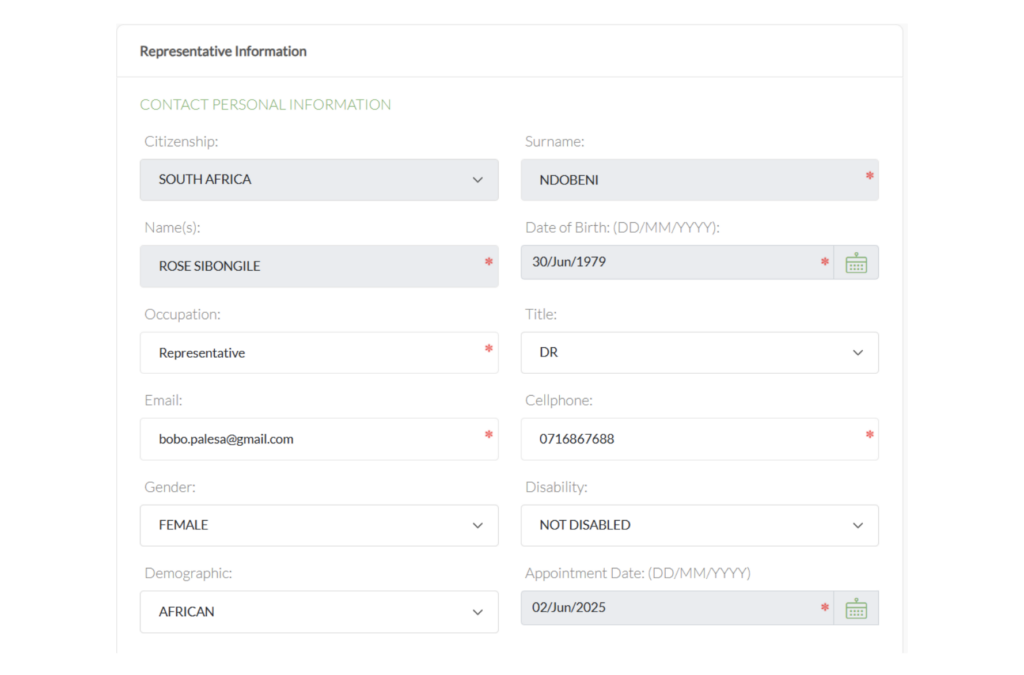
    The CIPC workflow includes a Representative Appointment section.

    The representative’s personal information must be captured, including information such as:

    • Citizenship
    • Surname
    • Name
    • Date of birth
    • Occupation
    • Title
    • Email
    • Cellphone number
    • Gender
    • Disability status
    • Demographic information
    • Appointment date

    The application also provides for the representative’s physical and postal address.

    Identification verification

    The guide shows an identification verification step requiring an identification number and identification issue date before verification can be completed.

    This is an important part of the automated system.

    It means that a filer should not wait until the final submission stage to discover that the representative’s identification details cannot be verified.

    Best practice

    Before beginning the application, obtain:

    1. The representative’s correct identification information.
    2. The relevant identification issue date.
    3. Current contact details.
    4. The correct appointment date.
    5. A reliable email address and cellphone number.

    Small discrepancies can create unnecessary delays.


    Step 9: Decide Whether to Appoint a Company Secretary

    Decide Whether to Appoint a Company Secretary
    Decide Whether to Appoint a Company Secretary

    The workflow asks whether the external company will be appointing a company secretary.

    If the answer is yes, the system proceeds to company-secretary information.

    The CIPC example shows personal information fields similar to those used for other company officials, including:

    • Citizenship
    • Surname
    • Names
    • Date of birth
    • Occupation
    • Title
    • Email
    • Cellphone
    • Gender
    • Disability information
    • Demographic information
    • Appointment date

    The secretary’s address information must also be captured.

    Do not confuse the company secretary with the representative

    These are separate roles in the application.

    A company secretary is not automatically the same person as the external company’s representative.

    Businesses should therefore determine the appropriate appointments before starting the application.


    Step 10: Add Directors

    The application then moves into the Director Appointment section.

    The guide provides an option to:

    • Add a director
    • Go back
    • Continue

    This allows multiple directors to be captured.

    The system distinguishes different types of director arrangements.

    For example, the guide demonstrates a director information screen containing fields for:

    • Enterprise number
    • Enterprise name
    • Country of residence
    • Director type
    • Appointment date
    • Email
    • Cellphone
    • Address information

    The director type can include options such as a trust, external/overseas entity or director associated with companies and close corporations, depending on the circumstances.


    Step 11: Understand Natural-Person and Juristic Directors

    One of the more interesting features demonstrated in the guide is that the application separates natural person directors and juristic directors.

    A natural person is an individual.

    A juristic person is a legal entity that can hold rights and obligations under law.

    The example shows a company-related entity appearing as a juristic director, alongside a natural person director.

    This is particularly relevant for international corporate structures.

    For example, a foreign group may have:

    Foreign parent company → South African external company → local operations

    If a corporate entity forms part of the director structure, the applicant needs to understand exactly how that entity should be captured.

    Incorrectly treating a juristic director as an ordinary individual can create problems later.


    Step 12: Deal With Foreign Directors

    The guide specifically includes a Director Foreigner Appointment section.

    The system asks whether a passport will be used to appoint a director.

    If a passport is being used, the guide notes that the passport must have been approved through the Foreigner Assurance process.

    The verification process includes:

    • Passport number
    • Passport expiry date
    • Verification

    This is particularly important for international businesses because a foreign director may not have a South African identity document.

    Practical lesson for international applicants

    Do not assume that simply having a valid passport means the director can immediately be added to the CIPC application.

    The foreigner-assurance component needs to be considered beforehand.

    Where multiple foreign directors are involved, it is sensible to prepare their documentation and verification requirements before starting the application.


    Step 13: Capture Director Personal Information

    For natural-person directors, the system captures personal information such as:

    • Citizenship
    • Surname
    • Name
    • Date of birth
    • Occupation
    • Director type
    • Email
    • Cellphone
    • Gender
    • Disability information
    • Demographic information
    • Title
    • Appointment date

    The guide also demonstrates different director classifications, including director, non-executive director and alternate director.

    The director’s physical and postal addresses are then captured separately.

    Once directors have been added, the application displays them in a table showing information such as:

    • Residency
    • Identification
    • Name
    • Type
    • Edit/remove controls

    This gives the filer an opportunity to review the information before moving forward.


    Step 14: Decide Whether an Auditor Will Be Appointed

    The application then includes a Company Auditor Appointment section.

    The filer is asked whether a company auditor will be appointed.

    If the answer is yes, the system requires auditor information. The example shows a profession number and appointment date, followed by a search function.

    The system then displays confirmation of the auditor associated with the enterprise.

    Why the search function is useful

    Rather than relying entirely on manually typed auditor details, the workflow demonstrates a search-and-confirm mechanism.

    This can reduce the risk of entering an incorrect professional registration number or auditor name.

    Applicants should nevertheless verify the information before saving the appointment.


    Step 15: Prepare the Supporting Documentation

    One of the most important parts of the process is the Supporting Documentation section.

    The CIPC guide states that supporting documents are compulsory and provides a list that includes:

    • Mandate for the authorised filer
    • Resolution from the directors
    • Certified Certificate of Incorporation
    • Certified Governance / Constitutional Document
    • Certified proof of business address within South Africa
    • Certified Translation Certificate, where documents are in a foreign language
    • Security Register, where applicable to profit external companies

    This is arguably one of the most important sections of the entire process.

    An applicant can complete the online form perfectly and still encounter problems if the supporting documents are incomplete, incorrectly certified or inconsistent with the information entered into the application.


    What Documents Should a Foreign Business Prepare?

    Before starting an external company application, I recommend creating a document checklist.

    1. Certificate of Incorporation

    A certified copy of the foreign company’s certificate of incorporation should be prepared.

    The company’s name, registration number and incorporation date should correspond with the information entered into the CIPC application.

    2. Constitutional or Governance Document

    The guide refers to a certified governance or constitutional document.

    Depending on the foreign jurisdiction, this could relate to the company’s:

    • Constitution
    • Articles
    • Memorandum
    • Charter
    • Governance instrument
    • Other founding corporate document

    The terminology varies between jurisdictions.

    3. Directors’ Resolution

    A resolution from the directors is listed among the compulsory supporting documents.

    The resolution should properly authorise the relevant corporate action and should be consistent with the application.

    4. Authorised Filer’s Mandate

    The authorised filer needs a mandate.

    This is particularly relevant where a professional service provider, consultant, attorney, accountant or corporate services provider is submitting the application on behalf of the foreign company.

    5. South African Proof of Business Address

    The application requires certified proof of the business address in South Africa.

    This should be arranged before submission rather than treated as an afterthought.

    6. Certified Translation

    If corporate documents are written in a foreign language, the CIPC guide specifically identifies a certified translation certificate as mandatory in that situation.

    This is particularly relevant to companies originating from non-English-speaking jurisdictions.

    7. Security Register

    The guide identifies a security register as mandatory only for Profit External Companies in the circumstances described in the process.

    Applicants should therefore determine whether this requirement applies to their specific registration before submitting the application.


    Step 16: Upload the Documents

    After preparing the required documentation, the applicant uploads the files to the system.

    The guide demonstrates a document table showing:

    DocumentExample Type
    Certificate of incorporationCertified Certificate of Incorporation
    Governance documentCertified Constitution
    Foreign-language documentationCertified Translation Certificate
    Security documentationSecurity Register
    AuthorisationMandate

    The system provides options to add a new document, go back or continue.

    A useful document-management strategy

    Instead of uploading files with vague names such as:

    • document1.pdf
    • scan.pdf
    • newfile.pdf

    use descriptive names such as:

    • Certified_Certificate_of_Incorporation.pdf
    • Directors_Resolution.pdf
    • Certified_Constitution.pdf
    • South_African_Address_Proof.pdf
    • Filer_Mandate.pdf
    • Certified_Translation.pdf

    This makes it easier for everyone involved to identify the documents and reduces administrative confusion.


    Step 17: Review the Application

    Before submission, CIPC displays a summary of the company information, company officials, auditor and supporting documentation.

    The example shows a company information section containing:

    • Application ID
    • Enterprise name
    • Enterprise type

    The company-officials section then lists the relevant officials and their roles.

    The review stage is extremely important.

    Check the following before confirming:

    • Foreign company’s legal name
    • Original jurisdiction
    • Incorporation date
    • Financial year-end
    • South African address
    • Foreign address
    • Representative
    • Directors
    • Juristic directors
    • Company secretary
    • Auditor
    • Appointment dates
    • Identification information
    • Passport information
    • Supporting documents

    A good rule is:

    Never submit an external-company application simply because every mandatory field has been completed. Submit it only after every field has been reconciled against the company’s official records.


    Step 18: Confirm the Application

    The final review screen provides a Confirm option.

    Once the filer confirms the information, the application proceeds to submission.

    This is effectively the point at which the filer is saying that the captured information and documentation are ready for CIPC processing.


    Step 19: Submit the Application

    After submission, the system provides an application status and reference number.

    The CIPC example states that the application has been submitted successfully and provides a reference number.

    The application then moves into the next stage of processing.

    However, submission does not necessarily mean immediate registration.

    This is an important distinction for applicants.


    Step 20: Complete OTP Verification

    One of the most important features of the automated process is OTP verification.

    The guide demonstrates that OTPs are required for the filer and appointed officials. Each official receives an email or SMS containing a verification mechanism.

    The system then records which officials have consented.

    The guide shows OTP approval information for company officials, with successful approvals represented in the system.

    Why OTP verification matters

    This creates an additional authentication and consent mechanism.

    It means that the filer should make sure all relevant officials:

    • Have access to their email or cellphone.
    • Know that an OTP will be sent.
    • Are available to complete the verification.
    • Understand the application being submitted.
    • Complete the verification within the applicable validity period.

    OTPs Can Expire

    The CIPC example indicates that OTPs have a limited validity period and that applications can become void after OTPs expire, requiring resubmission. It also indicates that payment instructions are issued after OTP consent.

    This has a practical implication for professional filers.

    If you are submitting an application on behalf of an overseas client, do not assume that you can collect all the information today and complete the OTP process weeks later.

    Coordinate the process.

    A sensible workflow is:

    1. Prepare the documents.
    2. Complete the application.
    3. Inform all officials.
    4. Submit the application.
    5. Coordinate OTP verification immediately.
    6. Monitor the application.
    7. Respond to CIPC queries promptly.
    8. Make payment when instructed after successful approval.

    Step 21: CIPC Back-Office Approval

    Once the OTPs have been successfully verified, the application is sent to the Back Office for approval.

    The guide’s example states that the Back Office may respond with queries if necessary. After successful approval, the applicant receives an email to make payment.

    This means there is an important distinction between:

    Application submitted → OTP verified → Back Office review → Approval → Payment

    Applicants should not automatically interpret successful online submission as final approval.


    Step 22: Respond to CIPC Queries

    The guide specifically indicates that the Back Office may issue queries.

    This is where document preparation becomes especially important.

    A query may arise because:

    • A document is unclear.
    • Information does not match.
    • A corporate document is incomplete.
    • A director’s information needs clarification.
    • A foreign document requires additional evidence.
    • The South African address needs attention.
    • An official’s information does not verify correctly.
    • A required supporting document is missing.

    How to handle a query

    Do not respond casually.

    Instead:

    1. Read the query carefully.
    2. Identify exactly what CIPC is requesting.
    3. Compare the request against the original corporate documents.
    4. Obtain the necessary correction or supporting evidence.
    5. Ensure the replacement document is properly certified where required.
    6. Submit the response through the prescribed process.
    7. Keep a copy of the response for your corporate records.

    Step 23: Payment After Approval

    The guide demonstrates that payment instructions are issued after successful approval.

    This is an important feature to understand when budgeting for the registration.

    Applicants should distinguish between:

    • Preparing the application
    • Submitting the application
    • OTP verification
    • Back-office approval
    • Payment
    • Finalisation of the registration

    The exact fee applicable to an external-company registration should always be checked against the current CIPC fee schedule rather than relying on an old guide, quotation or third-party website.


    The Complete External Company Registration Workflow

    The process can be summarised as follows:

    1. POPIA consent
    ↓
    2. Accept Companies Act terms
    ↓
    3. Select New External Company
    ↓
    4. Capture foreign company details
    ↓
    5. Capture South African address
    ↓
    6. Capture foreign address
    ↓
    7. Capture business coordinates
    ↓
    8. Appoint representative
    ↓
    9. Verify representative
    ↓
    10. Add company secretary where applicable
    ↓
    11. Add directors
    ↓
    12. Deal with juristic directors where applicable
    ↓
    13. Verify foreign directors where applicable
    ↓
    14. Add auditor where applicable
    ↓
    15. Upload supporting documents
    ↓
    16. Review application
    ↓
    17. Confirm and submit
    ↓
    18. Complete OTP verification
    ↓
    19. Back-office review
    ↓
    20. Respond to queries if required
    ↓
    21. Receive approval
    ↓
    22. Make payment as instructed

    This sequence is based on the workflow illustrated in the CIPC automation guide.


    Common Mistakes to Avoid

    1. Starting Without the Foreign Corporate Documents

    One of the biggest mistakes is starting the online application before obtaining the foreign company’s documents.

    The application requires information that should normally be verified against official records.

    Better approach

    Prepare the corporate document pack first.


    2. Entering Information That Does Not Match the Certificate

    For example, the company name entered into CIPC should not casually differ from the legal name appearing on the foreign certificate.

    The same principle applies to:

    • Incorporation date
    • Registration number
    • Jurisdiction
    • Directors
    • Company address
    • Corporate structure

    Consistency is essential.


    3. Ignoring Foreign Directors’ Verification Requirements

    Foreign directors may require passport and foreigner-assurance verification.

    The CIPC guide specifically warns that a passport used for a foreign director appointment must have been approved through the Foreigner Assurance process.

    Do not leave this until the final submission.


    4. Forgetting the Translation Requirement

    If a foreign company’s documentation is not in an accepted language, the applicant may need a certified translation.

    The CIPC guide specifically identifies a certified translation certificate as mandatory when documents are in a foreign language.


    5. Using an Incorrect South African Address

    A South African external company registration requires a local business address.

    Do not simply insert an address without confirming that it can support the company’s registration and related regulatory obligations.


    6. Using the Wrong Director Classification

    The application provides different director types.

    This is particularly important where the company has:

    • Natural-person directors
    • Corporate directors
    • Non-executive directors
    • Alternate directors
    • Foreign directors
    • Other specialised arrangements

    Review the corporate structure carefully before selecting an option.


    7. Delaying OTP Verification

    OTP verification is not something to postpone unnecessarily.

    The guide shows that OTPs have a validity period and that expired OTPs can result in the application becoming void and requiring resubmission.


    A Practical Pre-Application Checklist

    Before beginning the CIPC external-company application, I recommend preparing the following checklist.

    Foreign company information

    • Legal company name
    • Foreign registration number
    • Original jurisdiction
    • Date of incorporation
    • Current jurisdiction, where different
    • Financial year-end
    • Industry information
    • Foreign physical address
    • Company email
    • Company telephone number

    South African information

    • South African physical address
    • South African postal address
    • Proof of business address
    • Latitude
    • Longitude

    Representative

    • Full name
    • Identification information
    • Identification issue date
    • Citizenship
    • Contact information
    • Appointment date
    • Physical address
    • Postal address

    Directors

    • Full names
    • Citizenship
    • Date of birth
    • Country of residence
    • Director type
    • Email
    • Cellphone
    • Appointment date
    • Identification documents
    • Passport information for foreign directors
    • Foreigner Assurance where applicable

    Company secretary

    • Appointment decision
    • Full details
    • Identification information
    • Contact information
    • Address
    • Appointment date

    Auditor

    • Decision on appointment
    • Professional number where applicable
    • Appointment date

    Supporting documents

    • Authorised filer mandate
    • Directors’ resolution
    • Certified certificate of incorporation
    • Certified constitutional/governance document
    • Certified South African address proof
    • Certified translation where applicable
    • Security register where applicable

    This checklist is closely aligned with the fields and supporting-document requirements demonstrated in the CIPC automation guide.


    Why External Company Registration Requires More Planning Than a Normal Company Registration

    A major misconception is that registering a foreign company in South Africa is simply another online company-registration exercise.

    It is more complicated because two legal and administrative environments are involved.

    The foreign company already exists under the laws of its original jurisdiction, while CIPC needs enough information to recognise and record its presence in South Africa.

    This creates a bridge between:

    Foreign corporate law

    and

    South African corporate regulation.

    That is why the application asks for both foreign and South African information.

    The process also involves multiple people who may be located in different countries.

    A foreign director could be in Europe, the company secretary could be in South Africa, the parent company could be registered in another African country, and the authorised filer could be a professional in Johannesburg.

    The automated process has to bring all these participants into one registration workflow.


    Advice for Foreign Investors Entering South Africa

    For foreign businesses considering South Africa as an expansion market, external-company registration should be treated as part of a broader market-entry strategy.

    Registration is only one component.

    A foreign business should also consider:

    Tax

    Determine the company’s South African tax obligations and whether it needs registrations with the South African Revenue Service.

    Banking

    Consider whether the company needs a South African bank account and what documentation the bank will require.

    Employment

    If employees will be hired locally, employment-related compliance becomes relevant.

    Licensing

    Certain industries require additional licences or approvals.

    Examples can include:

    • Financial services
    • Healthcare
    • Telecommunications
    • Transport
    • Mining
    • Security
    • Construction
    • Education
    • Food-related activities

    Immigration

    Foreign directors, employees and investors should separately consider immigration and work-authorisation requirements where relevant.

    Beneficial ownership

    Corporate ownership and beneficial ownership obligations should also be considered as part of the company’s wider compliance framework.

    In other words, CIPC registration should be viewed as the beginning of the South African compliance journey, not necessarily the end of it.


    The Role of Professional Assistance

    The automated system makes the application more structured, but automation does not eliminate the need for professional judgement.

    A corporate services provider, attorney, accountant or other qualified professional can help with:

    • Reviewing foreign corporate documents
    • Preparing the application
    • Coordinating directors
    • Preparing resolutions
    • Preparing mandates
    • Checking certification requirements
    • Coordinating translations
    • Assisting with foreign director verification
    • Reviewing South African address documentation
      -Monitoring OTPs
    • Responding to CIPC queries
    • Coordinating payment
    • Maintaining corporate records

    This can be especially useful where the foreign company’s ownership structure is complicated.


    Final Thoughts

    The CIPC External Company Automation process represents a more structured way for foreign companies to submit external-company registration applications electronically.

    The process is not merely about filling in an online form. It involves the verification of corporate information, South African and foreign addresses, representatives, directors, company secretaries where applicable, auditors where applicable, supporting documents and OTP-based consent.

    The most important lesson for applicants is therefore preparation.

    If the foreign company’s corporate documents are complete, the South African address is ready, the officials have been identified, foreign directors have been considered, supporting documents have been properly prepared and everyone is available for OTP verification, the online application becomes considerably easier to manage.

    The CIPC guide shows a workflow that moves from initial consent and company information through appointments, documentation, review, submission, OTP verification and back-office approval.

    For a foreign business planning to establish operations in South Africa, the best strategy is to treat the application as a corporate compliance project rather than a simple registration form. That approach reduces errors, improves document consistency and makes it easier to respond if CIPC raises a query.

    Because regulatory procedures, fees, forms and system functionality can change, applicants should also verify the current requirements directly with CIPC before submitting an application.

    Learn how to register an external company with CIPC in South Africa using the automated process, including company details, directors, foreign directors, representatives, documents, OTP verification and approval.

Free Consultation

Talk to a consultant

Tell us about your business and we’ll get back to you within a few minutes.

Message Sent!

Thank you for reaching out. We have received your inquiry and our consulting team will get back to you within a few minutes.